
<?xml version="1.0" encoding="utf-8"?>
<feed xmlns="http://www.w3.org/2005/Atom">
  <author>
    <name>clubsspades</name>
  </author>
  <generator uri="https://hexo.io/">Hexo</generator>
  <id>https://clubsspades.github.io/</id>
  <link href="https://clubsspades.github.io/" rel="alternate"/>
  <link href="https://clubsspades.github.io/atom.xml" rel="self"/>
  <rights>All rights reserved 2026, clubsspades</rights>
  <subtitle>ClubsSpades's Space</subtitle>
  <title>
    <![CDATA[Clubs&Spades's Space]]>
  </title>
  <updated>2026-04-08T16:00:00.000Z</updated>
  <entry>
    <author>
      <name>clubsspades</name>
    </author>
    <category term="Study" scheme="https://clubsspades.github.io/categories/Study/"/>
    <category term="Forensics" scheme="https://clubsspades.github.io/categories/Study/Forensics/"/>
    <category term="Sherlock" scheme="https://clubsspades.github.io/categories/Study/Forensics/Sherlock/"/>
    <category term="Forensics" scheme="https://clubsspades.github.io/tags/Forensics/"/>
    <category term="Study" scheme="https://clubsspades.github.io/tags/Study/"/>
    <category term="CTF" scheme="https://clubsspades.github.io/tags/CTF/"/>
    <category term="Sherlock" scheme="https://clubsspades.github.io/tags/Sherlock/"/>
    <content>
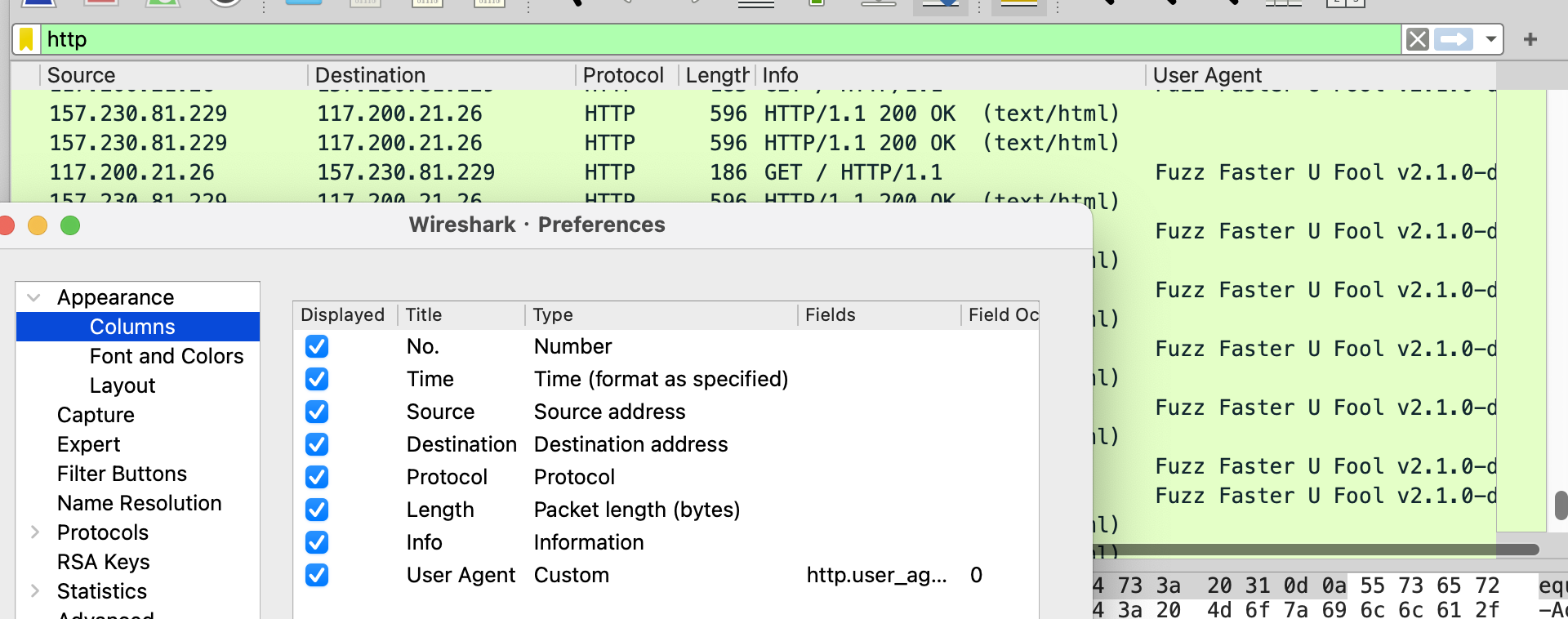
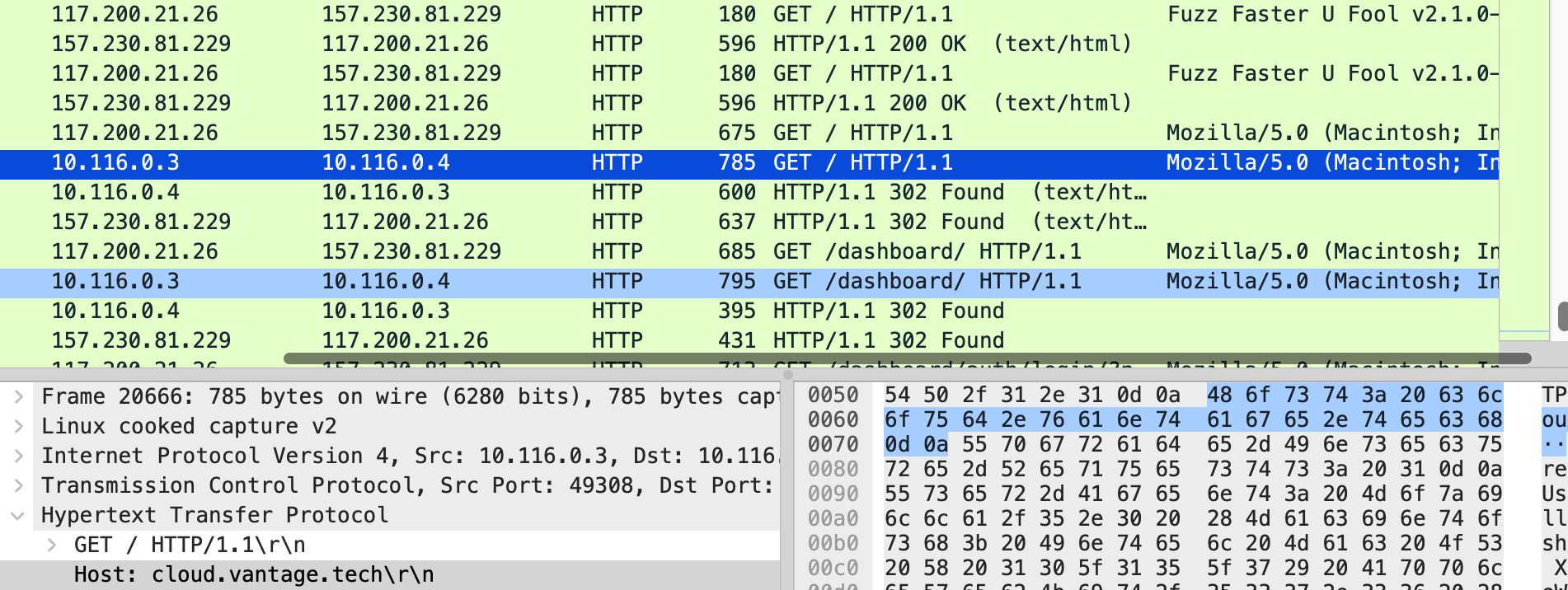
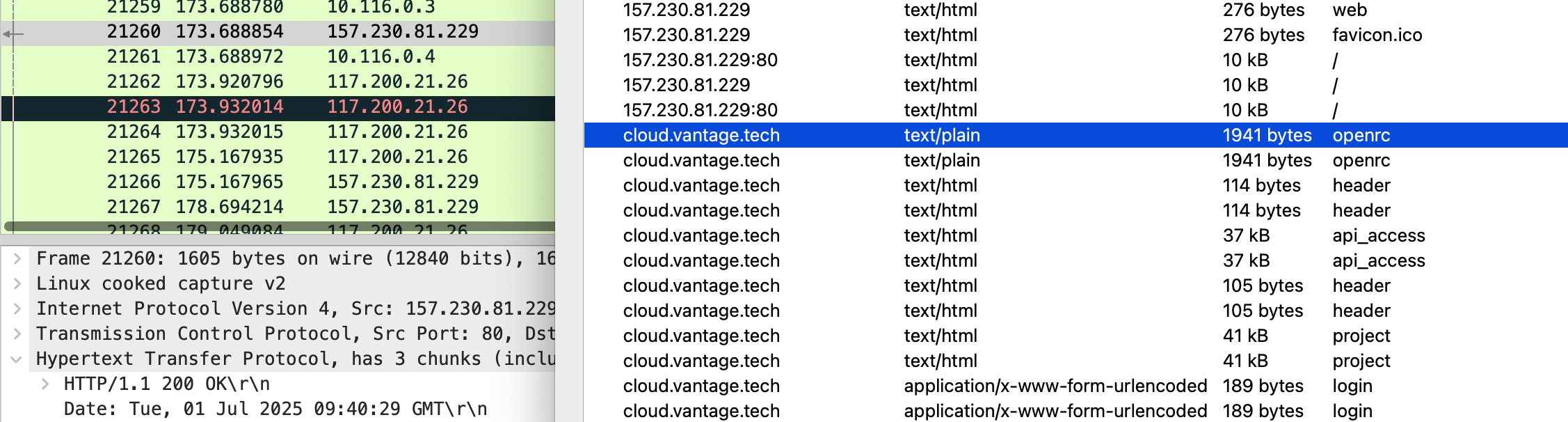
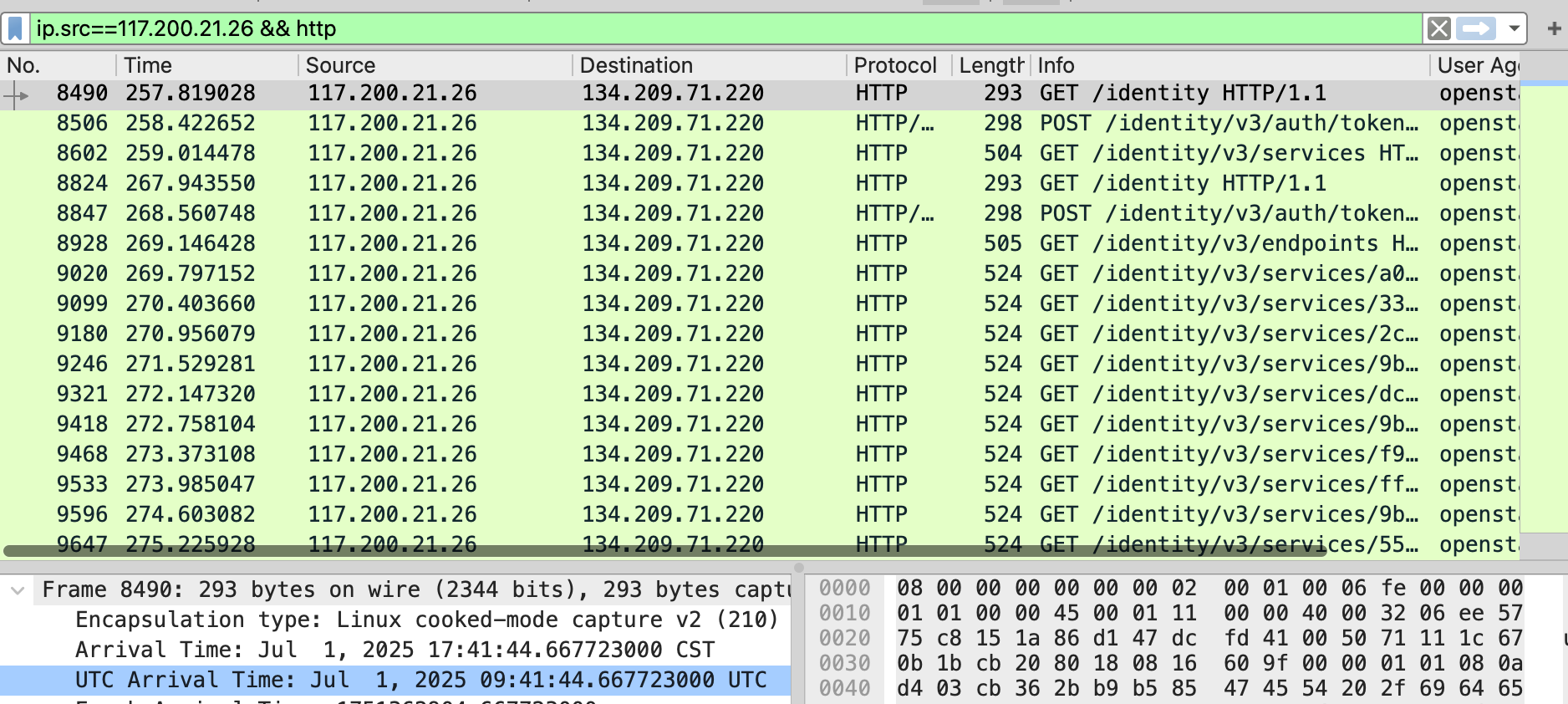
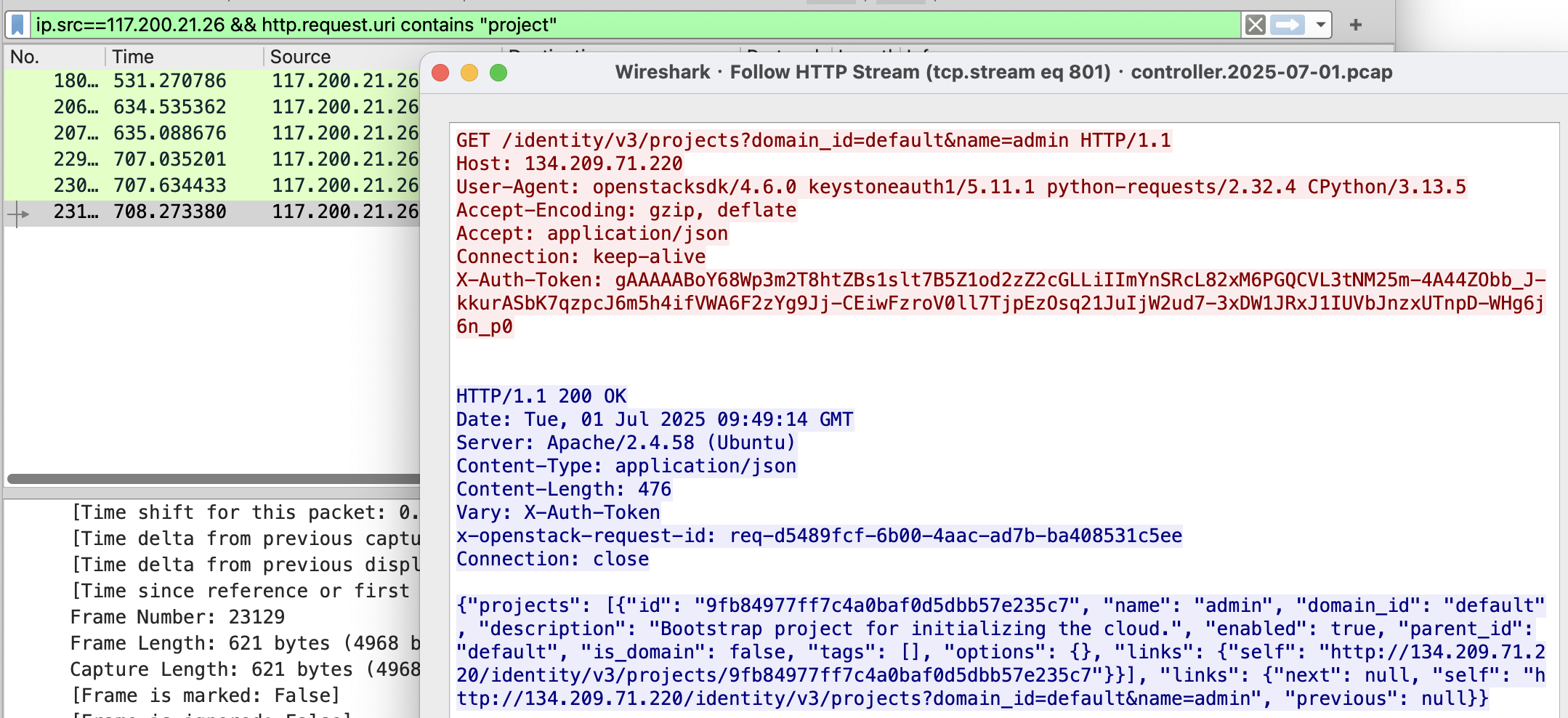
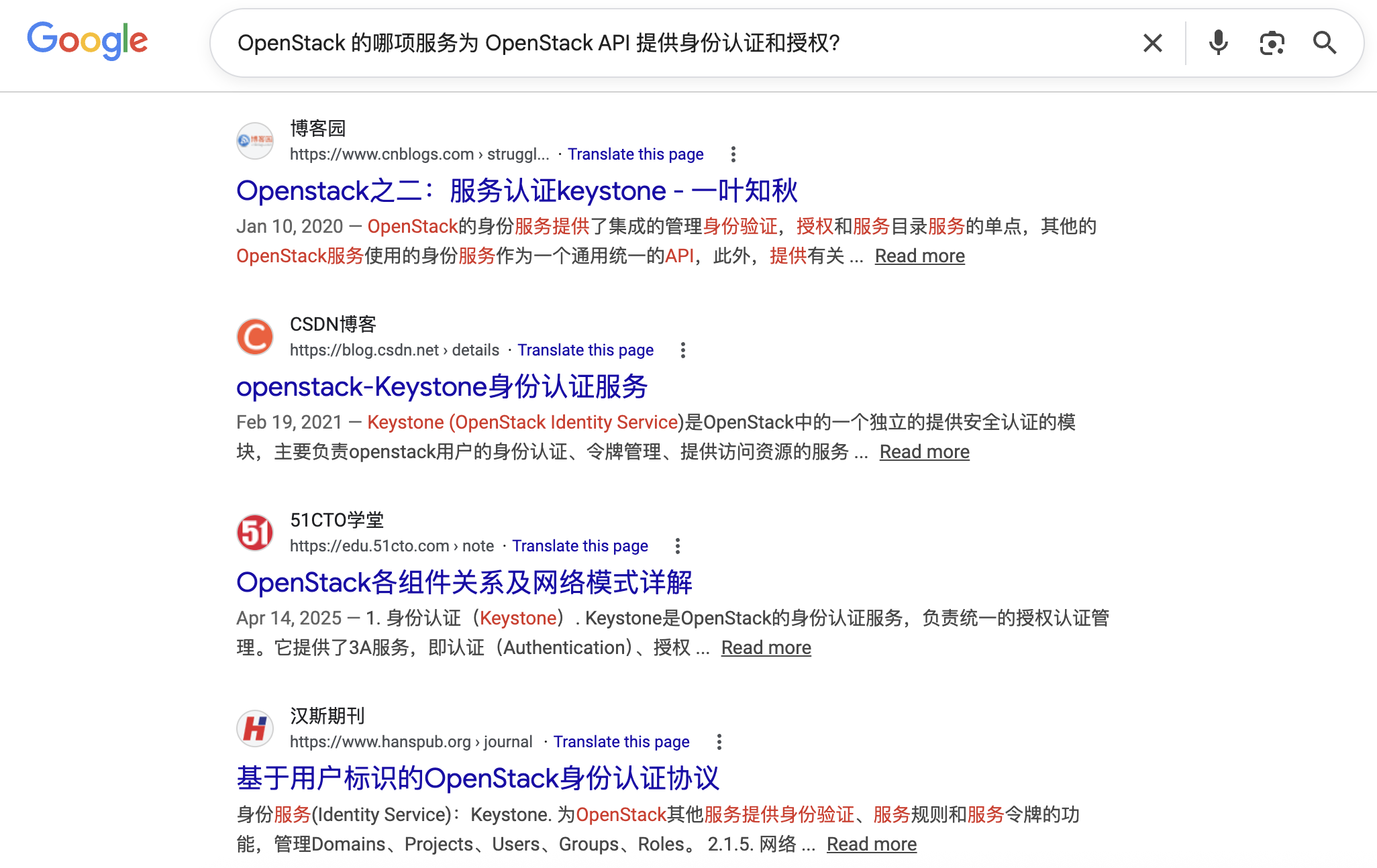
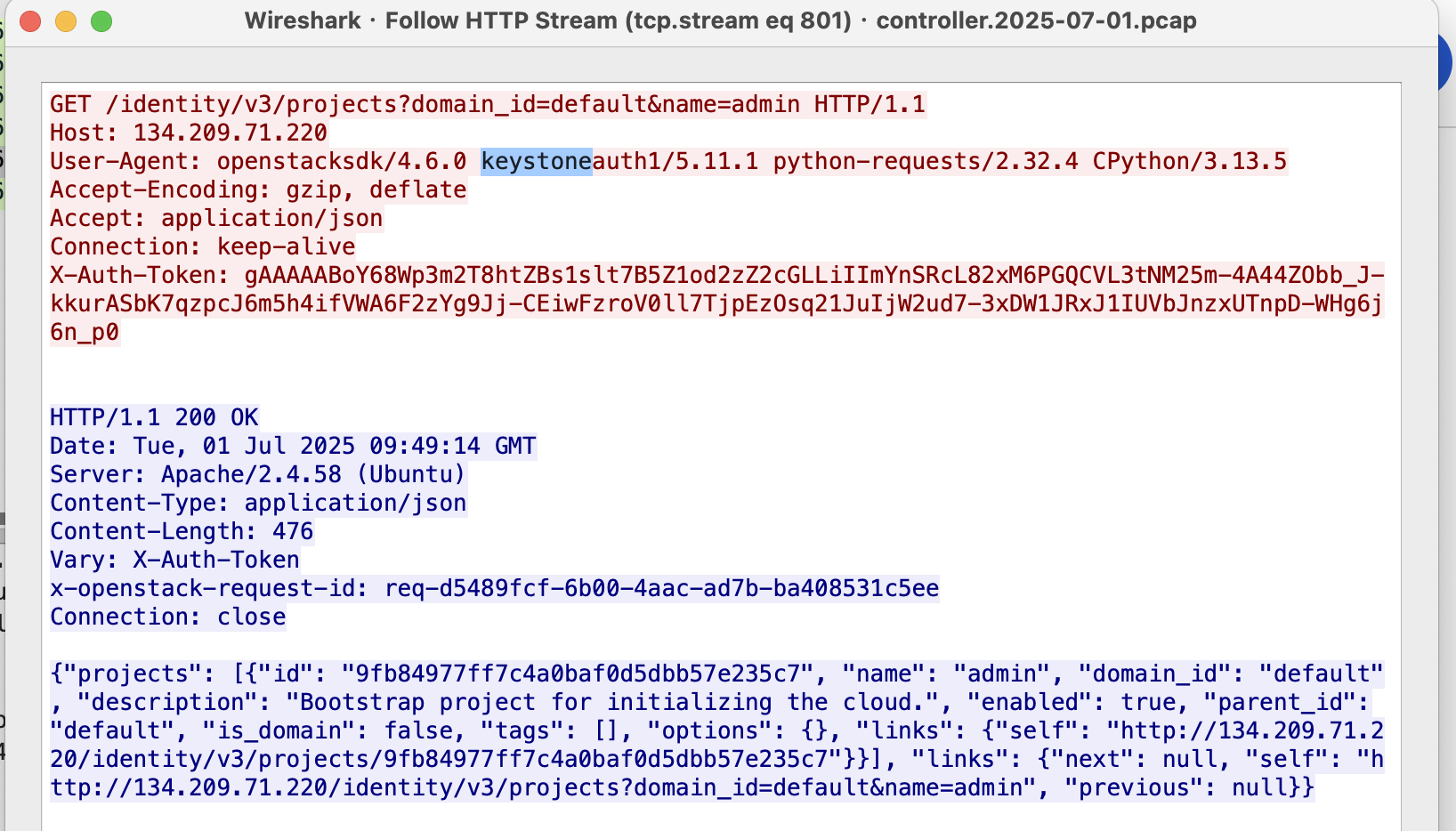
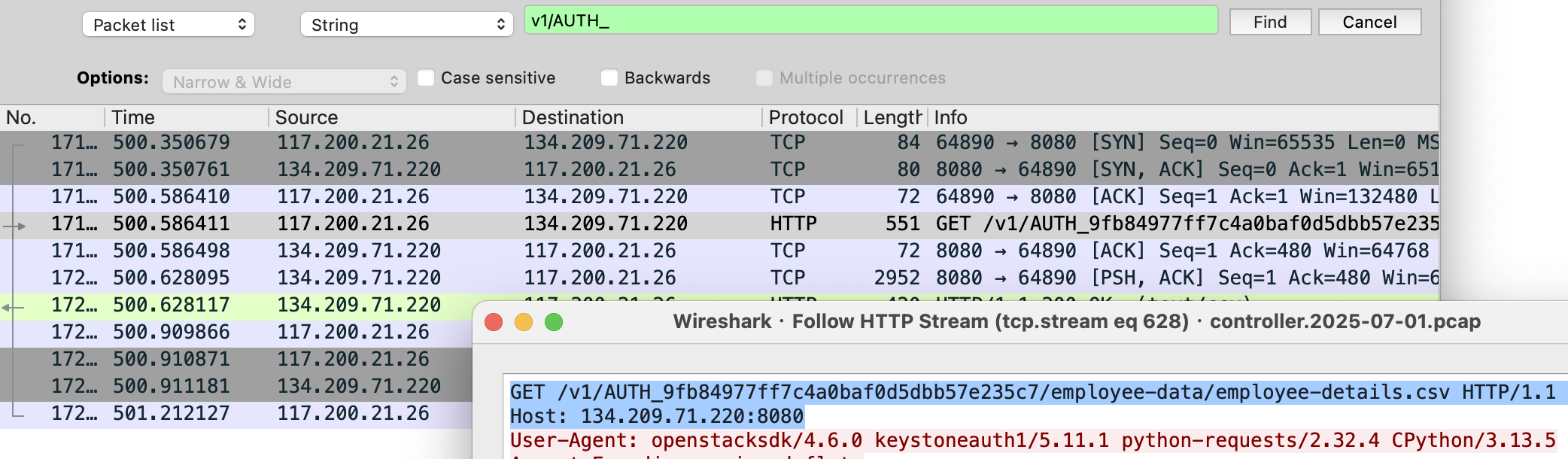
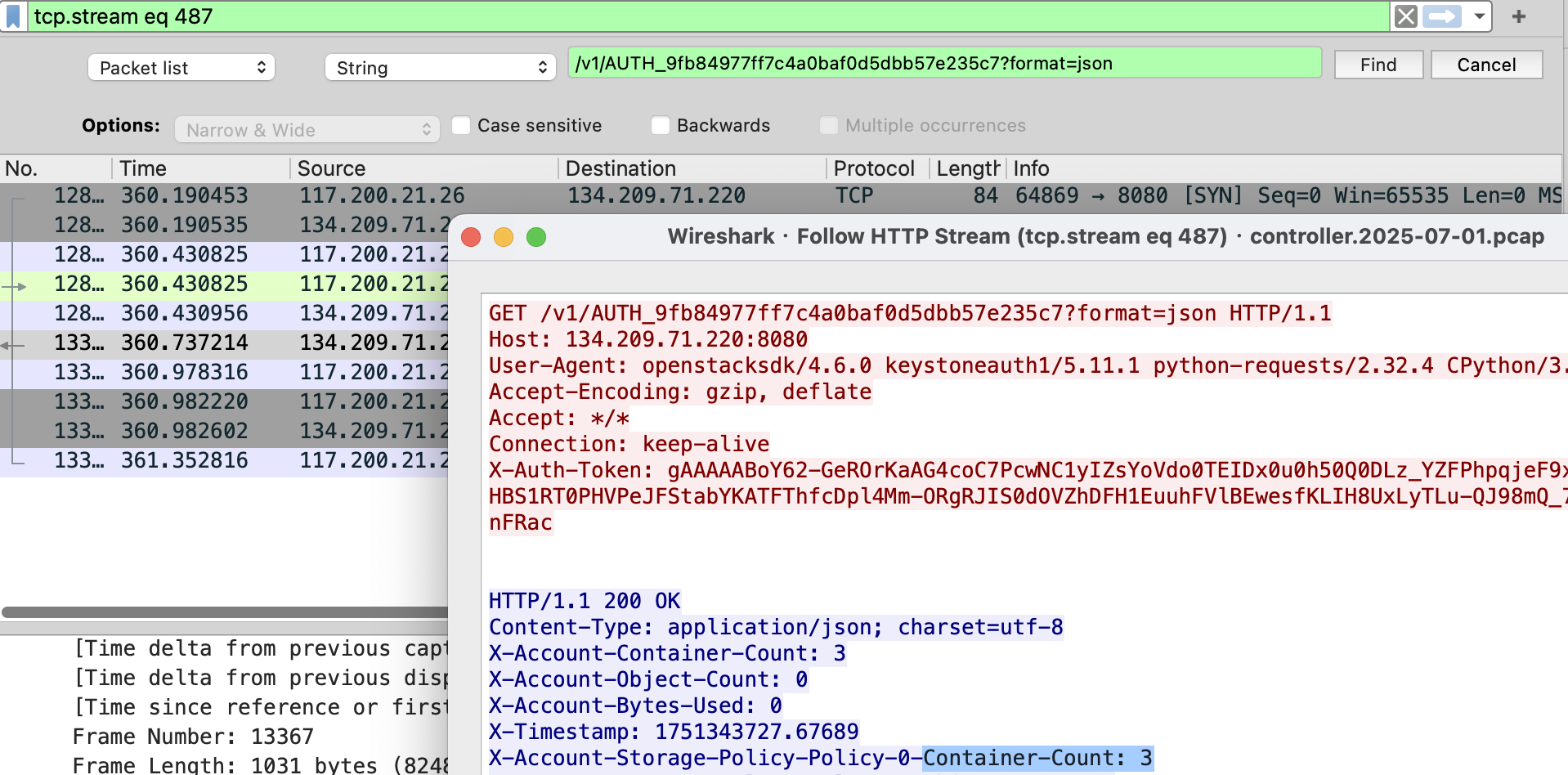
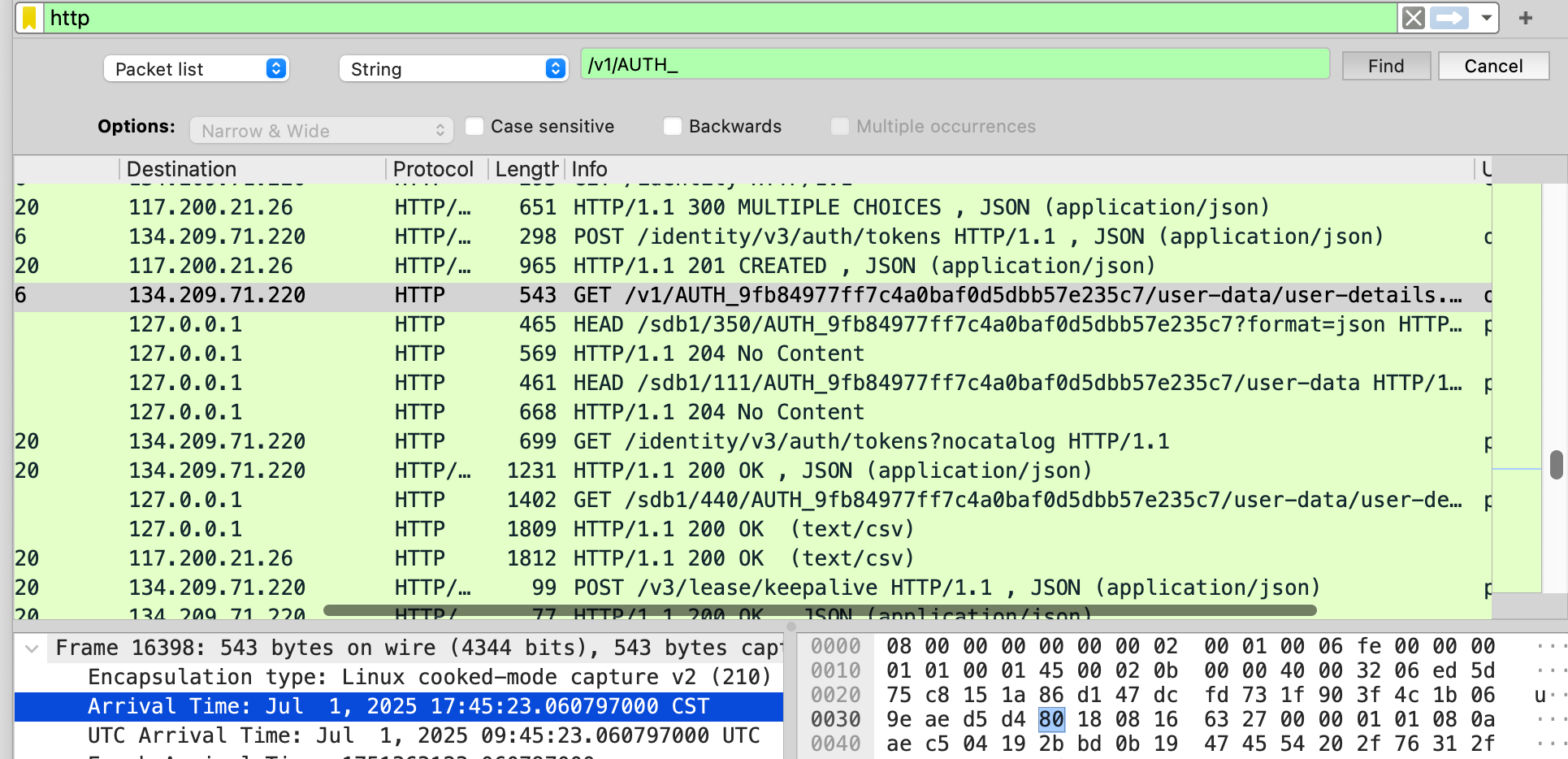
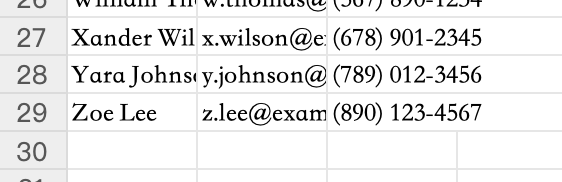
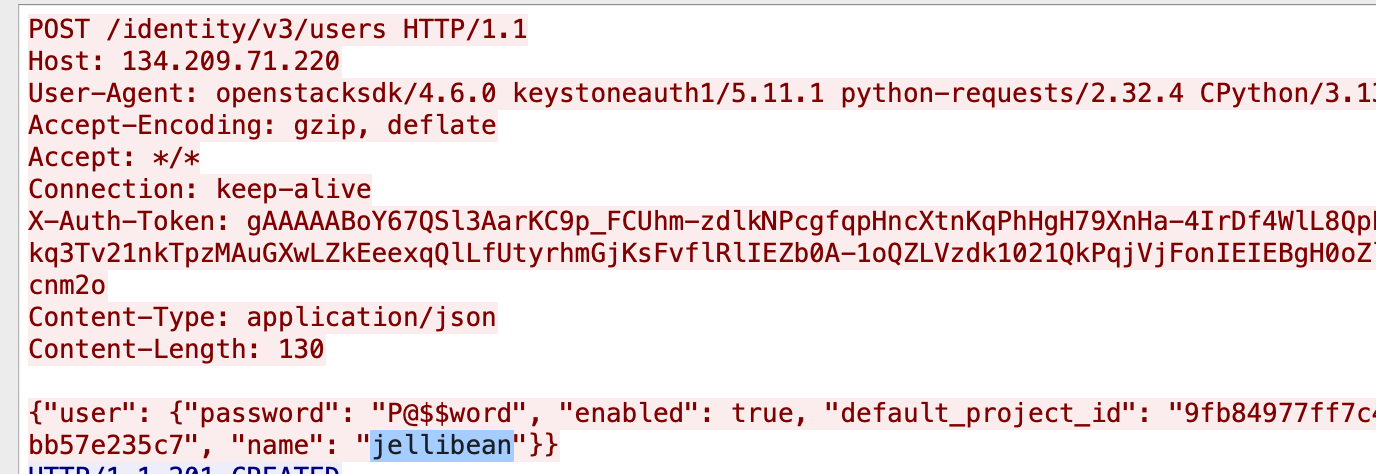
      <![CDATA[<blockquote><p>二零二六年-四月九日 上课无聊  天气-晴☀️</p></blockquote><h2 id="Task-1-What-tool-did-the-attacker-use-to-fuzz-the-web-server"><a href="#Task-1-What-tool-did-the-attacker-use-to-fuzz-the-web-server" class="headerlink" title="Task 1 : What tool did the attacker use to fuzz the web server ?"></a>Task 1 : What tool did the attacker use to fuzz the web server ?</h2><p>(Format- include version e.g, <a href="mailto:&#x6e;&#x6d;&#x61;&#x70;&#64;&#55;&#x2e;&#56;&#x30;">nmap@7.80</a>)<br>需要关注User-Agent，于是新加一列UA，便于分析：<br><img src="/./Vantage/Vantage/Pasted%20image%2020260409190246.png" alt="Task 1"><br>可知是：Fuzz Faster U Fool v2.1.0-dev</p><blockquote><p><a href="mailto:&#102;&#102;&#x75;&#102;&#x40;&#x32;&#x2e;&#x31;&#x2e;&#48;">ffuf@2.1.0</a></p></blockquote><h2 id="Task-2-Which-subdomain-did-the-attacker-discover"><a href="#Task-2-Which-subdomain-did-the-attacker-discover" class="headerlink" title="Task 2 : Which subdomain did the attacker discover?"></a>Task 2 : Which subdomain did the attacker discover?</h2><p>可以看到ffuf结束后，攻击者发现了cloud.vantage.tech并对它尝试进一步探索<br><img src="/./Vantage/Vantage/Pasted%20image%2020260409190828.png" alt="Task 2"></p><blockquote><p>cloud</p></blockquote><h2 id="Task-3-攻击者在成功登录仪表盘前尝试了多少次登录？"><a href="#Task-3-攻击者在成功登录仪表盘前尝试了多少次登录？" class="headerlink" title="Task 3 : 攻击者在成功登录仪表盘前尝试了多少次登录？"></a>Task 3 : 攻击者在成功登录仪表盘前尝试了多少次登录？</h2><p>过滤 <code>ip.dst  == 117.200.21.26 &amp;&amp;  http.request.uri == &quot;/dashboard/auth/login/&quot;</code><br><img src="/./Vantage/Vantage/Pasted%20image%2020260409192206.png" alt="Task 3"><br>失败了3次</p><blockquote><p>3</p></blockquote><h2 id="Task-4-攻击者是什么时候下载了-OpenStack-API-远程访问配置文件的？（UTC）"><a href="#Task-4-攻击者是什么时候下载了-OpenStack-API-远程访问配置文件的？（UTC）" class="headerlink" title="Task 4 : 攻击者是什么时候下载了 OpenStack API 远程访问配置文件的？（UTC）"></a>Task 4 : 攻击者是什么时候下载了 OpenStack API 远程访问配置文件的？（UTC）</h2><p>由于有文件被下载，所以我们可以去文件导出列表查看<br>发现几个和openstack api相关的文件，了解一下攻击链：</p><figure class="highlight plaintext"><table><tr><td class="gutter"><pre><span class="line">1</span><br><span class="line">2</span><br><span class="line">3</span><br><span class="line">4</span><br><span class="line">5</span><br><span class="line">6</span><br><span class="line">7</span><br><span class="line">8</span><br><span class="line">9</span><br></pre></td><td class="code"><pre><span class="line">攻击者登录 Horizon</span><br><span class="line">       ↓</span><br><span class="line">访问 /project/api_access/ 页面</span><br><span class="line">       ↓</span><br><span class="line">点击&quot;Download OpenStack RC File&quot;按钮</span><br><span class="line">       ↓</span><br><span class="line">服务器响应 Content-Type: text/plain</span><br><span class="line">       ↓</span><br><span class="line">攻击者获得 openrc.sh 文件内容（含密码）</span><br></pre></td></tr></table></figure><p>所以我们要找的文件是<code>openrc</code> （GMT 与 UTC 在日常精度下视为相同）<br><img src="/./Vantage/Vantage/Pasted%20image%2020260409193801.png" alt="Task 4"></p><blockquote><p>2025-07-01 09:40:29</p></blockquote><h2 id="Task-5-攻击者何时首次与控制器节点上的-API-进行了交互？"><a href="#Task-5-攻击者何时首次与控制器节点上的-API-进行了交互？" class="headerlink" title="Task 5 : 攻击者何时首次与控制器节点上的 API 进行了交互？"></a>Task 5 : 攻击者何时首次与控制器节点上的 API 进行了交互？</h2><p>对文件 <code>controller.2025-07-01.pcap</code>分析，过滤 <code>ip.src==117.200.21.26 &amp;&amp; http</code><br><img src="/./Vantage/Vantage/Pasted%20image%2020260409194826.png" alt="Task 5"><br>第一个包的时间就是答案</p><blockquote><p>2025-07-01 09:41:44</p></blockquote><h2 id="Task-6-攻击者访问的默认项目的项目-ID-是什么？"><a href="#Task-6-攻击者访问的默认项目的项目-ID-是什么？" class="headerlink" title="Task 6 : 攻击者访问的默认项目的项目 ID 是什么？"></a>Task 6 : 攻击者访问的默认项目的项目 ID 是什么？</h2><p>过滤 <code>ip.src==117.200.21.26 &amp;&amp; http.request.uri contains &quot;default&quot;</code><br>查看追踪流：<br><img src="/./Vantage/Vantage/Pasted%20image%2020260409195742.png" alt="Task 6"></p><blockquote><p>9fb84977ff7c4a0baf0d5dbb57e235c7</p></blockquote><h2 id="Task-7-哪个-OpenStack-服务为-OpenStack-API-提供认证和授权？"><a href="#Task-7-哪个-OpenStack-服务为-OpenStack-API-提供认证和授权？" class="headerlink" title="Task 7 : 哪个 OpenStack 服务为 OpenStack API 提供认证和授权？"></a>Task 7 : 哪个 OpenStack 服务为 OpenStack API 提供认证和授权？</h2><p>直接一个搜：<br><img src="/./Vantage/Vantage/Pasted%20image%2020260409200239.png" alt="Task 7-1"><br>包里也能找到：<br><img src="/./Vantage/Vantage/Pasted%20image%2020260409200320.png" alt="Task 7-2"><br>后面还跟了一个<code>auth</code>（认证）</p><blockquote><p>keystone</p></blockquote><h2 id="Task-8-Swift-服务的端点-URL-是什么？"><a href="#Task-8-Swift-服务的端点-URL-是什么？" class="headerlink" title="Task 8 : Swift 服务的端点 URL 是什么？"></a>Task 8 : Swift 服务的端点 URL 是什么？</h2><p>swift 端点的url格式：</p><figure class="highlight plaintext"><table><tr><td class="gutter"><pre><span class="line">1</span><br></pre></td><td class="code"><pre><span class="line">http(s)://[控制器IP或域名]:8080/v1/AUTH_$(PROJECT_ID)</span><br></pre></td></tr></table></figure><p>全局string检索：<br><img src="/./Vantage/Vantage/Pasted%20image%2020260409201123.png" alt="Task 8"></p><blockquote><p><a href="http://134.209.71.220:8080/v1/AUTH_9fb84977ff7c4a0baf0d5dbb57e235c7">http://134.209.71.220:8080/v1/AUTH_9fb84977ff7c4a0baf0d5dbb57e235c7</a></p></blockquote><h2 id="Task-9-攻击者发现了多少个containers"><a href="#Task-9-攻击者发现了多少个containers" class="headerlink" title="Task 9 : 攻击者发现了多少个containers"></a>Task 9 : 攻击者发现了多少个containers</h2><p>检索 <code>/v1/AUTH_9fb84977ff7c4a0baf0d5dbb57e235c7?format=json</code>，追踪流查看<br><img src="/./Vantage/Vantage/Pasted%20image%2020260409202305.png" alt="Task 9"></p><blockquote><p>3</p></blockquote><h2 id="Task-10-攻击者是在何时下载了敏感用户数据文件的？-UTC"><a href="#Task-10-攻击者是在何时下载了敏感用户数据文件的？-UTC" class="headerlink" title="Task 10 : 攻击者是在何时下载了敏感用户数据文件的？(UTC)"></a>Task 10 : 攻击者是在何时下载了敏感用户数据文件的？(UTC)</h2><p><img src="/./Vantage/Vantage/Pasted%20image%2020260409205810.png" alt="Task 10"><br>找获得csv文件（<code>GET /v1/AUTH_9fb84977ff7c4a0baf0d5dbb57e235c7/user-data/user-details.csv HTTP/1.1\r\n</code>）的流量，得到时间：</p><blockquote><p>2025-07-01 09:45:23</p></blockquote><h2 id="Task-11-How-many-user-records-are-in-the-sensitive-user-data-file"><a href="#Task-11-How-many-user-records-are-in-the-sensitive-user-data-file" class="headerlink" title="Task 11 : How many user records are in the sensitive user data file?"></a>Task 11 : How many user records are in the sensitive user data file?</h2><p>直接查看user-details.csv<br><img src="/./Vantage/Vantage/Pasted%20image%2020260410143417.png" alt="Task 11"></p><blockquote><p>28</p></blockquote><h2 id="Task-12-为了实现持久化，攻击者创建了一个具有管理员权限的新用户。请问该新用户的用户名是什么？"><a href="#Task-12-为了实现持久化，攻击者创建了一个具有管理员权限的新用户。请问该新用户的用户名是什么？" class="headerlink" title="Task 12 : 为了实现持久化，攻击者创建了一个具有管理员权限的新用户。请问该新用户的用户名是什么？"></a>Task 12 : 为了实现持久化，攻击者创建了一个具有管理员权限的新用户。请问该新用户的用户名是什么？</h2><p>过滤：<code>http.request.uri == &quot;/identity/v3/users&quot;</code>，查看 POST 包：<br><img src="/./Vantage/Vantage/Pasted%20image%2020260414203935.png" alt="Task 12"></p><blockquote><p><code>jellibean</code></p></blockquote><h2 id="Task-13-新用户的密码是什么？"><a href="#Task-13-新用户的密码是什么？" class="headerlink" title="Task 13 : 新用户的密码是什么？"></a>Task 13 : 新用户的密码是什么？</h2><p><img src="/./Vantage/Vantage/Pasted%20image%2020260414204024.png" alt="Task 13"></p><blockquote><p><code>P@$$word</code></p></blockquote><h2 id="Task-14-该行为对应-MITRE-ATT-CK-的哪个子技术？"><a href="#Task-14-该行为对应-MITRE-ATT-CK-的哪个子技术？" class="headerlink" title="Task 14 : 该行为对应 MITRE ATT&amp;CK 的哪个子技术？"></a>Task 14 : 该行为对应 MITRE ATT&amp;CK 的哪个子技术？</h2><p><img src="/./Vantage/Vantage/Pasted%20image%2020260414204040.png" alt="Task 14"><br>攻击者通过调用 OpenStack API 创建新用户（<code>jellibean</code>），并设置密码 <code>P@$$word</code>，可能用于维持访问权限或绕过已有身份验证机制。这属于在云环境中创建非法账户的行为，对应 MITRE ATT&amp;CK 中的 <strong>T1136.003</strong>（子技术）。</p><blockquote><p>T1136.003</p></blockquote>]]>
    </content>
    <id>https://clubsspades.github.io/Vantage/Vantage/</id>
    <link href="https://clubsspades.github.io/Vantage/Vantage/"/>
    <published>2026-04-08T16:00:00.000Z</published>
    <summary>Sherlock Vantage 流量取证题解与攻击链分析记录。</summary>
    <title>Sherlock - Vantage</title>
    <updated>2026-04-08T16:00:00.000Z</updated>
  </entry>
  <entry>
    <author>
      <name>clubsspades</name>
    </author>
    <category term="Forensics" scheme="https://clubsspades.github.io/categories/Forensics/"/>
    <category term="Tools" scheme="https://clubsspades.github.io/categories/Forensics/Tools/"/>
    <category term="Forensics" scheme="https://clubsspades.github.io/tags/Forensics/"/>
    <category term="Tools" scheme="https://clubsspades.github.io/tags/Tools/"/>
    <content>
      <![CDATA[<h2 id="1-Get-ZimmermanTools"><a href="#1-Get-ZimmermanTools" class="headerlink" title="1. Get-ZimmermanTools"></a>1. Get-ZimmermanTools</h2><ul><li><strong>用途</strong>：批量下载、更新 Eric Zimmerman 工具集，快速搭建应急&#x2F;取证分析环境。</li><li><strong>应急响应场景</strong>：<ul><li>初始化分析机</li><li>统一工具版本</li><li>快速补齐常用取证组件</li></ul></li><li><strong>适用文件类型&#x2F;后缀</strong>：<ul><li>无固定取证输入文件</li><li>常见分发文件：<code>.ps1</code>、<code>.zip</code></li></ul></li></ul><h2 id="2-AmcacheParser"><a href="#2-AmcacheParser" class="headerlink" title="2. AmcacheParser"></a>2. AmcacheParser</h2><ul><li><strong>用途</strong>：解析 Amcache，发现程序落地、安装与执行相关痕迹。</li><li><strong>应急响应场景</strong>：<ul><li>排查可疑 EXE &#x2F; DLL 是否曾落地</li><li>辅助确认软件安装历史</li><li>补充程序出现与活动时间线</li></ul></li><li><strong>适用文件类型&#x2F;后缀</strong>：<ul><li><code>.hve</code></li><li>常见文件名：<code>Amcache.hve</code></li></ul></li></ul><h2 id="3-AppCompatCacheParser"><a href="#3-AppCompatCacheParser" class="headerlink" title="3. AppCompatCacheParser"></a>3. AppCompatCacheParser</h2><ul><li><strong>用途</strong>：解析 ShimCache &#x2F; AppCompatCache。</li><li><strong>应急响应场景</strong>：<ul><li>判断可疑程序是否曾在系统中出现</li><li>辅助分析历史执行痕迹</li><li>与 Prefetch &#x2F; Amcache 交叉验证</li></ul></li><li><strong>适用文件类型&#x2F;后缀</strong>：<ul><li>主要来自注册表 hive</li><li>常见输入：<code>SYSTEM</code>（通常无普通后缀）</li><li>也可能是其导出副本文件</li></ul></li></ul><h2 id="4-bstrings"><a href="#4-bstrings" class="headerlink" title="4. bstrings"></a>4. bstrings</h2><ul><li><strong>用途</strong>：从二进制文件中提取可读字符串。</li><li><strong>应急响应场景</strong>：<ul><li>从恶意样本提取 URL、域名、路径、命令行、互斥体、账号等 IOC</li><li>快速辅助样本静态分析</li></ul></li><li><strong>适用文件类型&#x2F;后缀</strong>：<ul><li><code>.exe</code></li><li><code>.dll</code></li><li><code>.sys</code></li><li><code>.bin</code></li><li><code>.dat</code></li><li>内存转储或其他任意二进制文件</li></ul></li></ul><h2 id="5-EvtxECmd"><a href="#5-EvtxECmd" class="headerlink" title="5. EvtxECmd"></a>5. EvtxECmd</h2><ul><li><strong>用途</strong>：解析 Windows 事件日志。</li><li><strong>应急响应场景</strong>：<ul><li>登录&#x2F;注销分析</li><li>进程创建排查</li><li>服务安装、计划任务、PowerShell、RDP、账户变更分析</li></ul></li><li><strong>适用文件类型&#x2F;后缀</strong>：<ul><li><code>.evtx</code></li></ul></li></ul><h2 id="6-EZViewer"><a href="#6-EZViewer" class="headerlink" title="6. EZViewer"></a>6. EZViewer</h2><ul><li><strong>用途</strong>：查看 EZ 工具输出结果。</li><li><strong>应急响应场景</strong>：<ul><li>浏览、筛选、复核解析结果</li><li>对批量导出的结果做人工审阅</li></ul></li><li><strong>适用文件类型&#x2F;后缀</strong>：<ul><li><code>.csv</code></li><li><code>.tsv</code></li><li>其他结果文本文件</li></ul></li></ul><h2 id="7-JLECmd"><a href="#7-JLECmd" class="headerlink" title="7. JLECmd"></a>7. JLECmd</h2><ul><li><strong>用途</strong>：解析 Jump Lists。</li><li><strong>应急响应场景</strong>：<ul><li>还原用户最近打开过的文件、文档、程序</li><li>分析用户实际操作轨迹</li></ul></li><li><strong>适用文件类型&#x2F;后缀</strong>：<ul><li><code>.automaticDestinations-ms</code></li><li><code>.customDestinations-ms</code></li></ul></li></ul><h2 id="8-JumpListExplorer"><a href="#8-JumpListExplorer" class="headerlink" title="8. JumpListExplorer"></a>8. JumpListExplorer</h2><ul><li><strong>用途</strong>：Jump Lists 图形化查看器。</li><li><strong>应急响应场景</strong>：<ul><li>人工审阅最近访问记录</li><li>对 Jump Lists 结果做可视化核查</li></ul></li><li><strong>适用文件类型&#x2F;后缀</strong>：<ul><li><code>.automaticDestinations-ms</code></li><li><code>.customDestinations-ms</code></li></ul></li></ul><h2 id="9-LECmd"><a href="#9-LECmd" class="headerlink" title="9. LECmd"></a>9. LECmd</h2><ul><li><strong>用途</strong>：解析 LNK 快捷方式。</li><li><strong>应急响应场景</strong>：<ul><li>分析用户打开过的文件、程序、共享路径、移动介质目标</li><li>追查钓鱼附件、U 盘文件、网络共享访问</li></ul></li><li><strong>适用文件类型&#x2F;后缀</strong>：<ul><li><code>.lnk</code></li></ul></li></ul><h2 id="10-MFTECmd"><a href="#10-MFTECmd" class="headerlink" title="10. MFTECmd"></a>10. MFTECmd</h2><ul><li><strong>用途</strong>：解析 NTFS 的 <code>$MFT</code>。</li><li><strong>应急响应场景</strong>：<ul><li>文件落地、删除、重命名分析</li><li>恢复“文件曾经存在”的证据</li><li>还原文件系统活动时间线</li></ul></li><li><strong>适用文件类型&#x2F;后缀</strong>：<ul><li><code>$MFT</code>（通常无普通后缀）</li><li>也常见为取证导出的副本文件</li></ul></li></ul><h2 id="11-MFTExplorer"><a href="#11-MFTExplorer" class="headerlink" title="11. MFTExplorer"></a>11. MFTExplorer</h2><ul><li><strong>用途</strong>：<code>$MFT</code> 图形化查看器。</li><li><strong>应急响应场景</strong>：<ul><li>人工核查文件系统记录</li><li>定点查看可疑文件条目与时间戳</li></ul></li><li><strong>适用文件类型&#x2F;后缀</strong>：<ul><li><code>$MFT</code></li></ul></li></ul><h2 id="12-PECmd"><a href="#12-PECmd" class="headerlink" title="12. PECmd"></a>12. PECmd</h2><ul><li><strong>用途</strong>：解析 Prefetch。</li><li><strong>应急响应场景</strong>：<ul><li>确认可疑程序是否执行过</li><li>查看执行次数、最近运行时间、加载文件</li><li>重建可疑程序执行链</li></ul></li><li><strong>适用文件类型&#x2F;后缀</strong>：<ul><li><code>.pf</code></li></ul></li></ul><h2 id="13-RBCmd"><a href="#13-RBCmd" class="headerlink" title="13. RBCmd"></a>13. RBCmd</h2><ul><li><strong>用途</strong>：解析回收站记录。</li><li><strong>应急响应场景</strong>：<ul><li>分析攻击者是否删除文件</li><li>确认删除时间、原始路径、被删对象</li><li>辅助研判清痕行为</li></ul></li><li><strong>适用文件类型&#x2F;后缀</strong>：<ul><li><code>$I*</code></li><li><code>$R*</code></li><li>常见位于回收站目录</li></ul></li></ul><h2 id="14-RecentFileCacheParser"><a href="#14-RecentFileCacheParser" class="headerlink" title="14. RecentFileCacheParser"></a>14. RecentFileCacheParser</h2><ul><li><strong>用途</strong>：解析 RecentFileCache。</li><li><strong>应急响应场景</strong>：<ul><li>补充系统曾接触过的文件痕迹</li><li>辅助确认某文件是否曾出现在系统中</li></ul></li><li><strong>适用文件类型&#x2F;后缀</strong>：<ul><li><code>.bcf</code></li><li>常见文件名：<code>RecentFileCache.bcf</code></li></ul></li></ul><h2 id="15-RECmd"><a href="#15-RECmd" class="headerlink" title="15. RECmd"></a>15. RECmd</h2><ul><li><strong>用途</strong>：批量解析 Windows Registry。</li><li><strong>应急响应场景</strong>：<ul><li>查自启动、服务、持久化、USB、用户活动、网络配置、软件安装</li><li>用批处理规则批量提取关键注册表痕迹</li></ul></li><li><strong>适用文件类型&#x2F;后缀</strong>：<ul><li>注册表 hive 文件，常见包括：<ul><li><code>SYSTEM</code></li><li><code>SOFTWARE</code></li><li><code>SAM</code></li><li><code>SECURITY</code></li><li><code>NTUSER.DAT</code></li><li><code>USRCLASS.DAT</code></li></ul></li><li>事务日志：<ul><li><code>.LOG1</code></li><li><code>.LOG2</code></li></ul></li></ul></li></ul><h2 id="16-RegistryExplorer"><a href="#16-RegistryExplorer" class="headerlink" title="16. RegistryExplorer"></a>16. RegistryExplorer</h2><ul><li><strong>用途</strong>：注册表图形化查看器。</li><li><strong>应急响应场景</strong>：<ul><li>人工检查可疑键值</li><li>验证持久化项、自启动项、用户配置痕迹</li></ul></li><li><strong>适用文件类型&#x2F;后缀</strong>：<ul><li><code>SYSTEM</code></li><li><code>SOFTWARE</code></li><li><code>SAM</code></li><li><code>SECURITY</code></li><li><code>NTUSER.DAT</code></li><li><code>USRCLASS.DAT</code></li><li><code>.LOG1</code></li><li><code>.LOG2</code></li></ul></li></ul><h2 id="17-rla"><a href="#17-rla" class="headerlink" title="17. rla"></a>17. rla</h2><ul><li><strong>用途</strong>：仅根据当前截图中的程序名 <code>rla.exe</code>，仍无法安全确认其准确功能。</li><li><strong>应急响应场景</strong>：<ul><li>暂不建议直接记录具体用途，避免记错</li><li>最好结合该工具的 <code>--help</code>、说明文档或官方发布页再确认</li></ul></li><li><strong>适用文件类型&#x2F;后缀</strong>：<ul><li>暂无法准确确认</li></ul></li></ul><h2 id="18-SDBExplorer"><a href="#18-SDBExplorer" class="headerlink" title="18. SDBExplorer"></a>18. SDBExplorer</h2><ul><li><strong>用途</strong>：解析 Shim Database（SDB）。</li><li><strong>应急响应场景</strong>：<ul><li>排查兼容性数据库中的异常配置</li><li>辅助分析利用 shim 的持久化手法</li></ul></li><li><strong>适用文件类型&#x2F;后缀</strong>：<ul><li><code>.sdb</code></li></ul></li></ul><h2 id="19-SBECmd"><a href="#19-SBECmd" class="headerlink" title="19. SBECmd"></a>19. SBECmd</h2><ul><li><strong>用途</strong>：解析 ShellBags。</li><li><strong>应急响应场景</strong>：<ul><li>还原用户浏览过的目录</li><li>发现已删除目录、移动介质目录、网络目录访问痕迹</li></ul></li><li><strong>适用文件类型&#x2F;后缀</strong>：<ul><li>主要来自注册表 hive：<ul><li><code>NTUSER.DAT</code></li><li><code>USRCLASS.DAT</code></li></ul></li></ul></li></ul><h2 id="20-ShellBagsExplorer"><a href="#20-ShellBagsExplorer" class="headerlink" title="20. ShellBagsExplorer"></a>20. ShellBagsExplorer</h2><ul><li><strong>用途</strong>：ShellBags 图形化查看器。</li><li><strong>应急响应场景</strong>：<ul><li>人工查看用户目录浏览轨迹</li><li>结合时间线验证目录访问行为</li></ul></li><li><strong>适用文件类型&#x2F;后缀</strong>：<ul><li><code>NTUSER.DAT</code></li><li><code>USRCLASS.DAT</code></li></ul></li></ul><h2 id="21-SQLECmd"><a href="#21-SQLECmd" class="headerlink" title="21. SQLECmd"></a>21. SQLECmd</h2><ul><li><strong>用途</strong>：解析 SQLite &#x2F; Windows Search &#x2F; 相关数据库痕迹。</li><li><strong>应急响应场景</strong>：<ul><li>从数据库中恢复文件、搜索、程序活动信息</li><li>补充系统活动与历史行为证据</li></ul></li><li><strong>适用文件类型&#x2F;后缀</strong>：<ul><li><code>.db</code></li><li><code>.sqlite</code></li><li><code>.sqlite3</code></li><li><code>.edb</code>（视具体数据源而定）</li></ul></li></ul><h2 id="22-SrumECmd"><a href="#22-SrumECmd" class="headerlink" title="22. SrumECmd"></a>22. SrumECmd</h2><ul><li><strong>用途</strong>：解析 SRUM（System Resource Usage Monitor）。</li><li><strong>应急响应场景</strong>：<ul><li>查看程序网络活动</li><li>分析资源消耗、应用使用情况</li><li>辅助分析出网行为与时间段</li></ul></li><li><strong>适用文件类型&#x2F;后缀</strong>：<ul><li><code>.dat</code></li><li>常见文件名：<code>SRUDB.dat</code></li></ul></li></ul><h2 id="23-SumECmd"><a href="#23-SumECmd" class="headerlink" title="23. SumECmd"></a>23. SumECmd</h2><ul><li><strong>用途</strong>：解析系统使用相关数据库&#x2F;痕迹数据，用于补充系统与应用活动轨迹。</li><li><strong>应急响应场景</strong>：<ul><li>补充系统&#x2F;应用活动分析</li><li>作为时间线辅助证据源</li></ul></li><li><strong>适用文件类型&#x2F;后缀</strong>：<ul><li>常见为数据库类文件</li><li>可能包括：<code>.dat</code>、<code>.edb</code></li></ul></li><li><strong>备注</strong>：<ul><li>具体输入类型最好结合该版本工具说明再次确认</li></ul></li></ul><h2 id="24-TimelineExplorer"><a href="#24-TimelineExplorer" class="headerlink" title="24. TimelineExplorer"></a>24. TimelineExplorer</h2><ul><li><strong>用途</strong>：时间线查看器。</li><li><strong>应急响应场景</strong>：<ul><li>将多种工具输出结果汇总筛选</li><li>串联完整攻击时间线</li><li>按时间窗口快速定位异常活动</li></ul></li><li><strong>适用文件类型&#x2F;后缀</strong>：<ul><li><code>.csv</code></li><li><code>.tsv</code></li></ul></li></ul><h2 id="25-VSCMount"><a href="#25-VSCMount" class="headerlink" title="25. VSCMount"></a>25. VSCMount</h2><ul><li><strong>用途</strong>：挂载卷影副本（Volume Shadow Copy）。</li><li><strong>应急响应场景</strong>：<ul><li>恢复历史文件版本</li><li>对比事发前后文件&#x2F;注册表差异</li><li>勒索、清痕场景取证</li></ul></li><li><strong>适用文件类型&#x2F;后缀</strong>：<ul><li>卷影副本设备&#x2F;系统对象</li><li>无典型普通文件后缀</li></ul></li></ul><h2 id="26-iisGeoLocate"><a href="#26-iisGeoLocate" class="headerlink" title="26. iisGeoLocate"></a>26. iisGeoLocate</h2><ul><li><strong>用途</strong>：对 IIS 日志中的 IP 进行地理定位与辅助分析。</li><li><strong>应急响应场景</strong>：<ul><li>分析 Web 访问来源</li><li>辅助排查扫描、爆破、WebShell 来源 IP</li></ul></li><li><strong>适用文件类型&#x2F;后缀</strong>：<ul><li><code>.log</code></li><li>IIS W3C 日志文件</li></ul></li></ul><hr><h1 id="最常用的一组（Windows-应急优先掌握）"><a href="#最常用的一组（Windows-应急优先掌握）" class="headerlink" title="最常用的一组（Windows 应急优先掌握）"></a>最常用的一组（Windows 应急优先掌握）</h1><ul><li><code>EvtxECmd</code>：看事件日志</li><li><code>PECmd</code>：看程序执行</li><li><code>AmcacheParser</code>：看程序落地&#x2F;安装痕迹</li><li><code>AppCompatCacheParser</code>：看历史出现痕迹</li><li><code>RECmd</code>：查注册表、持久化、自启动</li><li><code>MFTECmd</code>：看文件系统变化</li><li><code>LECmd</code>：看快捷方式访问</li><li><code>JLECmd</code>：看 Jump Lists</li><li><code>SBECmd</code>：看目录浏览轨迹</li><li><code>SrumECmd</code>：看网络&#x2F;资源使用</li><li><code>TimelineExplorer</code>：串联全案时间线</li></ul><h1 id="一句话记忆"><a href="#一句话记忆" class="headerlink" title="一句话记忆"></a>一句话记忆</h1><ul><li><strong>看执行</strong>：<code>PECmd</code>、<code>AmcacheParser</code>、<code>AppCompatCacheParser</code></li><li><strong>看注册表&#x2F;持久化</strong>：<code>RECmd</code>、<code>RegistryExplorer</code></li><li><strong>看文件落地&#x2F;删除</strong>：<code>MFTECmd</code>、<code>RBCmd</code>、<code>VSCMount</code></li><li><strong>看用户行为</strong>：<code>LECmd</code>、<code>JLECmd</code>、<code>SBECmd</code></li><li><strong>看日志</strong>：<code>EvtxECmd</code></li><li><strong>看网络&#x2F;资源</strong>：<code>SrumECmd</code>、<code>iisGeoLocate</code></li><li><strong>看汇总时间线</strong>：<code>TimelineExplorer</code></li></ul>]]>
    </content>
    <id>https://clubsspades.github.io/EZ%20%E5%B7%A5%E5%85%B7%E4%B8%8E%E5%BA%94%E6%80%A5%E5%93%8D%E5%BA%94%E7%94%A8%E9%80%94%E9%80%9F%E6%9F%A5%E8%A1%A8/</id>
    <link href="https://clubsspades.github.io/EZ%20%E5%B7%A5%E5%85%B7%E4%B8%8E%E5%BA%94%E6%80%A5%E5%93%8D%E5%BA%94%E7%94%A8%E9%80%94%E9%80%9F%E6%9F%A5%E8%A1%A8/"/>
    <published>2026-03-15T16:00:00.000Z</published>
    <summary>应急响应与取证工具用途、场景和输入类型速查。</summary>
    <title>EZ 工具与应急响应用途速查表</title>
    <updated>2026-03-15T16:00:00.000Z</updated>
  </entry>
  <entry>
    <author>
      <name>clubsspades</name>
    </author>
    <category term="CTF" scheme="https://clubsspades.github.io/categories/CTF/"/>
    <category term="MISC" scheme="https://clubsspades.github.io/categories/CTF/MISC/"/>
    <category term="CTF" scheme="https://clubsspades.github.io/tags/CTF/"/>
    <category term="MISC" scheme="https://clubsspades.github.io/tags/MISC/"/>
    <category term="PolyUCTF 2026" scheme="https://clubsspades.github.io/tags/PolyUCTF-2026/"/>
    <content>
      <![CDATA[<h2 id="题目信息"><a href="#题目信息" class="headerlink" title="题目信息"></a>题目信息</h2><p>题面提示：</p><blockquote><p>人們都說，愛情建立在溝通之上。<br>很明顯，Anna 和 Jason 正在同一個頻道上。</p></blockquote><p>Flag 格式：</p><figure class="highlight text"><table><tr><td class="gutter"><pre><span class="line">1</span><br></pre></td><td class="code"><pre><span class="line">PUCTF26&#123;[a-zA-Z0-9_]+_[a-fA-F0-9]&#123;32&#125;&#125;</span><br></pre></td></tr></table></figure><p>附件给了两个流量包：</p><ul><li><code>greenhat-anna.pcap</code></li><li><code>greenhat-jason.pcap</code></li></ul><p>这题的核心不是单纯搜明文 flag，而是：</p><ol><li>先从 HTTP 明文流量里提取 <strong>配置 &#x2F; 图片 &#x2F; 响应头</strong> 等线索；</li><li>还原 <code>agent_message</code> 的 <strong>对称密钥</strong>；</li><li>解密 C2 通信；</li><li>从被窃取的文件内容里拿到 flag。</li></ol><hr><h2 id="1-初步观察"><a href="#1-初步观察" class="headerlink" title="1. 初步观察"></a>1. 初步观察</h2><p>先全局搜关键字，能看到几个非常醒目的明文资源：</p><ul><li><code>/.well-known/service-config</code></li><li><code>/photos/selfie.jpg</code></li><li><code>/downloads/photo-viewer</code></li><li><code>/private/note.txt</code></li><li><code>POST //api/v1.4/agent_message</code></li></ul><p>其中 <code>agent_message</code> 最可疑，因为题面说 Anna 和 Jason 在同一“频道”上，而这个接口明显像是 Agent&#x2F;C2 的消息通道。</p><p>在流量里还能直接看到 <code>service-config</code> 的响应内容：</p><figure class="highlight json"><table><tr><td class="gutter"><pre><span class="line">1</span><br><span class="line">2</span><br><span class="line">3</span><br><span class="line">4</span><br><span class="line">5</span><br><span class="line">6</span><br><span class="line">7</span><br><span class="line">8</span><br><span class="line">9</span><br><span class="line">10</span><br><span class="line">11</span><br><span class="line">12</span><br><span class="line">13</span><br><span class="line">14</span><br><span class="line">15</span><br><span class="line">16</span><br><span class="line">17</span><br><span class="line">18</span><br><span class="line">19</span><br></pre></td><td class="code"><pre><span class="line"><span class="punctuation">&#123;</span></span><br><span class="line">  <span class="attr">&quot;service&quot;</span><span class="punctuation">:</span> <span class="string">&quot;media-sync&quot;</span><span class="punctuation">,</span></span><br><span class="line">  <span class="attr">&quot;version&quot;</span><span class="punctuation">:</span> <span class="string">&quot;3.2.1&quot;</span><span class="punctuation">,</span></span><br><span class="line">  <span class="attr">&quot;auth&quot;</span><span class="punctuation">:</span> <span class="punctuation">&#123;</span></span><br><span class="line">    <span class="attr">&quot;method&quot;</span><span class="punctuation">:</span> <span class="string">&quot;composite&quot;</span><span class="punctuation">,</span></span><br><span class="line">    <span class="attr">&quot;components&quot;</span><span class="punctuation">:</span> <span class="punctuation">[</span><span class="string">&quot;alpha&quot;</span><span class="punctuation">,</span> <span class="string">&quot;beta&quot;</span><span class="punctuation">,</span> <span class="string">&quot;gamma&quot;</span><span class="punctuation">]</span><span class="punctuation">,</span></span><br><span class="line">    <span class="attr">&quot;algorithm&quot;</span><span class="punctuation">:</span> <span class="string">&quot;aes-256-cbc&quot;</span><span class="punctuation">,</span></span><br><span class="line">    <span class="attr">&quot;verify&quot;</span><span class="punctuation">:</span> <span class="literal"><span class="keyword">false</span></span></span><br><span class="line">  <span class="punctuation">&#125;</span><span class="punctuation">,</span></span><br><span class="line">  <span class="attr">&quot;nodes&quot;</span><span class="punctuation">:</span> <span class="punctuation">[</span></span><br><span class="line">    <span class="punctuation">&#123;</span></span><br><span class="line">      <span class="attr">&quot;id&quot;</span><span class="punctuation">:</span> <span class="string">&quot;node-0&quot;</span><span class="punctuation">,</span></span><br><span class="line">      <span class="attr">&quot;host&quot;</span><span class="punctuation">:</span> <span class="string">&quot;10.20.0.20&quot;</span><span class="punctuation">,</span></span><br><span class="line">      <span class="attr">&quot;port&quot;</span><span class="punctuation">:</span> <span class="number">80</span><span class="punctuation">,</span></span><br><span class="line">      <span class="attr">&quot;path&quot;</span><span class="punctuation">:</span> <span class="string">&quot;/api/v1.4/agent_message&quot;</span><span class="punctuation">,</span></span><br><span class="line">      <span class="attr">&quot;secret&quot;</span><span class="punctuation">:</span> <span class="string">&quot;3UurTD6IUvd9jQ==&quot;</span></span><br><span class="line">    <span class="punctuation">&#125;</span></span><br><span class="line">  <span class="punctuation">]</span></span><br><span class="line"><span class="punctuation">&#125;</span></span><br></pre></td></tr></table></figure><p>这里已经把最关键的情报告诉我们了：</p><ul><li><code>agent_message</code> 用的是 <strong>AES-256-CBC</strong></li><li>密钥不是单个值，而是 <strong>composite</strong>（由多个 component 拼起来）</li><li><code>node-0</code> 的 secret 是：</li></ul><figure class="highlight text"><table><tr><td class="gutter"><pre><span class="line">1</span><br></pre></td><td class="code"><pre><span class="line">3UurTD6IUvd9jQ==</span><br></pre></td></tr></table></figure><p>同一个 HTTP 响应头里还有一个很关键的字段：</p><figure class="highlight text"><table><tr><td class="gutter"><pre><span class="line">1</span><br></pre></td><td class="code"><pre><span class="line">X-Correlation-ID: bwoRWmUWL6d9XCw=</span><br></pre></td></tr></table></figure><p>这通常看起来像普通追踪头，但在这种题里很可能也是 key material。</p><hr><h2 id="2-观察-agent-message-的外层格式"><a href="#2-观察-agent-message-的外层格式" class="headerlink" title="2. 观察 agent_message 的外层格式"></a>2. 观察 <code>agent_message</code> 的外层格式</h2><p><code>POST //api/v1.4/agent_message</code> 的 body 长这样：</p><figure class="highlight text"><table><tr><td class="gutter"><pre><span class="line">1</span><br></pre></td><td class="code"><pre><span class="line">NDI4NWY0ZDUtMWE0NS00MTI1LThiOTQtMmUxZWExODFiNGEx...</span><br></pre></td></tr></table></figure><p>一眼看上去就是 Base64。</p><p>把它 Base64 解码后，可以看到前 36 字节是一个 UUID，例如：</p><figure class="highlight text"><table><tr><td class="gutter"><pre><span class="line">1</span><br></pre></td><td class="code"><pre><span class="line">4285f4d5-1a45-4125-8b94-2e1ea181b4a1</span><br></pre></td></tr></table></figure><p>也就是说消息格式不是普通 JSON，而是：</p><figure class="highlight text"><table><tr><td class="gutter"><pre><span class="line">1</span><br><span class="line">2</span><br><span class="line">3</span><br></pre></td><td class="code"><pre><span class="line">Base64(</span><br><span class="line">    UUID(36 bytes ASCII) || ???binary payload???</span><br><span class="line">)</span><br></pre></td></tr></table></figure><p>继续看长度和分块后可以确认，后半段可以拆成：</p><figure class="highlight text"><table><tr><td class="gutter"><pre><span class="line">1</span><br></pre></td><td class="code"><pre><span class="line">UUID(36) || IV(16) || CIPHERTEXT(n*16) || HMAC-SHA256(32)</span><br></pre></td></tr></table></figure><p>我拿第一条消息验证后，结构是：</p><ul><li>UUID: <code>37bc765d-c15a-45b6-9d1b-f246ee7c0ccc</code></li><li>IV 长度：16 字节</li><li>密文长度：608 字节</li><li>末尾校验：32 字节</li></ul><p>这和 AES-CBC + HMAC-SHA256 的常见封装完全一致。</p><hr><h2 id="3-从图片里拿到第三段-key-material"><a href="#3-从图片里拿到第三段-key-material" class="headerlink" title="3. 从图片里拿到第三段 key material"></a>3. 从图片里拿到第三段 key material</h2><p>接下来要解决的是：<code>alpha / beta / gamma</code> 到底分别是什么。</p><p>流量中有一张明文下载的图片：</p><figure class="highlight text"><table><tr><td class="gutter"><pre><span class="line">1</span><br></pre></td><td class="code"><pre><span class="line">GET /photos/selfie.jpg HTTP/1.1</span><br></pre></td></tr></table></figure><p>把这张 JPEG 提出来看 EXIF，可以直接看到 <code>UserComment</code>：</p><figure class="highlight text"><table><tr><td class="gutter"><pre><span class="line">1</span><br></pre></td><td class="code"><pre><span class="line">IACTNJIOUGTU4m4=</span><br></pre></td></tr></table></figure><p>另外 EXIF 里还带了时间和描述：</p><ul><li><code>ImageDescription = MK Love Hotel</code></li><li><code>Artist = Jason &amp; Michelle</code></li><li><code>DateTimeOriginal = 2026:02:15 22:45:03</code></li></ul><p>其中真正有密码学价值的是这条：</p><figure class="highlight text"><table><tr><td class="gutter"><pre><span class="line">1</span><br></pre></td><td class="code"><pre><span class="line">IACTNJIOUGTU4m4=</span><br></pre></td></tr></table></figure><hr><h2 id="4-三段材料的长度非常“巧”"><a href="#4-三段材料的长度非常“巧”" class="headerlink" title="4. 三段材料的长度非常“巧”"></a>4. 三段材料的长度非常“巧”</h2><p>现在我们手里有三段 Base64：</p><ol><li><p>EXIF <code>UserComment</code></p><figure class="highlight text"><table><tr><td class="gutter"><pre><span class="line">1</span><br></pre></td><td class="code"><pre><span class="line">IACTNJIOUGTU4m4=</span><br></pre></td></tr></table></figure></li><li><p><code>service-config</code> 响应头里的 <code>X-Correlation-ID</code></p><figure class="highlight text"><table><tr><td class="gutter"><pre><span class="line">1</span><br></pre></td><td class="code"><pre><span class="line">bwoRWmUWL6d9XCw=</span><br></pre></td></tr></table></figure></li><li><p><code>node-0</code> 的 <code>secret</code></p><figure class="highlight text"><table><tr><td class="gutter"><pre><span class="line">1</span><br></pre></td><td class="code"><pre><span class="line">3UurTD6IUvd9jQ==</span><br></pre></td></tr></table></figure></li></ol><p>把它们分别 Base64 解码：</p><figure class="highlight python"><table><tr><td class="gutter"><pre><span class="line">1</span><br><span class="line">2</span><br><span class="line">3</span><br><span class="line">4</span><br><span class="line">5</span><br><span class="line">6</span><br><span class="line">7</span><br><span class="line">8</span><br></pre></td><td class="code"><pre><span class="line"><span class="meta">&gt;&gt;&gt; </span>base64.b64decode(<span class="string">&quot;IACTNJIOUGTU4m4=&quot;</span>).<span class="built_in">hex</span>()</span><br><span class="line"><span class="string">&#x27;20009334920e5064d4e26e&#x27;</span></span><br><span class="line"></span><br><span class="line"><span class="meta">&gt;&gt;&gt; </span>base64.b64decode(<span class="string">&quot;bwoRWmUWL6d9XCw=&quot;</span>).<span class="built_in">hex</span>()</span><br><span class="line"><span class="string">&#x27;6f0a115a65162fa77d5c2c&#x27;</span></span><br><span class="line"></span><br><span class="line"><span class="meta">&gt;&gt;&gt; </span>base64.b64decode(<span class="string">&quot;3UurTD6IUvd9jQ==&quot;</span>).<span class="built_in">hex</span>()</span><br><span class="line"><span class="string">&#x27;dd4bab4c3e8852f77d8d&#x27;</span></span><br></pre></td></tr></table></figure><p>它们的长度分别是：</p><ul><li>11 字节</li><li>11 字节</li><li>10 字节</li></ul><p>合计正好：</p><figure class="highlight text"><table><tr><td class="gutter"><pre><span class="line">1</span><br></pre></td><td class="code"><pre><span class="line">11 + 11 + 10 = 32 bytes</span><br></pre></td></tr></table></figure><p>而 AES-256 的 key 恰好就是 <strong>32 字节</strong>。</p><p>这基本已经明示了：<br><code>composite</code> 的三段 component 就是这三段 Base64 解码后的结果。</p><hr><h2 id="5-确定拼接顺序"><a href="#5-确定拼接顺序" class="headerlink" title="5. 确定拼接顺序"></a>5. 确定拼接顺序</h2><p>虽然三段材料已经找齐，但顺序还没完全确定。</p><p>最稳的方法不是猜，而是直接枚举 3! &#x3D; 6 种排列，并用第一条 <code>agent_message</code> 验证：</p><ul><li>先按 <code>UUID(36) || IV(16) || CT || HMAC(32)</code> 切分；</li><li>对候选 key 计算：</li></ul><figure class="highlight text"><table><tr><td class="gutter"><pre><span class="line">1</span><br></pre></td><td class="code"><pre><span class="line">HMAC-SHA256(key, IV || ciphertext)</span><br></pre></td></tr></table></figure><ul><li>哪个排列的 HMAC 与包尾的 32 字节完全一致，哪个就是正确 key。</li></ul><p>实际只有一种排列能通过校验：</p><figure class="highlight text"><table><tr><td class="gutter"><pre><span class="line">1</span><br></pre></td><td class="code"><pre><span class="line">usercomment || x-correlation-id || node0-secret</span><br></pre></td></tr></table></figure><p>最终 AES key 十六进制是：</p><figure class="highlight text"><table><tr><td class="gutter"><pre><span class="line">1</span><br></pre></td><td class="code"><pre><span class="line">20009334920e5064d4e26e6f0a115a65162fa77d5c2cdd4bab4c3e8852f77d8d</span><br></pre></td></tr></table></figure><hr><h2 id="6-解密-agent-message"><a href="#6-解密-agent-message" class="headerlink" title="6. 解密 agent_message"></a>6. 解密 <code>agent_message</code></h2><p>确定 key 以后，解密步骤就很直接了：</p><ol><li>Base64 解码 body</li><li>取前 36 字节作为 UUID</li><li>取接下来的 16 字节作为 IV</li><li>取最后 32 字节作为 HMAC</li><li>中间部分作为 AES-CBC 密文</li><li>用 <code>HMAC-SHA256(key, IV || ct)</code> 做完整性校验</li><li>校验通过后用 AES-256-CBC 解密并去 PKCS#7 padding</li></ol><p>第一条请求解出来是一个典型的 Agent checkin：</p><figure class="highlight json"><table><tr><td class="gutter"><pre><span class="line">1</span><br><span class="line">2</span><br><span class="line">3</span><br><span class="line">4</span><br><span class="line">5</span><br><span class="line">6</span><br><span class="line">7</span><br></pre></td><td class="code"><pre><span class="line"><span class="punctuation">&#123;</span></span><br><span class="line">  <span class="attr">&quot;action&quot;</span><span class="punctuation">:</span><span class="string">&quot;checkin&quot;</span><span class="punctuation">,</span></span><br><span class="line">  <span class="attr">&quot;architecture&quot;</span><span class="punctuation">:</span><span class="string">&quot;amd64&quot;</span><span class="punctuation">,</span></span><br><span class="line">  <span class="attr">&quot;host&quot;</span><span class="punctuation">:</span><span class="string">&quot;anna-pc&quot;</span><span class="punctuation">,</span></span><br><span class="line">  <span class="attr">&quot;ips&quot;</span><span class="punctuation">:</span><span class="punctuation">[</span><span class="string">&quot;10.20.0.10&quot;</span><span class="punctuation">]</span><span class="punctuation">,</span></span><br><span class="line">  ...</span><br><span class="line"><span class="punctuation">&#125;</span></span><br></pre></td></tr></table></figure><p>服务端返回：</p><figure class="highlight json"><table><tr><td class="gutter"><pre><span class="line">1</span><br><span class="line">2</span><br><span class="line">3</span><br><span class="line">4</span><br><span class="line">5</span><br></pre></td><td class="code"><pre><span class="line"><span class="punctuation">&#123;</span></span><br><span class="line">  <span class="attr">&quot;id&quot;</span><span class="punctuation">:</span><span class="string">&quot;4285f4d5-1a45-4125-8b94-2e1ea181b4a1&quot;</span><span class="punctuation">,</span></span><br><span class="line">  <span class="attr">&quot;status&quot;</span><span class="punctuation">:</span><span class="string">&quot;success&quot;</span><span class="punctuation">,</span></span><br><span class="line">  <span class="attr">&quot;action&quot;</span><span class="punctuation">:</span><span class="string">&quot;checkin&quot;</span></span><br><span class="line"><span class="punctuation">&#125;</span></span><br></pre></td></tr></table></figure><p>之后就是连续的 <code>get_tasking</code> 轮询，以及服务端下发的命令。</p><hr><h2 id="7-解密后看到的攻击行为"><a href="#7-解密后看到的攻击行为" class="headerlink" title="7. 解密后看到的攻击行为"></a>7. 解密后看到的攻击行为</h2><p>把整条 C2 通信解开以后，可以看到服务端在对 Anna 的机器做枚举和取证，典型任务包括：</p><figure class="highlight text"><table><tr><td class="gutter"><pre><span class="line">1</span><br><span class="line">2</span><br><span class="line">3</span><br><span class="line">4</span><br><span class="line">5</span><br><span class="line">6</span><br><span class="line">7</span><br><span class="line">8</span><br><span class="line">9</span><br><span class="line">10</span><br><span class="line">11</span><br><span class="line">12</span><br><span class="line">13</span><br><span class="line">14</span><br><span class="line">15</span><br></pre></td><td class="code"><pre><span class="line">whoami</span><br><span class="line">id</span><br><span class="line">uname -a</span><br><span class="line">ls -la /home/</span><br><span class="line">ls -la /home/anna/</span><br><span class="line">ls -la /home/anna/Documents/</span><br><span class="line">ip addr show</span><br><span class="line">cat /etc/resolv.conf</span><br><span class="line">find /home/anna -name &#x27;*.txt&#x27; 2&gt;/dev/null | head -20</span><br><span class="line">cat /home/anna/.bash_history 2&gt;/dev/null || echo &#x27;no history&#x27;</span><br><span class="line">netstat -tlnp 2&gt;/dev/null || ss -tlnp</span><br><span class="line">ps aux</span><br><span class="line">download /home/anna/Documents/diary.txt</span><br><span class="line">download /home/anna/Documents/draft-message.txt</span><br><span class="line">cat /home/anna/Documents/draft-message.txt</span><br></pre></td></tr></table></figure><p>这里最重要的是两次文件下载：</p><ul><li><code>/home/anna/Documents/diary.txt</code></li><li><code>/home/anna/Documents/draft-message.txt</code></li></ul><hr><h2 id="8-从下载块里恢复-flag"><a href="#8-从下载块里恢复-flag" class="headerlink" title="8. 从下载块里恢复 flag"></a>8. 从下载块里恢复 flag</h2><p><code>download</code> 类型的回包不是直接明文文件，而是 JSON 里嵌一个 <code>chunk_data</code> 字段，内容再次 Base64 编码。</p><p>例如 <code>draft-message.txt</code> 的这一段回传里有：</p><figure class="highlight json"><table><tr><td class="gutter"><pre><span class="line">1</span><br><span class="line">2</span><br><span class="line">3</span><br><span class="line">4</span><br><span class="line">5</span><br></pre></td><td class="code"><pre><span class="line"><span class="punctuation">&#123;</span></span><br><span class="line">  <span class="attr">&quot;download&quot;</span><span class="punctuation">:</span> <span class="punctuation">&#123;</span></span><br><span class="line">    <span class="attr">&quot;chunk_data&quot;</span><span class="punctuation">:</span> <span class="string">&quot;aGV5IHNhcmFoLCBhcmUgeW91IHRoZXJlPwpjYW4geW91IHRlbGwga2V2aW4gaSBjYW50IG1ha2UgaXQgdG9tb3Jyb3cK...&quot;</span></span><br><span class="line">  <span class="punctuation">&#125;</span></span><br><span class="line"><span class="punctuation">&#125;</span></span><br></pre></td></tr></table></figure><p>把这个 <code>chunk_data</code> Base64 解码以后，就能得到完整文本。关键片段如下：</p><figure class="highlight text"><table><tr><td class="gutter"><pre><span class="line">1</span><br><span class="line">2</span><br><span class="line">3</span><br></pre></td><td class="code"><pre><span class="line">oh btw here is the secret code for our shared album</span><br><span class="line">PUCTF26&#123;1_4m_w4tch_1ng_y0u_ch34t_a3b7c9d1e5f20846f1d9b3a7c5e80264&#125;</span><br><span class="line">dont share it with anyone especially not jason</span><br></pre></td></tr></table></figure><p>因此最终 flag 为：</p><figure class="highlight text"><table><tr><td class="gutter"><pre><span class="line">1</span><br></pre></td><td class="code"><pre><span class="line">PUCTF26&#123;1_4m_w4tch_1ng_y0u_ch34t_a3b7c9d1e5f20846f1d9b3a7c5e80264&#125;</span><br></pre></td></tr></table></figure><hr><h2 id="9-最终脚本思路"><a href="#9-最终脚本思路" class="headerlink" title="9. 最终脚本思路"></a>9. 最终脚本思路</h2><p>完整脚本做了这些事：</p><ol><li>用 <code>dpkt</code> 解析 pcap，按 TCP 四元组重组流；</li><li>解析 HTTP 请求&#x2F;响应；</li><li>自动提取：<ul><li><code>service-config</code> 的 JSON</li><li><code>X-Correlation-ID</code></li><li><code>node-0 secret</code></li><li><code>selfie.jpg</code> 的 EXIF <code>UserComment</code></li></ul></li><li>枚举三段 key material 的排列，找到能通过 HMAC 校验的 32 字节 key；</li><li>解密全部 <code>agent_message</code>；</li><li>遍历 JSON 里的 <code>chunk_data</code> 并 Base64 解码；</li><li>正则提取 flag。</li></ol><p>脚本运行结果：</p><figure class="highlight text"><table><tr><td class="gutter"><pre><span class="line">1</span><br><span class="line">2</span><br><span class="line">3</span><br><span class="line">4</span><br><span class="line">5</span><br><span class="line">6</span><br></pre></td><td class="code"><pre><span class="line">[+] user_comment      = IACTNJIOUGTU4m4=</span><br><span class="line">[+] x-correlation-id  = bwoRWmUWL6d9XCw=</span><br><span class="line">[+] node0 secret      = 3UurTD6IUvd9jQ==</span><br><span class="line">[+] key order         = usercomment || x-correlation-id || node0-secret</span><br><span class="line">[+] aes key (hex)     = 20009334920e5064d4e26e6f0a115a65162fa77d5c2cdd4bab4c3e8852f77d8d</span><br><span class="line">[+] FLAG = PUCTF26&#123;1_4m_w4tch_1ng_y0u_ch34t_a3b7c9d1e5f20846f1d9b3a7c5e80264&#125;</span><br></pre></td></tr></table></figure><hr><h2 id="复盘"><a href="#复盘" class="headerlink" title="复盘"></a>复盘</h2><p>这题的设计点挺漂亮：</p><ul><li>表面是双人聊天 &#x2F; 流量取证题；</li><li>中间用博客、配置、图片 EXIF 把 key material 分散藏起来；</li><li>真正的核心是把 C2 的 AES-CBC + HMAC 封装还原出来；</li><li>flag 不在明文流量里，而是在 <strong>被窃取文件</strong> 的内容里。</li></ul><figure class="highlight text"><table><tr><td class="gutter"><pre><span class="line">1</span><br></pre></td><td class="code"><pre><span class="line">明文资源取线索 -&gt; 组合密钥 -&gt; 解密 C2 -&gt; 恢复 exfil 文件 -&gt; 拿 flag</span><br></pre></td></tr></table></figure>]]>
    </content>
    <id>https://clubsspades.github.io/polyuctf-2026-misc-greenhat/</id>
    <link href="https://clubsspades.github.io/polyuctf-2026-misc-greenhat/"/>
    <published>2026-03-08T16:00:00.000Z</published>
    <summary>PolyUCTF 2026 MISC Greenhat 题解.</summary>
    <title>PolyUCTF 2026 MISC Greenhat Writeup</title>
    <updated>2026-03-08T16:00:00.000Z</updated>
  </entry>
  <entry>
    <author>
      <name>clubsspades</name>
    </author>
    <category term="CTF" scheme="https://clubsspades.github.io/categories/CTF/"/>
    <category term="MISC" scheme="https://clubsspades.github.io/categories/CTF/MISC/"/>
    <category term="CTF" scheme="https://clubsspades.github.io/tags/CTF/"/>
    <category term="MISC" scheme="https://clubsspades.github.io/tags/MISC/"/>
    <content>
      <![CDATA[<h2 id="题目"><a href="#题目" class="headerlink" title="题目"></a>题目</h2><p>题目内容：<strong>聽住呢首歌跟住跳足84轉就攞到flag</strong><br>附件：<code>nutty_rick.mid</code></p><h2 id="解题思路"><a href="#解题思路" class="headerlink" title="解题思路"></a>解题思路</h2><p>题目是 Misc，附件是一个 MIDI 文件，题面又提到“听住呢首歌”“84 转”，第一反应就是不要真的去听歌，而是先检查 MIDI 里有没有藏信息。</p><h3 id="1-先看-MIDI-里有什么可疑内容"><a href="#1-先看-MIDI-里有什么可疑内容" class="headerlink" title="1. 先看 MIDI 里有什么可疑内容"></a>1. 先看 MIDI 里有什么可疑内容</h3><p>直接用 <code>strings</code> 扫一下文件里的可打印字符串：<br>strings -n 4 nutty_rick.mid<br>能看到很多正常的轨道名，例如：</p><ul><li><code>E.PIANO 2</code></li><li><code>SYN BASS 2</code></li><li><code>CLEAN GTR</code></li><li><code>MELODY</code></li><li><code>DRUMS</code></li><li><code>WHISTLE</code></li></ul><p>但最后还会出现一个很可疑的隐藏轨名：</p><p>Phantom’s Breath</p><p>正常乐器轨里混进一个这种名字，基本可以判断这就是藏数据的地方。</p><hr><h3 id="2-解析隐藏轨-Phantom-s-Breath"><a href="#2-解析隐藏轨-Phantom-s-Breath" class="headerlink" title="2. 解析隐藏轨 Phantom&#39;s Breath"></a>2. 解析隐藏轨 <code>Phantom&#39;s Breath</code></h3><p>把 MIDI 事件解析出来之后会发现，这条轨里面有大量重复的事件，形式大概是：</p><p>note_on  channel&#x3D;14 note&#x3D;0 velocity&#x3D;114<br>note_off channel&#x3D;14 note&#x3D;0 velocity&#x3D;0<br>note_on  channel&#x3D;14 note&#x3D;0 velocity&#x3D;105<br>note_off channel&#x3D;14 note&#x3D;0 velocity&#x3D;0<br>…</p><p>这里有两个明显特征：</p><ol><li><code>note</code> 基本固定不变</li><li>变化的是 <code>velocity</code>，而且数值都落在可打印 ASCII 范围附近</li></ol><p>所以很自然地想到：<strong>把 velocity 当成 ASCII 解码</strong>。</p><p>例如前几个值：</p><ul><li>114 -&gt; <code>r</code></li><li>105 -&gt; <code>i</code></li><li>99 -&gt; <code>c</code></li><li>107 -&gt; <code>k</code></li></ul><p>拼起来就是 <code>rick...</code></p><p>继续解完整条隐藏轨，得到：</p><p>rickroll_lyrics[84],then,dcb58-&lt;rickroll_lyrics[84]&gt;-aa401.github.io</p><p>到这里题意就很清楚了：</p><ul><li>“84 转”并不是真的让你转圈</li><li>而是在提示你去取 <strong>rickroll 歌词里的第 84 个词</strong></li><li>然后把它代进仓库名模板里</li></ul><hr><h3 id="3-不用硬数歌词，直接定位-GitHub-仓库"><a href="#3-不用硬数歌词，直接定位-GitHub-仓库" class="headerlink" title="3. 不用硬数歌词，直接定位 GitHub 仓库"></a>3. 不用硬数歌词，直接定位 GitHub 仓库</h3><p>其实这里没必要去纠结歌词到底按哪种方式分词。<br>因为字符串已经给了非常明显的模板：</p><p>dcb58-&lt;某个词&gt;-aa401.github.io</p><p>直接拿固定前后缀去搜，就能定位到 GitHub Pages 仓库：</p><p><code>dcb58-aching-aa401/dcb58-aching-aa401.github.io</code></p><p>仓库页面显示它是一个公开仓库，当前只有一个 <code>index.html</code> 文件。</p><p>于是就能反推出：</p><p>rickroll_lyrics[84] &#x3D; aching</p><hr><h3 id="4-打开仓库源码拿-flag"><a href="#4-打开仓库源码拿-flag" class="headerlink" title="4. 打开仓库源码拿 flag"></a>4. 打开仓库源码拿 flag</h3><p>继续打开这个仓库的 raw <code>index.html</code>，第一行就是 flag。</p><p>最终得到：</p><p>PUCTF26{Ri3k_R011_Phant0m_Velo31ty_9f3a7c2e1b8d4a0f6c5e2d9b1a7f4c8e}</p><hr><h2 id="复现脚本"><a href="#复现脚本" class="headerlink" title="复现脚本"></a>复现脚本</h2><p>下面这个脚本不依赖第三方库，直接解析 MIDI 并提取隐藏轨里的 velocity 文本：</p><p>from pathlib import Path</p><p>def read_vlq(data, off):<br>    value &#x3D; 0<br>    while True:<br>    b &#x3D; data[off]<br>    off +&#x3D; 1<br>    value &#x3D; (value &lt;&lt; 7) | (b &amp; 0x7F)<br>    if b &lt; 0x80:<br>    return value, off</p><p>def parse_midi(path):<br>    data &#x3D; Path(path).read_bytes()<br>    off &#x3D; 0</p><pre><code>assert data[off:off+4] == b&quot;MThd&quot;off += 4hdr_len = int.from_bytes(data[off:off+4], &quot;big&quot;)off += 4hdr = data[off:off+hdr_len]off += hdr_lenntracks = int.from_bytes(hdr[2:4], &quot;big&quot;)tracks = []for _ in range(ntracks):assert data[off:off+4] == b&quot;MTrk&quot;off += 4tlen = int.from_bytes(data[off:off+4], &quot;big&quot;)off += 4tdata = data[off:off+tlen]off += tlenevents = []i = 0running = Nonewhile i &lt; len(tdata):_, i = read_vlq(tdata, i)status = tdata[i]if status &lt; 0x80:status = runningelse:i += 1if status &lt; 0xF0:running = statuselse:running = Noneif status == 0xFF:  # meta eventmeta_type = tdata[i]i += 1length, i = read_vlq(tdata, i)payload = tdata[i:i+length]i += lengthevents.append((&quot;meta&quot;, meta_type, payload))elif status in (0xF0, 0xF7):  # sysexlength, i = read_vlq(tdata, i)i += lengthelse:ev_type = status &amp; 0xF0ch = status &amp; 0x0Fif ev_type in (0xC0, 0xD0):d1 = tdata[i]i += 1events.append((&quot;midi&quot;, ev_type, ch, d1))else:d1 = tdata[i]d2 = tdata[i + 1]i += 2events.append((&quot;midi&quot;, ev_type, ch, d1, d2))tracks.append(events)return tracks</code></pre><p>tracks &#x3D; parse_midi(“nutty_rick.mid”)</p><p>for tr in tracks:<br>    names &#x3D; [e[2].decode(errors&#x3D;”ignore”) for e in tr if e[0] &#x3D;&#x3D; “meta” and e[1] &#x3D;&#x3D; 0x03]<br>    if names and names[0] &#x3D;&#x3D; “Phantom’s Breath”:<br>    msg &#x3D; “”.join(<br>    chr(e[4]) for e in tr<br>    if e[0] &#x3D;&#x3D; “midi” and e[1] &#x3D;&#x3D; 0x90 and e[4] &gt; 0<br>    )<br>    print(msg)<br>    break</p><p>运行输出：</p><p>rickroll_lyrics[84],then,dcb58-&lt;rickroll_lyrics[84]&gt;-aa401.github.io</p><hr><h2 id="总结"><a href="#总结" class="headerlink" title="总结"></a>总结</h2><p>这题的核心是一个很典型的 <strong>MIDI 隐写</strong>：</p><ul><li>先从 MIDI 轨道名里发现隐藏轨 <code>Phantom&#39;s Breath</code></li><li>再把隐藏轨里的 <code>Note On velocity</code> 当作 ASCII 解码</li><li>得到 GitHub Pages 仓库名模板</li><li>最后去仓库源码里拿到 flag</li></ul>]]>
    </content>
    <id>https://clubsspades.github.io/polyuctf-2026-misc-midi/</id>
    <link href="https://clubsspades.github.io/polyuctf-2026-misc-midi/"/>
    <published>2026-03-08T16:00:00.000Z</published>
    <summary>PolyUCTF 2026 MIDI 隐写题解与还原思路。</summary>
    <title>PolyUCTF 2026 MISC MIDI隐写 writeup</title>
    <updated>2026-03-08T16:00:00.000Z</updated>
  </entry>
  <entry>
    <author>
      <name>clubsspades</name>
    </author>
    <category term="Study" scheme="https://clubsspades.github.io/categories/Study/"/>
    <category term="Forensics" scheme="https://clubsspades.github.io/categories/Study/Forensics/"/>
    <category term="Linux" scheme="https://clubsspades.github.io/categories/Study/Forensics/Linux/"/>
    <category term="Forensics" scheme="https://clubsspades.github.io/tags/Forensics/"/>
    <category term="Study" scheme="https://clubsspades.github.io/tags/Study/"/>
    <category term="Linux" scheme="https://clubsspades.github.io/tags/Linux/"/>
    <content>
      <![CDATA[<h2 id="🛠️-准备工作：解析-Sysmon-for-Linux-日志"><a href="#🛠️-准备工作：解析-Sysmon-for-Linux-日志" class="headerlink" title="🛠️ 准备工作：解析 Sysmon for Linux 日志"></a>🛠️ 准备工作：解析 Sysmon for Linux 日志</h2><p>微软推出的 Sysmon for Linux 是一个极其强大的工具，它可以记录进程创建、网络连接、文件更改等高级事件。<br>原始的 syslog 中包含了 Sysmon 的 XML 格式数据，为了方便后续分析，我们需要先将其解析为易读的文本。<br><code>cat /var/log/syslog | sudo /opt/sysmon/sysmonLogView 2&gt;/dev/null &gt; /tmp/sysmon_parsed.txt</code><br>命令解析：</p><ul><li>cat：读取原始日志文件。</li><li>sysmonLogView：Sysmon 官方提供的日志解析工具。</li><li>2&gt;&#x2F;dev&#x2F;null：将标准错误（如解析不规范的 XML 报错）丢弃，避免干扰正常输出。</li><li><blockquote><p>&#x2F;tmp&#x2F;sysmon_parsed.txt：将解析好的干净结果重定向到临时文件，后续所有的 grep 搜索都基于此文件，大大提高效率。</p></blockquote></li></ul><hr><h2 id="🔍-第一部分：基于日志的进程与网络溯源"><a href="#🔍-第一部分：基于日志的进程与网络溯源" class="headerlink" title="🔍 第一部分：基于日志的进程与网络溯源"></a>🔍 第一部分：基于日志的进程与网络溯源</h2><h4 id="1-查找连接到-C2-服务器的恶意进程-PID"><a href="#1-查找连接到-C2-服务器的恶意进程-PID" class="headerlink" title="1. 查找连接到 C2 服务器的恶意进程 (PID)"></a>1. 查找连接到 C2 服务器的恶意进程 (PID)</h4><p>场景： 我们已知攻击者的 C2（命令与控制）服务器 IP 为 3.212.197.166，需要找出系统中哪些进程连接过它。<br><code>grep -B 8 &quot;DestinationIp: 3.212.197.166&quot; /tmp/sysmon_parsed.txt | grep &quot;ProcessId:&quot; | grep -v &quot;Parent&quot; | awk &#39;{print $2}&#39; | sort -n | uniq</code><br>命令解析：</p><ul><li>grep -B 8：-B (Before) 打印匹配行及其前面 8 行。因为在 Sysmon 的网络连接事件（EventID 3）中，ProcessId 字段通常在 DestinationIp 的上方。</li><li>grep -v “Parent”：-v (Invert match) 排除包含 “Parent” 的行（排除 ParentProcessId 的干扰）。</li><li>awk ‘{print $2}’：以空格为分隔符，提取第二列（即 PID 数字本身）。</li><li>sort -n | uniq：-n 按数字大小排序，uniq 去除重复项。</li></ul><h4 id="2-数据库取证：分析被窃取的用户信息"><a href="#2-数据库取证：分析被窃取的用户信息" class="headerlink" title="2. 数据库取证：分析被窃取的用户信息"></a>2. 数据库取证：分析被窃取的用户信息</h4><p>场景： 攻击者利用权限执行了 PostgreSQL 数据库查询，我们需要知道窃取了谁的信息。<br>直接查看 PostgreSQL 的查询日志：<br><code>grep -i &quot;SELECT\|INSERT\|UPDATE\|COPY\|dump&quot; /var/log/postgresql/postgresql-12-main.log</code><br>发现核心攻击记录：<br>select name from users;<br>select * from users where name LIKE ‘Wade Murphy%’;</p><h4 id="结论：-攻击者首先获取了-users-表的用户名列表，随后精准窃取了用户-Wade-Murphy-的所有信息。"><a href="#结论：-攻击者首先获取了-users-表的用户名列表，随后精准窃取了用户-Wade-Murphy-的所有信息。" class="headerlink" title="结论： 攻击者首先获取了 users 表的用户名列表，随后精准窃取了用户 Wade Murphy 的所有信息。"></a>结论： 攻击者首先获取了 users 表的用户名列表，随后精准窃取了用户 Wade Murphy 的所有信息。</h4><hr><h2 id="🧠-第二部分：Volatility-3-内存取证高级技巧"><a href="#🧠-第二部分：Volatility-3-内存取证高级技巧" class="headerlink" title="🧠 第二部分：Volatility 3 内存取证高级技巧"></a>🧠 第二部分：Volatility 3 内存取证高级技巧</h2><p>当日志被篡改或存在欺骗性时，内存转储 (Memory Dump) 才是最诚实的证人。这里使用 Volatility 3 (<a href="https://github.com/volatilityfoundation/volatility3">https://github.com/volatilityfoundation/volatility3</a>) 框架。</p><h4 id="1-突破迷雾：寻找真实的父进程-PPID"><a href="#1-突破迷雾：寻找真实的父进程-PPID" class="headerlink" title="1. 突破迷雾：寻找真实的父进程 (PPID)"></a>1. 突破迷雾：寻找真实的父进程 (PPID)</h4><p>场景： 攻击者使用了一条命令来提权：&#x2F;bin&#x2F;sh -c echo “december” | sudo -S python3 -c “import sys,base64…”。我们在 Sysmon 日志中看到该 sh 命令的 ParentProcessId 为 3320，但这其实是个“幽灵 PID”。如何找到真实的父进程？<br>解决方案： 使用 Volatility 3 直接分析内存中的进程树结构。<br><code>python3 vol.py -f memdump.mem linux.pslist | grep -E &quot;sh|python|sudo&quot;</code><br>命令解析：</p><ul><li>-f memdump.mem：指定内存转储文件。</li><li>linux.pslist：列出内存中捕获的所有活动进程及其父子关系。<br>分析结果：<br>2840    2831    python3  (C2 代理进程)</li></ul><p>3321    2840    sh       (执行 echo 的 shell)<br>3323    3321    sudo     (接收密码并提权)<br>惊人发现： PID 3321 (sh 命令) 的真实父进程是 <em>2840 (python3)</em>！这是因为恶意 python 脚本通过管道派生了子 shell 来完成自动化提权。Sysmon 日志偶尔会因为异步或 PID 快速回收出现归属偏差，而内存取证还原了最真实的进程链。</p><h4 id="2-内存文件提取：Dump-可疑-ELF"><a href="#2-内存文件提取：Dump-可疑-ELF" class="headerlink" title="2. 内存文件提取：Dump 可疑 ELF"></a>2. 内存文件提取：Dump 可疑 ELF</h4><p>场景： 我们怀疑内存中的 sshd 被注入了，需要提取它的 ELF 文件计算 MD5。<br><code>python3 vol.py -f memdump.mem linux.elfs --dump</code><br><code>md5sum pid.3939.sshd.0x7fb4eed88000.dmp</code><br>命令解析：</p><ul><li>linux.elfs：枚举内存中加载的所有 ELF 文件（执行档和共享库）。</li><li>–dump：将这些文件提取到当前物理硬盘上。</li></ul><h4 id="3-寻找注入的恶意代码-RWX-内存区"><a href="#3-寻找注入的恶意代码-RWX-内存区" class="headerlink" title="3. 寻找注入的恶意代码 (RWX 内存区)"></a>3. 寻找注入的恶意代码 (RWX 内存区)</h4><p>场景： 正常的代码段权限是 R-X (读&#x2F;执行)，如果一块内存是 RWX (读&#x2F;写&#x2F;执行)，大概率是注入了 Shellcode。<br><code>python3 vol.py -f memdump.mem linux.malfind --pid 3939</code><br>命令解析：</p><ul><li>linux.malfind：专门寻找进程中隐藏的或注入的代码（寻找 VMA 权限为 RWX 且头部包含可疑指令的内存块）。</li><li>–pid 3939：针对可疑的被注入进程进行定点扫描。</li></ul><hr><h2 id="第三部分：恶意软件静态分析-YARA-Hexdump"><a href="#第三部分：恶意软件静态分析-YARA-Hexdump" class="headerlink" title="第三部分：恶意软件静态分析 (YARA &amp; Hexdump)"></a>第三部分：恶意软件静态分析 (YARA &amp; Hexdump)</h2><p>从内存中 dump 出恶意文件后，我们需要确认它到底是什么，以及提取它的网络配置。</p><h4 id="1-批量运行-YARA-规则"><a href="#1-批量运行-YARA-规则" class="headerlink" title="1. 批量运行 YARA 规则"></a>1. 批量运行 YARA 规则</h4><p>场景： 使用本地的 YARA 签名库扫描 Dump 出来的恶意代码。</p><figure class="highlight plaintext"><table><tr><td class="gutter"><pre><span class="line">1</span><br><span class="line">2</span><br><span class="line">3</span><br><span class="line">4</span><br></pre></td><td class="code"><pre><span class="line">for rule in ~/tools/yara/*; do </span><br><span class="line">    result=$(yara &quot;$rule&quot; pid.3939.sshd.0x7fb4ee007000.dmp 2&gt;/dev/null)</span><br><span class="line">    if [ -n &quot;$result&quot; ]; then echo &quot;$result&quot;; fi</span><br><span class="line">done</span><br></pre></td></tr></table></figure><p>命令解析：</p><ul><li>这是一个 Bash 的 for 循环，遍历 yara 规则目录中的所有文件。</li><li>yara <rule> <file>：应用签名进行扫描。</li><li>结果： 触发了 mettle 规则。Mettle 是 Metasploit 针对 Linux 的 Meterpreter payload 实现。</li></ul><h4 id="2-手工提取-Meterpreter-UUID-Hexdump-技巧"><a href="#2-手工提取-Meterpreter-UUID-Hexdump-技巧" class="headerlink" title="2. 手工提取 Meterpreter UUID (Hexdump 技巧)"></a>2. 手工提取 Meterpreter UUID (Hexdump 技巧)</h4><p>场景： 找出这个 Meterpreter payload 中硬编码的 Session UUID。<br>由于 Mettle 习惯将配置参数存储在 ELF 文件的末尾（或者数据段末尾），我们可以先用 strings 寻找线索：<br>strings -t x pid.3939.sshd.0x7fb4ee007000.dmp | grep -i “tcp:&#x2F;&#x2F;“<br>发现 0xd9206 偏移处有 “tcp:&#x2F;&#x2F;0.0.0.0:8080 字样。接着使用 hexdump 查看该地址附近的十六进制数据：<br><code>hexdump -C -s 0xd91a0 -n 256 pid.3939.sshd.0x7fb4ee007000.dmp</code><br>命令解析：</p><ul><li>hexdump -C：以标准十六进制 + ASCII 字符的形式输出。</li><li>-s 0xd91a0：跳过前面的数据，直接从 0xd91a0 (十六进制) 偏移量开始查看。</li><li>-n 256：只打印 256 个字节，防止输出刷屏。<br>完美斩获：<br>在输出的明文中，我们清晰地看到了 Mettle 的启动参数：<br>mettle.-U.”bWWoXsWDgPG1A7MB0C+Qkg&#x3D;&#x3D;. -G.”ZpM+…<br>其中紧跟在 -U 参数后面的 bWWoXsWDgPG1A7MB0C+Qkg&#x3D;&#x3D; 就是 Base64 编码的 Session UUID！</li></ul><hr><h2 id="💡-总结与反思"><a href="#💡-总结与反思" class="headerlink" title="💡 总结与反思"></a>💡 总结与反思</h2><ol><li>不要盲信单一日志： Sysmon 日志给出的 PPID 可能是错的，Volatility 内存分析能提供进程树的上帝视角。</li><li>结合 grep, awk, sed 的文本三剑客： 是处理巨大日志文件的效率保障。</li><li>恶意代码的蛛丝马迹都在内存里： 熟练使用 linux.malfind (找 RWX) 和 hexdump&#x2F;strings (提取硬编码配置) 是应对高级持久化威胁 (APT) 和无文件攻击的关键。</li></ol>]]>
    </content>
    <id>https://clubsspades.github.io/%E3%80%90HTB%20Academy%E3%80%91Linux%E5%8F%96%E8%AF%81%E7%BB%83%E4%B9%A0%E8%AE%B0%E5%BD%95/</id>
    <link href="https://clubsspades.github.io/%E3%80%90HTB%20Academy%E3%80%91Linux%E5%8F%96%E8%AF%81%E7%BB%83%E4%B9%A0%E8%AE%B0%E5%BD%95/"/>
    <published>2026-02-28T16:00:00.000Z</published>
    <summary>HTB Academy Linux 取证练习过程与命令分析记录。</summary>
    <title>【HTB Academy】Linux取证练习记录</title>
    <updated>2026-02-28T16:00:00.000Z</updated>
  </entry>
  <entry>
    <author>
      <name>clubsspades</name>
    </author>
    <category term="Study" scheme="https://clubsspades.github.io/categories/Study/"/>
    <category term="Forensics" scheme="https://clubsspades.github.io/categories/Study/Forensics/"/>
    <category term="Windows" scheme="https://clubsspades.github.io/categories/Study/Forensics/Windows/"/>
    <category term="Forensics" scheme="https://clubsspades.github.io/tags/Forensics/"/>
    <category term="Study" scheme="https://clubsspades.github.io/tags/Study/"/>
    <category term="Windows" scheme="https://clubsspades.github.io/tags/Windows/"/>
    <content>
      <![CDATA[<h2 id="NTFS"><a href="#NTFS" class="headerlink" title="NTFS"></a>NTFS</h2><ul><li><code>文件元数据</code> ：NTFS 为每个文件存储广泛的元数据，包括创建时间、修改时间、访问时间和属性信息（如只读、隐藏或系统文件属性）。分析这些时间戳有助于建立时间线并重建用户活动。</li><li><code>MFT 条目</code> ：主文件表（MFT）是 NTFS 的关键组成部分，它存储了卷上所有文件和目录的元数据。检查 MFT 条目可以提供有关文件名、大小、时间戳和数据存储位置的见解。当文件被删除时，它们的 MFT 条目会被标记为可用，但数据可能仍保留在磁盘上，直到被覆盖。</li><li><code>File Slack and Unallocated Space</code> : NTFS 卷上的未分配空间可能包含已删除文件的残留物或数据碎片。文件松弛是指集群中未使用的部分，可能包含先前文件的数据。数字取证工具可以帮助从这些区域恢复和分析数据。</li><li><code>文件签名</code> : 文件头部和签名即使在文件扩展名被更改或隐藏时，也有助于识别文件类型。这些信息对于重建系统上存在的文件类型至关重要。</li><li><code>USN 日志</code> : 更新序列号（USN）日志由 NTFS 维护，用于记录对文件和目录所做的更改。法证调查人员可以分析 USN 日志来追踪文件修改、删除和重命名。</li><li><code>LNK 文件</code> : Windows 快捷方式文件（LNK 文件）包含有关目标文件或程序的信息，以及时间戳和元数据。这些文件可以提供有关最近访问的文件或执行的程序的线索。</li><li><code>预取文件</code> : 预取文件由 Windows 生成，以提高应用程序的启动性能。这些文件可以指示哪些程序在系统上运行以及它们最后一次执行的时间。</li><li><code>注册表 hive</code>: 虽然与文件系统没有直接关系，但 Windows 注册表 hive 包含重要的配置和系统信息。恶意活动或未经授权的更改会在注册表中留下痕迹，法医调查人员通过分析这些痕迹来了解系统修改情况。</li><li><code>Shellbags</code>: Shellbags 是存储文件夹视图设置的注册表条目，例如窗口位置和排序偏好。分析 Shellbags 可以揭示用户导航模式，并可能识别访问过的文件夹。</li><li><code>缩略图缓存</code> : 缩略图缓存存储图像和文档的小型预览。这些缓存可以显示最近查看的文件，即使原始文件已被删除。</li><li><code>回收站</code> : 回收站包含从文件系统中删除的文件。分析回收站有助于恢复删除的文件，并提供有关用户操作的见解。</li><li><code>替代数据流 (ADS)</code>: ADS 是与文件关联的附加数据流。恶意行为者可能会使用 ADS 来隐藏数据，而法证调查人员需要检查这些数据流以确保全面分析。</li><li><code>卷影副本</code> : NTFS 支持卷影副本，这是文件系统在不同时间点的快照。这些副本对于数据恢复和随时间变化的分析非常有价值。</li><li><code>安全描述符和 ACL</code>：访问控制列表（ACL）和安全描述符决定了文件和文件夹的权限。分析这些证据有助于了解用户访问权限和潜在的安全漏洞。</li></ul><h2 id="Windows事件日志"><a href="#Windows事件日志" class="headerlink" title="Windows事件日志"></a>Windows事件日志</h2><blockquote><p>日志存储的默认文件路径 <code>C:\Windows\System32\winevt\logs</code> 。</p></blockquote><h2 id="执行痕迹"><a href="#执行痕迹" class="headerlink" title="执行痕迹"></a>执行痕迹</h2><ul><li><code>预取文件</code> : Windows 维护一个预取文件夹，其中包含有关各种应用程序执行情况的元数据。预取文件记录了文件路径、执行次数以及应用程序运行的时间戳等信息。分析预取文件可以揭示已执行程序的记录以及它们运行的顺序。</li><li><code>Shimcache</code>: Shimcache 是 Windows 的一种机制，用于记录程序执行信息以协助兼容性和性能优化。它记录了文件路径、执行时间戳等详细信息，以及指示程序是否被执行的标志。Shimcache 可以帮助调查人员识别最近执行的程序及其相关文件。</li><li><code>Amcache</code>: Amcache 是 Windows 8 中引入的一个数据库，用于存储已安装应用程序和可执行文件的信息。它包含文件路径、大小、数字签名以及应用程序最后执行的时间戳等详细信息。分析 Amcache 可以提供程序执行历史的洞察，并识别潜在的恶意或未经授权的软件。</li><li><code>UserAssist</code>: UserAssist 是一个注册表键，用于维护用户执行程序的信息。它记录了应用程序名称、执行次数和时间戳等详细信息。分析 UserAssist 残留物可以揭示已执行应用程序的历史记录和用户活动。</li><li><code>运行 MRU 列表</code> : Windows 注册表中的运行 MRU（最近使用）列表存储了从不同位置（如 <code>Run</code> 和 <code>RunOnce</code> 键）最近执行程序的信息。这些列表可以指示哪些程序被运行、运行时间，并可能揭示用户活动。</li><li><code>跳转列表</code> : 跳转列表存储关于最近访问的文件、文件夹以及特定应用程序相关任务的信息。它们可以提供有关用户活动和最近使用文件的信息。</li><li><code>快捷方式 (LNK) 文件</code> ：快捷方式文件可以包含目标可执行文件、文件路径、时间戳和用户交互信息。分析 LNK 文件可以揭示已执行程序及其运行上下文的详细信息。</li><li><code>最近使用的项目</code> : 最近使用的项目文件夹维护一个最近打开的文件列表。它可以提供有关最近访问的文档和用户活动的信息。</li><li><code>Windows 事件日志</code> : 各种 Windows 事件日志，如安全日志、应用程序日志和系统日志，记录与程序执行相关的各种事件，包括进程创建和终止、应用程序崩溃等。</li></ul><table><thead><tr><th>证据</th><th>位置&#x2F;注册表键</th><th>存储的数据</th></tr></thead><tbody><tr><td>预取文件</td><td>C:\Windows\Prefetch</td><td>已执行应用程序的元数据（文件路径、时间戳、执行次数）</td></tr><tr><td>Shimcache</td><td>注册表：HKEY_LOCAL_MACHINE\SYSTEM\CurrentControlSet\Control\Session Manager\AppCompatCache</td><td>程序执行细节（文件路径、时间戳、标志）</td></tr><tr><td>Amcache</td><td>C:\Windows\AppCompat\Programs\Amcache.hve (二进制注册表 hive)</td><td>应用程序详细信息（文件路径、大小、数字签名、时间戳）</td></tr><tr><td>UserAssist</td><td>注册表：HKEY_CURRENT_USER\Software\Microsoft\Windows\CurrentVersion\Explorer\UserAssist</td><td>已执行程序详情（应用程序名称、执行次数、时间戳）</td></tr><tr><td>运行 MRU 列表</td><td>注册表：HKEY_CURRENT_USER\Software\Microsoft\Windows\CurrentVersion\Explorer\RunMRU</td><td>最近执行的程序及其命令行</td></tr><tr><td>跳转列表</td><td>用户特定文件夹（例如：%AppData%\Microsoft\Windows\Recent）</td><td>最近访问的文件、文件夹和与应用程序关联的任务</td></tr><tr><td>快捷方式（LNK）文件</td><td>不同的位置（例如，桌面、开始菜单）</td><td>目标可执行文件、文件路径、时间戳、用户交互</td></tr><tr><td>最近使用的项目</td><td>用户特定文件夹（例如：%AppData%\Microsoft\Windows\Recent）</td><td>最近访问的文件</td></tr><tr><td>Windows 事件日志</td><td>C:\Windows\System32\winevt\Logs</td><td>包含进程创建、终止和其他事件的多种事件日志</td></tr></tbody></table><p><strong>Schtasks</strong><br>Windows 提供了一个功能，允许程序安排特定任务。这些任务位于 <code>C:\Windows\System32\Tasks</code>，每个任务都保存为一个 XML 文件。该文件详细说明了创建者、任务的定时或触发器，以及要运行的命令或程序的路径。要审查计划任务，我们应该导航到 <code>C:\Windows\System32\Tasks</code> 并检查 XML 文件的内容。</p><p><strong>Services</strong><br><code>服务</code>在 Windows 中至关重要，它们负责维护系统上的进程，使软件组件能够在后台运行而无需用户干预。恶意行为者经常篡改或制作流氓服务，以确保持久性并保留未经授权的访问权限。需要关注的注册表位置是： <code>HKEY_LOCAL_MACHINE\System\CurrentControlSet\Services</code> 。</p><h2 id="网络浏览器取证"><a href="#网络浏览器取证" class="headerlink" title="网络浏览器取证"></a>网络浏览器取证</h2><ul><li><code>浏览历史</code> : 访问过的网站记录，包括 URL、标题、时间戳和访问频率。</li><li><code>Cookie</code>: 网站在用户设备上存储的小型数据文件，包含会话详情、偏好设置和身份验证令牌等信息。</li><li><code>缓存</code> : 用户访问过的网页、图片和其他内容的缓存副本。即使清除历史记录，也能揭示访问过的网站。</li><li><code>书签/收藏</code> : 保存的经常访问的网站或感兴趣页面的链接。</li><li><code>下载历史</code> : 下载文件的记录，包括源 URL、文件名和时间戳。</li><li><code>自动填充数据</code> : 自动填入表单中的信息，例如姓名、地址和密码。</li><li><code>搜索历史</code> : 在搜索引擎中输入的查询，包括搜索词和时间戳。</li><li><code>会话数据</code> : 关于活跃浏览会话、标签页和窗口的信息。</li><li><code>输入的 URL</code>: 直接输入到地址栏中的 URL。</li><li><code>表单数据</code> : 输入到网页表单中的信息，例如登录凭证和搜索查询。</li><li><code>Passwords</code>: 保存或自动填充的网站密码。</li><li><code>Web Storage</code>: 网站用于各种目的的本地存储数据。</li><li><code>Favicons</code>: 网站相关的小图标，可以揭示访问过的网站。</li><li><code>Tab Recovery Data</code>: 关于打开的标签页和会话的信息，可以在浏览器崩溃后恢复。</li><li><code>扩展和插件</code> : 已安装的浏览器扩展及其配置。</li></ul><h2 id="SRUM"><a href="#SRUM" class="headerlink" title="SRUM"></a>SRUM</h2><blockquote><p>切换到 <code>SRUM</code>（系统资源使用监视器），这是一个在 Windows 8 及后续版本中引入的功能。SRUM 会精确地跟踪资源利用情况和应用程序使用模式。这些数据存储在一个名为 <code>sru.db</code> 的数据库文件中，该文件位于 <code>C:\Windows\System32\sru</code> 目录下。这个 SQLite 格式的数据库允许结构化数据存储和高效的数据检索。SRUM 的记录按时间间隔组织，可以帮助在特定时间段内重建应用程序和资源的使用情况。</p></blockquote><ul><li><code>应用分析</code> : SRUM 可以提供有关 Windows 系统上已执行的应用程序和进程的全面视图。它记录可执行文件名称、文件路径、时间戳和资源使用指标等详细信息。这些信息对于了解系统上的软件环境、识别潜在的恶意或未经授权的应用程序以及重建用户活动至关重要。</li><li><code>资源消耗</code> ：SRUM 捕获每个应用程序和进程的 CPU 时间、网络使用情况和内存消耗数据。这些数据对于调查资源密集型活动、识别资源消耗的异常模式以及检测由特定应用程序引起的潜在性能问题非常有价值。</li><li><code>时间线重建</code> ：通过分析 SRUM 数据，数字取证专家可以创建应用程序和进程执行、资源使用以及系统活动的时间线。这种时间线重建对于理解事件顺序、识别可疑行为以及建立用户交互和操作的清晰图景至关重要。</li><li><code>用户和系统上下文</code> ：SRUM 数据包含用户标识符，这有助于将活动归因于特定用户。这可以辅助用户行为分析，并确定某些操作是否由合法用户或潜在威胁行为者执行。</li><li><code>Malware Analysis and Detection</code> : SRUM 数据可用于识别异常或未经授权的应用程序，这些应用程序可能表明存在恶意软件或恶意活动。通过 SRUM 分析可以检测到资源使用量的突然激增、异常应用程序模式或未经授权的软件安装。</li><li><code>事件响应</code> ：在事件响应过程中，SRUM 能够提供对近期应用程序和进程活动的快速洞察，使分析师能够迅速识别潜在威胁并有效应对。</li></ul>]]>
    </content>
    <id>https://clubsspades.github.io/%E3%80%90HTB%20Academy%E3%80%91Windows%20%E5%8F%96%E8%AF%81/</id>
    <link href="https://clubsspades.github.io/%E3%80%90HTB%20Academy%E3%80%91Windows%20%E5%8F%96%E8%AF%81/"/>
    <published>2026-02-27T16:00:00.000Z</published>
    <summary>HTB Academy Windows 取证知识点与关键痕迹笔记。</summary>
    <title>【HTB Academy】Windows 取证</title>
    <updated>2026-02-27T16:00:00.000Z</updated>
  </entry>
  <entry>
    <author>
      <name>clubsspades</name>
    </author>
    <category term="Study" scheme="https://clubsspades.github.io/categories/Study/"/>
    <category term="Forensics" scheme="https://clubsspades.github.io/categories/Study/Forensics/"/>
    <category term="Linux" scheme="https://clubsspades.github.io/categories/Study/Forensics/Linux/"/>
    <category term="Forensics" scheme="https://clubsspades.github.io/tags/Forensics/"/>
    <category term="Study" scheme="https://clubsspades.github.io/tags/Study/"/>
    <category term="Linux" scheme="https://clubsspades.github.io/tags/Linux/"/>
    <content>
      <![CDATA[<h2 id="Linux-目录"><a href="#Linux-目录" class="headerlink" title="Linux 目录"></a>Linux 目录</h2><h4 id="boot-efi"><a href="#boot-efi" class="headerlink" title="&#x2F;boot&#x2F; &amp; &#x2F;efi&#x2F;"></a>&#x2F;boot&#x2F; &amp; &#x2F;efi&#x2F;</h4><p><code>/boot/</code> 和 <code>/efi/</code> 目录存储启动系统所需的基本文件。这包括启动配置文件、内核参数等。在这些目录中，还可以找到当前和之前的内核版本，以及初始 ramfs。</p><h4 id="etc"><a href="#etc" class="headerlink" title="&#x2F;etc&#x2F;"></a>&#x2F;etc&#x2F;</h4><p><code>/etc/</code> 目录传统上是系统级配置文件和相关数据的中央存储库。这些文件中的大多数以明文形式容易访问。配置文件通常带有以 .d 扩展名标记的关联目录，允许包含额外的配置片段。需要注意的是，位于用户 <code>/home/</code> 目录中的用户特定配置文件可以优先于 <code>/etc/</code> 中的系统级配置。</p><table><thead><tr><th><strong>Purpose  用途</strong></th><th><strong>Path  路径</strong></th><th><strong>Description  描述</strong></th></tr></thead><tbody><tr><td>用户账户和密码</td><td><code>/etc/passwd</code></td><td>包含用户账户信息</td></tr><tr><td>用户账户和密码</td><td><code>/etc/shadow</code></td><td>密码哈希</td></tr><tr><td>组信息</td><td><code>/etc/group</code></td><td>用户组</td></tr><tr><td>系统配置</td><td><code>/etc/hostname</code></td><td>主机名</td></tr><tr><td>系统配置</td><td><code>/etc/hosts</code></td><td>本地DNS解析</td></tr><tr><td>系统配置</td><td><code>/etc/issue</code></td><td>登录前显示的文本</td></tr><tr><td>系统配置</td><td><code>/etc/issue.net</code></td><td>远程登录前显示的文本</td></tr><tr><td>系统配置</td><td><code>/etc/os-release</code></td><td>操作系统信息</td></tr><tr><td>网络配置</td><td><code>/etc/network/</code> , <code>/etc/netplan/</code> , or <code>/etc/NetworkManager/</code></td><td>网络配置文件</td></tr><tr><td>网络配置</td><td><code>/etc/iptables/</code>, <code>/etc/iptables.rules</code></td><td>存储防火墙规则</td></tr><tr><td>服务与软件配置</td><td><code>/etc/cron.d/</code>, <code>/etc/cron.daily/</code></td><td>计划任务（cron 作业）的配置。</td></tr><tr><td>服务和软件配置</td><td><code>/etc/sudoers</code></td><td>访问的配置。</td></tr><tr><td>系统日志</td><td><code>/etc/rsyslog.conf</code> or <code>/etc/syslog-ng/syslog-ng.conf</code></td><td>系统日志配置。</td></tr><tr><td>系统日志</td><td><code>/etc/logrotate.conf</code></td><td>日志轮转配置。</td></tr><tr><td>安全配置</td><td><code>/etc/security/</code></td><td>与系统安全相关的配置文件。</td></tr><tr><td>安全配置</td><td><code>/etc/ssh/sshd_config</code></td><td>SSH 服务器配置。</td></tr><tr><td>安全配置</td><td><code>/etc/pam.d/</code></td><td>可插拔认证模块配置。</td></tr><tr><td>包管理</td><td><code>/etc/apt/</code></td><td>APT 包管理器（Debian&#x2F;Ubuntu）的配置。</td></tr><tr><td>包管理</td><td><code>/etc/yum.conf</code> and <code>/etc/yum.repos.d/</code></td><td>YUM 软件包管理器（RHEL&#x2F;CentOS）的配置。</td></tr><tr><td>主机名解析</td><td><code>/etc/resolv.conf</code></td><td>DNS 解析器配置。</td></tr><tr><td>服务器配置</td><td><code>/etc/apache2/</code>, <code>/etc/nginx/</code></td><td>标准 Web 服务器配置目录。</td></tr><tr><td>数据库配置</td><td><code>/etc/mysql/</code></td><td>MySQL 或 MariaDB 的配置文件。</td></tr><tr><td>数据库配置</td><td><code>/etc/postgresql/</code></td><td>PostgreSQL 的配置。</td></tr><tr><td>Shell 配置</td><td><code>~/.bashrc</code>, <code>~/.bash_profile</code>, <code>~/.zshrc</code>, <code>/etc</code></td><td>用户特定的 shell 配置文件可以在用户的家目录中找到，而全局的 shell 配置在 <code>/etc</code> 。</td></tr><tr><td>用户特定配置</td><td><code>/etc/skel/</code></td><td>包含为新用户账户提供的默认文件和目录。</td></tr></tbody></table><h4 id="tmp"><a href="#tmp" class="headerlink" title="&#x2F;tmp&#x2F;"></a>&#x2F;tmp&#x2F;</h4><p><code>/tmp/</code> 目录用于临时存储文件。在某些 Linux 发行版中， <code>/tmp/</code> 的内容可能会使用 tmpfs 虚拟内存文件系统存储在系统 RAM 中。在取证镜像中，使用 tmpfs 挂载 <code>/tmp/</code> 的系统可能会显示为空。</p><h4 id="run"><a href="#run" class="headerlink" title="&#x2F;run&#x2F;"></a>&#x2F;run&#x2F;</h4><p><code>/run/</code> 目录是一个位于 RAM 中的 tmpfs 挂载目录，在取证镜像上可能会为空。在运行中的系统上，该目录包含运行时信息，如 PID 和锁文件、systemd 运行时配置等。日志或配置文件中可能会引用 <code>/run/</code> 中的文件和目录。</p><h4 id="home-root"><a href="#home-root" class="headerlink" title="&#x2F;home&#x2F; &amp; &#x2F;root&#x2F;"></a>&#x2F;home&#x2F; &amp; &#x2F;root&#x2F;</h4><p><code>/home/</code> 目录是用户主目录的默认位置。用户的主目录包含用户创建或下载的文件，包括配置文件、缓存、数据、文档、媒体、桌面内容以及其他用户拥有的文件。root 用户的主目录通常是 root 文件系统的 <code>/root/</code> 。这些主目录对取证调查员来说非常重要，因为它们提供了有关系统人类用户的信息。用户主目录的创建时间戳可能表明用户账户何时首次被添加。</p><table><thead><tr><th><strong>Purpose用途</strong></th><th><strong>Path路径</strong></th><th><strong>Description描述</strong></th></tr></thead><tbody><tr><td>用户文档和文件</td><td><code>/home/&lt;username&gt;</code></td><td>用户的个人文件，包括文档、图片、视频和其他数据，通常存储在子目录中。</td></tr><tr><td>浏览痕迹</td><td><code>~/.mozilla/</code> and <code>~/.config/google-chrome/</code></td><td>Firefox 和 Chrome 网络浏览器用户配置文件的目录。这些目录可能包含浏览历史记录、书签和缓存文件。</td></tr><tr><td>浏览缓存文件</td><td><code>~/.cache</code></td><td>浏览器为加快未来访问速度而存储的网页资源（如图片、脚本和样式表）的临时本地副本。</td></tr><tr><td>隐藏目录</td><td><code>~/.&lt;directory-name&gt;</code> like <code>~/.config</code>, <code>~/.ssh</code></td><td>许多配置文件和目录以点开头，这些通常包含各种应用程序的设置和偏好。</td></tr><tr><td>桌面环境设置</td><td><code>~/.config/</code></td><td>用户特定的桌面环境（例如 GNOME、KDE）的设置可以在这个目录中找到。</td></tr><tr><td>历史记录</td><td><code>~/.bash_history</code></td><td>用户的 Shell（例如 Bash）的命令历史记录存储在这个文件或类似位置。</td></tr><tr><td>邮件客户端</td><td><code>~/.thunderbird/</code></td><td>Thunderbird 邮件客户端数据存储位置。</td></tr><tr><td>消息应用程序</td><td><code>~/.config</code></td><td>消息数据可能存储在此目录或应用程序特定的目录中。</td></tr><tr><td>桌面环境日志</td><td><code>~/.local/share</code> or <code>~/.config</code></td><td>用户的桌面环境的日志和使用数据可以在这几个目录中找到。</td></tr><tr><td>访问和修改时间戳</td><td><code>/home/</code></td><td>家目录中文件和目录相关的时间戳可以指示文件创建、修改或访问的时间。这些时间戳是文件系统的固有属性。</td></tr><tr><td>最近使用文件</td><td><code>~/.local/share/recently-used.xbel</code></td><td>最近访问或类似文件的列表。</td></tr><tr><td>SSH 和 PGP 密钥</td><td><code>~/.ssh/</code>, <code>~/.gnupg/</code></td><td>SSH 和 PGP 密钥可以在这几个目录中找到。</td></tr><tr><td>系统日志</td><td><code>~/.local</code></td><td>一些系统日志和已安装应用程序的日志可能存储在这个目录或其他隐藏目录中。</td></tr><tr><td>下载的文件</td><td><code>/home/&lt;username&gt;/Downloads</code></td><td>用户经常将文件下载到他们的目录中。</td></tr><tr><td>云存储同步</td><td><code>~/.dropbox</code> or <code>~/.config/google-drive-ocamlfuse</code></td><td>如果用户使用 Dropbox 或 Google Drive 等云存储服务，同步数据和配置设置可以在这些目录中找到。</td></tr></tbody></table><h4 id="bin-、-sbin-、-usr-bin-和-usr-sbin"><a href="#bin-、-sbin-、-usr-bin-和-usr-sbin" class="headerlink" title="&#x2F;bin&#x2F;、&#x2F;sbin&#x2F;、&#x2F;usr&#x2F;bin&#x2F;和&#x2F;usr&#x2F;sbin&#x2F;"></a>&#x2F;bin&#x2F;、&#x2F;sbin&#x2F;、&#x2F;usr&#x2F;bin&#x2F;和&#x2F;usr&#x2F;sbin&#x2F;</h4><p>可执行程序的标准位置是 <code>/bin/</code> 、 <code>/sbin/</code> 、 <code>/usr/bin/</code> 和 <code>/usr/sbin/</code> 。这些目录最初是为了将程序分组，分别供用户、管理员、启动过程或单独挂载的文件系统使用。如今， <code>/bin/</code> 和 <code>/sbin/</code> 通常会链接到 <code>/usr/</code> 中的相应目录，在某些情况下， <code>/bin/</code> 、 <code>/sbin/</code> 和 <code>/usr/sbin/</code> 也会链接到一个包含所有程序的 <code>/usr/bin/</code> 目录。</p><h4 id="lib-and-usr-lib-lib-和-usr-lib"><a href="#lib-and-usr-lib-lib-和-usr-lib" class="headerlink" title="&#x2F;lib&#x2F; and &#x2F;usr&#x2F;lib&#x2F;&#x2F;lib&#x2F; 和 &#x2F;usr&#x2F;lib&#x2F;"></a>&#x2F;lib&#x2F; and &#x2F;usr&#x2F;lib&#x2F;&#x2F;lib&#x2F; 和 &#x2F;usr&#x2F;lib&#x2F;</h4><p><code>/lib/</code> 目录在当今大多数 Linux 系统中通常符号链接到 <code>/usr/lib/</code> 。这包括共享库代码（也适用于多个平台）、内核模块、编程环境支持（头文件）等。 <code>/lib/</code> 目录还包含许多软件包的默认配置文件。</p><h4 id="usr"><a href="#usr" class="headerlink" title="&#x2F;usr&#x2F;"></a>&#x2F;usr&#x2F;</h4><p><code>/usr/</code> 目录包含系统大部分静态只读数据。这包括可执行文件、库、文档等。大多数 Linux 系统会将 <code>/bin/</code> 、 <code>/sbin/</code> 和 <code>/lib/</code> 符号链接到 <code>/usr/</code> 子目录中的对应文件。这里位于此处的、不属于任何已安装软件包的文件可能具有法证意义，因为它们是在正常软件安装过程之外添加的。这些可能是具有 root 访问权限的用户手动安装的文件，或者是恶意行为者放置的不授权文件。</p><h4 id="var"><a href="#var" class="headerlink" title="&#x2F;var&#x2F;"></a>&#x2F;var&#x2F;</h4><p><code>/var/</code> 目录包含变化的系统数据（变量），并且通常在重启后仍然存在。 <code>/var/</code> 下的子目录从取证角度来看特别有趣，因为它们包含日志、缓存、历史数据、持久临时文件、邮件和打印子系统等。</p><table><thead><tr><th><strong>Purpose用途</strong></th><th><strong>Path路径</strong></th><th><strong>Description描述</strong></th></tr></thead><tbody><tr><td>系统日志</td><td><code>/var/log/</code></td><td>这个目录包含记录各种系统事件和活动的系统日志，包括登录尝试、服务启动和系统错误。常见的日志文件包括 <code>/var/log/auth.log</code> 、 <code>/var/log/syslog</code> 和 <code>/var/log/messages</code> 。</td></tr><tr><td>包管理日志</td><td><code>/var/log/dpkg.log</code> or <code>/var/log/yum.log</code></td><td>这些日志记录了软件包的安装、更新和移除，可以提供有关系统软件变化的信息。</td></tr><tr><td>打印后台处理程序文件</td><td><code>/var/spool/cups/</code></td><td>通用 UNIX 打印系统（CUPS）将打印作业信息存储在此目录中，可能揭示打印作业历史记录。</td></tr><tr><td>邮件服务器数据</td><td><code>/var/mail/</code> or <code>/var/spool/mail/</code></td><td>邮箱和与电子邮件相关的证据通常存储在这里。</td></tr><tr><td>数据库文件</td><td><code>/var/lib/</code></td><td>像 MySQL 或 PostgreSQL 这样的数据库存储其数据文件和日志。</td></tr><tr><td>临时文件</td><td><code>/var/tmp/</code> and <code>/var/run/</code></td><td>临时文件和目录可能包含诸如非正常关机日志或已执行进程的残留物等证据。</td></tr><tr><td>cron 和计划任务</td><td><code>/var/spool/cron/crontabs/</code></td><td>有关计划任务的详细信息可以在这类文件中找到，其中可能包括由 cron 作业执行的脚本和命令。</td></tr><tr><td>服务器日志</td><td><code>/var/log/apache2/</code> or <code>/var/log/nginx/</code></td><td>如果安装了 Web 服务器，访问和错误日志可以提供有关 Web 活动的洞察。</td></tr><tr><td>打印机日志</td><td><code>/var/log/cups/</code></td><td>与打印机相关的日志。</td></tr><tr><td>DHCP 和网络日志</td><td><code>/var/log/</code></td><td>DHCP 客户端和服务器日志。</td></tr><tr><td>安全和认证数据</td><td><code>/var/log/secure</code> or <code>/var/log/auth.log</code></td><td>这些日志记录认证和安全相关的事件，包括登录尝试和 SSH 连接。</td></tr><tr><td>软件包缓存</td><td><code>/var/cache/apt/archives/</code> or <code>/var/cache/yum/</code></td><td>软件包缓存可能包含已下载的软件包文件，这些文件可能具有法证价值。</td></tr><tr><td>系统状态信息</td><td><code>/var/lib/misc/</code></td><td>此目录可能包含系统状态信息，包括与网络和硬件相关的文件。</td></tr><tr><td>会话信息</td><td><code>/var/run/utmp</code> and <code>/var/log/wtmp</code></td><td>这些文件记录用户登录和注销会话。</td></tr><tr><td>内核日志</td><td><code>/var/log/kern.log</code> or <code>/var/log/dmesg</code></td><td>与内核相关的日志。</td></tr><tr><td>软件更新信息</td><td><code>/var/lib/update-notifier/package-data-downloads/</code></td><td>此目录可能包含与软件更新相关的数据。</td></tr></tbody></table><h4 id="dev-、-sys-和-proc"><a href="#dev-、-sys-和-proc" class="headerlink" title="&#x2F;dev&#x2F;、&#x2F;sys&#x2F; 和 &#x2F;proc&#x2F;"></a>&#x2F;dev&#x2F;、&#x2F;sys&#x2F; 和 &#x2F;proc&#x2F;</h4><p>Linux 还有其他几个 tmpfs 和伪文件系统，在系统运行时看似包含文件，包括 <code>/dev/</code> 、 <code>/sys/</code> 和 <code>/proc/</code> 。这些目录提供了设备或内核数据结构的表示，但内容实际上并不存在于普通文件系统中。在检查取证镜像时，这些目录可能是空的。</p><h4 id="media"><a href="#media" class="headerlink" title="&#x2F;media&#x2F;"></a>&#x2F;media&#x2F;</h4><p><code>/media/</code> 目录用于存放动态创建的挂载点，用于挂载外部可移动存储设备，如 CD-ROM 或 USB 驱动器。在检查取证镜像时，此目录可能是空的。在日志、文件系统元数据或其他持久化数据中引用 <code>/media/</code> 可能提供有关用户连接（已挂载）的外部存储设备的信息。</p><h4 id="opt"><a href="#opt" class="headerlink" title="&#x2F;opt&#x2F;"></a>&#x2F;opt&#x2F;</h4><p><code>/opt/</code> 目录包含附加包，这些包通常按供应商名称或包名称分组。这些包可能会创建一个自包含的目录树来组织它们自己的文件（例如， <code>bin/</code> 、 <code>etc/</code> 和其他常见子目录）。</p><h4 id="lost-found"><a href="#lost-found" class="headerlink" title="&#x2F;lost+found&#x2F;"></a>&#x2F;lost+found&#x2F;</h4><p>每个文件系统的根目录上可能存在一个 <code>/lost+found/</code> 目录。如果运行文件系统修复（使用 fsck 命令），并且找到一个没有父目录的文件，该文件（有时称为孤儿文件）会被放置在 <code>/lost+found/</code> 目录中，以便可以恢复。这些文件没有它们原始的名称，因为包含文件名的目录未知或缺失。</p><h2 id="Linux持久化"><a href="#Linux持久化" class="headerlink" title="Linux持久化"></a>Linux持久化</h2><h4 id="计划任务"><a href="#计划任务" class="headerlink" title="计划任务"></a>计划任务</h4><p>你可以使用 cron 作业来在特定时间或间隔安排任务。crontab 文件中的条目（例如 <code>/etc/crontab</code>，或使用 <code>crontab -e</code> 的每个用户的 crontab）可用于启动脚本或命令。</p><p>例如，你可以使用 <code>crontab -l</code> 来获取 crontab 数据：</p><figure class="highlight plaintext"><table><tr><td class="gutter"><pre><span class="line">1</span><br><span class="line">2</span><br><span class="line">3</span><br></pre></td><td class="code"><pre><span class="line">linuxforensics@ubuntu:~$ crontab -l</span><br><span class="line"></span><br><span class="line">0 2 * * /bin/sh backup.sh</span><br></pre></td></tr></table></figure><h4 id="SSH-Authorized-keys"><a href="#SSH-Authorized-keys" class="headerlink" title="SSH Authorized_keys"></a>SSH Authorized_keys</h4><p>授权密钥文件，位于 <code>~/.ssh/.authorized_keys</code>，指定了可用于登录该文件配置的用户账户的 SSH 密钥。</p><h4 id="启动应用程序"><a href="#启动应用程序" class="headerlink" title="启动应用程序"></a>启动应用程序</h4><p>许多 Linux 桌面环境，如 GNOME 和 KDE，允许用户通过图形设置配置启动应用程序。这些通常是用户特定的，可以通过桌面设置进行配置。</p><h4 id="etc-rc-local"><a href="#etc-rc-local" class="headerlink" title="&#x2F;etc&#x2F;rc.local"></a>&#x2F;etc&#x2F;rc.local</h4><p>这是一种在启动时运行自定义脚本的传统方法。<code>/etc/rc.local</code> 脚本在系统初始化结束时被执行。</p><h4 id="Shell-Profile-文件"><a href="#Shell-Profile-文件" class="headerlink" title="Shell Profile 文件"></a>Shell Profile 文件</h4><p>您可以将命令添加到像 <code>~/.bashrc</code>、<code>~/.bash_profile</code> 或 <code>~/.profile</code> 这样的 shell profile 文件中。这些命令将在用户每次登录时被执行。</p><h4 id="自动启动目录"><a href="#自动启动目录" class="headerlink" title="自动启动目录"></a>自动启动目录</h4><p>一些桌面环境使用自动启动目录来启动用户特定的应用程序。例如，在 GNOME 中，你可以将.desktop 文件放在 <code>~/.config/autostart/</code>。</p><h4 id="服务管理工具"><a href="#服务管理工具" class="headerlink" title="服务管理工具"></a>服务管理工具</h4><p>可以使用像 <code>chkconfig</code> 或 <code>update-rc.d</code>（用于 SysV Init）这样的工具来管理服务和它们的运行级别配置。</p><h4 id="用户会话启动脚本"><a href="#用户会话启动脚本" class="headerlink" title="用户会话启动脚本"></a>用户会话启动脚本</h4><p>在某些情况下，您可能希望在用户会话开始时执行脚本或程序。您可以通过向适当的 shell 启动文件添加命令（例如 <code>~/.xprofile</code>），或使用桌面环境的会话管理器来实现这一点。</p><h2 id="常见的-Linux-日志机制"><a href="#常见的-Linux-日志机制" class="headerlink" title="常见的 Linux 日志机制"></a>常见的 Linux 日志机制</h2><p>Linux 中有几种值得注意的日志机制：</p><ol><li><code>Syslog</code>: Syslog 是一种标准的日志协议，用于收集和发送网络中的日志消息。Linux 系统通常使用 syslog 将日志数据存储在不同的日志文件中，这些文件通常位于 <code>/var/log/</code> 目录。常见的日志文件包括 <code>/var/log/messages</code>、<code>/var/log/auth.log</code> 和 <code>/var/log/syslog</code>。这些日志可以提供有关系统和应用程序活动的宝贵信息，例如失败的登录尝试或服务启动。</li><li><code>Systemd Journal</code>: Systemd，许多 Linux 发行版中常见的初始化系统，使用 systemd journal 进行日志记录。Journalctl 是用于查询和检查这些日志的命令行工具。与传统平面文本日志文件相比，该 journal 提供了结构化且更全面的信息，包括时间戳、进程 ID 和严重级别等元数据。</li><li><code>Auditd</code>: Linux 审计框架允许对系统活动进行详细监控，包括文件访问、进程创建和用户认证。Auditd 是用户空间组件，将其数据记录到 <code>/var/log/audit/audit.log</code>。这是一个强大的工具，用于跟踪变更和潜在的安全事件，常用于合规性较高的环境。</li><li><code>SysmonForLinux</code>: 这是一个类似于 Windows Sysmon 的工具，用于监控和记录系统活动，包括进程、网络连接和文件系统写入。SysmonForLinux 以 XML 格式将事件记录到 <code>/var/log/syslog</code>。它特别适用于端点检测与响应（EDR）场景。</li></ol><h4 id="Syslog"><a href="#Syslog" class="headerlink" title="Syslog"></a>Syslog</h4><table><thead><tr><th><strong>组件</strong></th><th><strong>描述</strong></th></tr></thead><tbody><tr><td>日志来源</td><td>支持 syslog 的程序</td></tr><tr><td>配置文件位置</td><td><code>/etc/rsyslogd.conf /etc/rsyslogd.d/conf /etc/syslog-ng/</code></td></tr><tr><td>守护进程</td><td><code>/usr/sbin/rsyslogd</code> (由 systemd 启动的服务)</td></tr><tr><td>网络日志主机</td><td>UDP 端口 514（配置为@host）</td></tr><tr><td>本地日志文件</td><td><code>/var/log/*</code> (按设施和严重程度)</td></tr><tr><td>例如，在基于 Debian 的系统上查看最近的 syslog 条目：</td><td></td></tr></tbody></table><figure class="highlight plaintext"><table><tr><td class="gutter"><pre><span class="line">1</span><br><span class="line">2</span><br><span class="line">3</span><br><span class="line">4</span><br><span class="line">5</span><br><span class="line">6</span><br><span class="line">7</span><br><span class="line">8</span><br><span class="line">9</span><br><span class="line">10</span><br><span class="line">11</span><br><span class="line">12</span><br></pre></td><td class="code"><pre><span class="line">clubs@htb[/htb]$ tail -n 10 /var/log/syslog</span><br><span class="line"></span><br><span class="line">Feb 26 15:45:01 ubuntu CRON[12345]: (root) CMD (   cd / &amp;&amp; run-parts --report /etc/cron.hourly)</span><br><span class="line">Feb 26 15:46:12 ubuntu systemd[1]: Started Time &amp; Date Service.</span><br><span class="line">Feb 26 15:47:23 ubuntu kernel: [ 1234.567890] eth0: link up</span><br><span class="line">Feb 26 15:48:34 ubuntu sshd[67890]: Accepted publickey for john from 10.10.16.14 port 22 ssh2</span><br><span class="line">Feb 26 15:49:45 ubuntu sudo: john : TTY=pts/0 ; PWD=/home/john ; USER=root ; COMMAND=/usr/bin/apt update</span><br><span class="line">Feb 26 15:50:56 ubuntu apt[23456]: Updating package lists...</span><br><span class="line">Feb 26 15:51:07 ubuntu systemd-logind[789]: New session 1 of user john.</span><br><span class="line">Feb 26 15:52:18 ubuntu NetworkManager[890]: &lt;info&gt;  [1234567890.123] dhcp4 (eth0): state changed unknown -&gt; bound</span><br><span class="line">Feb 26 15:53:29 ubuntu rsyslogd: [origin software=&quot;rsyslogd&quot; swVersion=&quot;8.32.0&quot; x-pid=&quot;7785&quot; x-info=&quot;&lt;https://www.rsyslog.com&gt;&quot;] rsyslogd was HUPed</span><br><span class="line">Feb 26 15:54:40 ubuntu anacron[34567]: Job `cron.daily&#x27; terminated</span><br></pre></td></tr></table></figure><p>该输出可以揭示未经授权访问或 cron 作业执行等模式。在取证中，我们经常使用 <code>grep</code> 等工具来过滤特定事件，例如 <code>grep &quot;Failed password&quot; /var/log/auth.log</code> ，以发现暴力破解尝试。</p><h4 id="扩展到其他机制"><a href="#扩展到其他机制" class="headerlink" title="扩展到其他机制"></a>扩展到其他机制</h4><p>在 Linux 取证中，也有一些常见的高级或专业日志选项：</p><ol><li><code>内核环形缓冲区（dmesg）</code>：记录内核消息，如硬件检测或驱动问题，存储在一个环形缓冲区中。可通过 <code>dmesg</code> 命令或启动时的 <code>/var/log/dmesg</code> 访问。用于调查启动时异常或设备连接问题。</li><li><code>应用特定日志</code> : 许多服务维护自己的日志，例如 Apache (<code>/var/log/apache2/access.log</code>) 或 MySQL (<code>/var/log/mysql/error.log</code>)。这些日志提供了关于网络流量或数据库查询的详细信息，通常通过 <code>logrotate</code> 在 <code>/etc/logrotate.d/</code> 中进行轮转。</li><li><code>ELK Stack or Splunk Integration</code> : 在企业环境中，日志会被转发到 Elasticsearch、Logstash、Kibana（ELK）或 Splunk 等集中式系统进行聚合和分析。检查 <code>/etc/rsyslog.d/</code> 目录下的转发配置，以检测数据窃取或监控设置。</li></ol><p>例如，要检查内核日志，我们可以使用以下命令：</p><figure class="highlight plaintext"><table><tr><td class="gutter"><pre><span class="line">1</span><br><span class="line">2</span><br><span class="line">3</span><br><span class="line">4</span><br><span class="line">5</span><br><span class="line">6</span><br><span class="line">7</span><br></pre></td><td class="code"><pre><span class="line">clubs@htb[/htb]$ dmesg | tail -n 5</span><br><span class="line"></span><br><span class="line">[12345.678901] usb 1-1: new high-speed USB device number 2 using xhci_hcd</span><br><span class="line">[12345.789012] usb 1-1: New USB device found, idVendor=0781, idProduct=5581, bcdDevice= 1.00</span><br><span class="line">[12345.890123] usb 1-1: New USB device strings: Mfr=1, Product=2, SerialNumber=3</span><br><span class="line">[12345.901234] usb 1-1: Product: Ultra</span><br><span class="line">[12345.912345] usb-storage 1-1:1.0: USB Mass Storage device detected</span><br></pre></td></tr></table></figure><p>在调查日志时，应通过复制到取证镜像来保留原始文件。使用 Plaso 的 <code>log2timeline</code> 等工具创建超级时间线，将日志与文件时间戳关联起来。通过 <code>/etc/logrotate.conf</code> 进行日志轮转和压缩可能会隐藏旧事件，因此需要检查 <code>/var/log/*.gz</code> 中的归档文件。</p><h4 id="Systemd-Journal"><a href="#Systemd-Journal" class="headerlink" title="Systemd Journal"></a>Systemd Journal</h4><p>可以使用 <code>man systemd.journal-fields</code> 来识别可用于搜索的字段：</p><table><thead><tr><th><strong>可信日志字段</strong></th><th><strong>描述</strong></th></tr></thead><tbody><tr><td><code>_PID</code>, <code>_UID</code>, <code>_GID</code></td><td>日志条目来源进程的进程 ID、用户 ID 和组 ID，以十进制字符串格式显示。注意，通过 forked 进程的”stdout”或”stderr”获取的条目将包含父进程（该进程启动了与 systemd-journal 的连接）的有效凭证。</td></tr><tr><td><code>_COMM</code>, <code>_EXE</code>, <code>_CMDLINE</code></td><td>该日志条目所源自的进程的名称、可执行路径和命令行。</td></tr><tr><td><code>_CAP_EFFECTIVE=</code></td><td>该日志条目来源进程的有效功能(7)。</td></tr><tr><td><code>_AUDIT_SESSION</code>, <code>_AUDIT_LOGINUID</code></td><td>该日志条目所源自进程的会话和登录 UID，由内核审计子系统维护。</td></tr><tr><td><code>_SYSTEMD_CGROUP=</code>, <code>_SYSTEMD_SLICE=</code>, <code>_SYSTEMD_UNIT=</code>, <code>_SYSTEMD_USER_UNIT=</code></td><td>会话中的控制组路径、systemd 层级所有者 UID、systemd 切片单元名称、systemd 用户管理器中的单元名称（如果有）、systemd 用户单元或 systemd 会话的所有者 ID（如果有），以及 systemd 用户的所有者 UID。</td></tr><tr><td><code>_SELINUX_CONTEXT=</code></td><td>该进程的日志条目来源的 SELinux 安全上下文（标签）。</td></tr></tbody></table><p>使用示例：</p><figure class="highlight plaintext"><table><tr><td class="gutter"><pre><span class="line">1</span><br><span class="line">2</span><br><span class="line">3</span><br><span class="line">4</span><br><span class="line">5</span><br><span class="line">6</span><br><span class="line">7</span><br><span class="line">8</span><br><span class="line">9</span><br><span class="line">10</span><br><span class="line">11</span><br><span class="line">12</span><br><span class="line">13</span><br><span class="line">14</span><br><span class="line">15</span><br><span class="line">16</span><br><span class="line">17</span><br><span class="line">18</span><br><span class="line">19</span><br><span class="line">20</span><br><span class="line">21</span><br><span class="line">22</span><br><span class="line">23</span><br><span class="line">24</span><br><span class="line">25</span><br><span class="line">26</span><br><span class="line">27</span><br></pre></td><td class="code"><pre><span class="line">clubs@htb[/htb]$ journalctl --utc --since &quot;2023-10-15 18:00:00&quot; --until &quot;2023-10-15 19:00:00&quot; -D /home/linuxforensics/Desktop/cases/scenario1/collection/uploads/auto/var/log/journal/894062f9af204645a289e8016977fe6c/ -u httpd.service _PID=27804 -o json-pretty</span><br><span class="line"></span><br><span class="line">&#123;</span><br><span class="line">        &quot;__CURSOR&quot; : &quot;s=abcdef1234567890;i=1234;b=567890abcdef1234;m=123456789;t=5f1234567890a;x=bcdef1234567890&quot;,</span><br><span class="line">        &quot;__REALTIME_TIMESTAMP&quot; : &quot;1697383200000000&quot;,</span><br><span class="line">        &quot;__MONOTONIC_TIMESTAMP&quot; : &quot;123456789&quot;,</span><br><span class="line">        &quot;_BOOT_ID&quot; : &quot;567890abcdef1234&quot;,</span><br><span class="line">        &quot;PRIORITY&quot; : &quot;6&quot;,</span><br><span class="line">        &quot;_UID&quot; : &quot;0&quot;,</span><br><span class="line">        &quot;_GID&quot; : &quot;0&quot;,</span><br><span class="line">        &quot;_SYSTEMD_SLICE&quot; : &quot;system.slice&quot;,</span><br><span class="line">        &quot;_MACHINE_ID&quot; : &quot;894062f9af204645a289e8016977fe6c&quot;,</span><br><span class="line">        &quot;_HOSTNAME&quot; : &quot;ubuntu&quot;,</span><br><span class="line">        &quot;SYSLOG_FACILITY&quot; : &quot;3&quot;,</span><br><span class="line">        &quot;SYSLOG_IDENTIFIER&quot; : &quot;httpd&quot;,</span><br><span class="line">        &quot;MESSAGE&quot; : &quot;Server started successfully&quot;,</span><br><span class="line">        &quot;_TRANSPORT&quot; : &quot;journal&quot;,</span><br><span class="line">        &quot;_PID&quot; : &quot;27804&quot;,</span><br><span class="line">        &quot;_COMM&quot; : &quot;httpd&quot;,</span><br><span class="line">        &quot;_EXE&quot; : &quot;/usr/sbin/httpd&quot;,</span><br><span class="line">        &quot;_CMDLINE&quot; : &quot;/usr/sbin/httpd -DFOREGROUND&quot;,</span><br><span class="line">        &quot;_CAP_EFFECTIVE&quot; : &quot;0&quot;,</span><br><span class="line">        &quot;_SYSTEMD_CGROUP&quot; : &quot;/system.slice/httpd.service&quot;,</span><br><span class="line">        &quot;_SYSTEMD_UNIT&quot; : &quot;httpd.service&quot;,</span><br><span class="line">        &quot;_SYSTEMD_INVOCATION_ID&quot; : &quot;12345678-90ab-cdef-1234-567890abcdef&quot;</span><br><span class="line">&#125;</span><br><span class="line">&lt;SNIP&gt;</span><br></pre></td></tr></table></figure><p>为增强取证分析，考虑导出日志进行离线审查。使用 <code>journalctl -o export &gt; journal.export</code> 创建二进制导出文件，该文件可以在其他地方使用 <code>journalctl --import journal.export</code> 导入。为持久化存储，配置 <code>/etc/systemd/journald.conf</code> 设置 <code>Storage=persistent</code>，确保日志在重启后仍保存在 <code>/var/log/journal/</code> 中。在调查中，结合过滤器进行目标搜索，例如使用 <code>journalctl -u ssh.service -p err</code> 查找 SSH 错误。像 <code>journalctl --vacuum-time=2weeks</code> 这样的工具可以清理旧条目，但在取证中应禁用此功能以保留数据。对于远程日志，在 <code>journald.conf</code> 中启用转发功能，通过 SystemLogSocket 将日志发送到中央服务器进行聚合。</p><h4 id="Auditd"><a href="#Auditd" class="headerlink" title="Auditd"></a>Auditd</h4><h5 id="aureport"><a href="#aureport" class="headerlink" title="aureport"></a>aureport</h5><p><code>aureport</code> 工具从审计日志文件生成摘要报告，将数据聚合为可读格式，如事件计数或用户活动摘要。默认情况下，它会查询 <code>/var/log/audit/</code> 目录中的所有 <code>audit.log</code> 文件来创建报告。您可以使用 <code>aureport</code> 选项 <code>-if file_name</code> 命令指定不同的文件来运行报告。Aureport 通过处理审计日志文件（默认 <code>/var/log/audit/audit.log</code>）并使用选项来指定报告类型来工作，例如 <code>-a</code> 用于认证，<code>-f</code> 用于文件，或 <code>-u</code> 用于用户（例如 <code>aureport -a</code> 用于认证事件的摘要）。它可以按时间筛选（<code>-ts</code>&#x2F;<code>-te</code>），解释数据（<code>-i</code>），并以适合进一步分析的格式输出，从硬编码的事件类别中提取数据，生成聚合统计数据，如成功&#x2F;失败计数。</p><p>示例命令使用：</p><figure class="highlight plaintext"><table><tr><td class="gutter"><pre><span class="line">1</span><br><span class="line">2</span><br><span class="line">3</span><br><span class="line">4</span><br><span class="line">5</span><br><span class="line">6</span><br><span class="line">7</span><br><span class="line">8</span><br><span class="line">9</span><br></pre></td><td class="code"><pre><span class="line">linuxforensics@ubuntu:~$ sudo aureport --input /home/linuxforensics/Desktop/cases/scenario1/collection/uploads/auto/var/log/audit/audit.log --login</span><br><span class="line"></span><br><span class="line">Login Report</span><br><span class="line">============================================</span><br><span class="line"># date time auid host term exe success event</span><br><span class="line">============================================</span><br><span class="line">1. 02/26/2025 15:00:01 1000 ? /dev/pts/0 /usr/sbin/sshd yes 7050</span><br><span class="line">2. 02/26/2025 15:01:12 0 ? /dev/pts/1 /bin/bash no 5678</span><br><span class="line">&lt;SNIP&gt;</span><br></pre></td></tr></table></figure><h5 id="ausearch"><a href="#ausearch" class="headerlink" title="ausearch"></a>ausearch</h5><p><code>Ausearch</code> 用于调查审计追踪，通过搜索日志来查找特定事件，例如失败的登录或文件访问，这对于安全分析、调试以及在事件响应过程中重建行动序列至关重要。默认情况下，<code>ausearch</code> 搜索 <code>/var/log/audit/audit.log</code> 文件。您可以使用 <code>ausearch</code> 选项 <code>-if file_name</code> 命令指定不同的文件。在一个 <code>ausearch</code> 命令中提供多个选项，相当于在字段类型之间使用 <code>AND</code> 运算符，在相同字段类型的多个实例之间使用 <code>OR</code> 运算符。</p><p>这样的命令可能看起来像这样：</p><figure class="highlight plaintext"><table><tr><td class="gutter"><pre><span class="line">1</span><br><span class="line">2</span><br><span class="line">3</span><br><span class="line">4</span><br><span class="line">5</span><br><span class="line">6</span><br></pre></td><td class="code"><pre><span class="line">linuxforensics@ubuntu:~$ sudo ausearch -if /home/linuxforensics/Desktop/cases/scenario1/collection/uploads/auto/var/log/audit/audit.log -m ADD_USER -m DEL_USER -m ADD_GROUP -m USER_CHAUTHTOK -m DEL_GROUP -m CHGRP_ID -m ROLE_ASSIGN -m ROLE_REMOVE -i</span><br><span class="line"></span><br><span class="line">----</span><br><span class="line">time-&gt;Wed Feb 26 15:02:23 2025</span><br><span class="line">type=USER_CHAUTHTOK msg=audit(1234567890.123:456): pid=12345 uid=0 auid=1000 ses=1 subj=unconfined_u:unconfined_r:unconfined_t:s0-s0:c0.c1023 msg=&#x27;op=PAM:chauthtok acct=&quot;john&quot; exe=&quot;/usr/bin/passwd&quot; hostname=? addr=? terminal=pts/0 res=success&#x27;</span><br><span class="line">&lt;SNIP&gt;</span><br></pre></td></tr></table></figure><p>要列出所有 <code>ausearch</code> 选项，我们可以使用 <code>man ausearch</code>。完整的 Auditd 文档可以在这里找到 <a href="https://access.redhat.com/documentation/en-us/red_hat_enterprise_linux/9/html/security_hardening/auditing-the-system_security-hardening">这里</a> 。</p><p>审计日志基于文本但结构化，包含字段如 type&#x3D;、msg&#x3D;audit(timestamp:event_id)：以及键值对（例如 pid&#x3D;、uid&#x3D;）。这种格式有助于解析；使用脚本或工具如 <code>awk</code>&#x2F;<code>grep</code> 进行提取。对于高级分析，通过 audispd 插件转发日志以集成 ELK Stack。</p><p>通过规则扩展监控网络变化：</p><figure class="highlight plaintext"><table><tr><td class="gutter"><pre><span class="line">1</span><br></pre></td><td class="code"><pre><span class="line">linuxforensics@ubuntu:~$ auditctl -a always,exit -F arch=b64 -S socket -k network_mod</span><br></pre></td></tr></table></figure><p>在调查中，使用 <code>chattr +i /var/log/audit/audit.log</code> 使日志不可变以防止篡改。与 journalctl 或 syslog 关联以获得更全面的视图——例如，将 Auditd 的系统调用事件与 journal 时间戳进行匹配。</p><p>例如，进行状态检查：</p><figure class="highlight plaintext"><table><tr><td class="gutter"><pre><span class="line">1</span><br><span class="line">2</span><br><span class="line">3</span><br><span class="line">4</span><br><span class="line">5</span><br><span class="line">6</span><br><span class="line">7</span><br><span class="line">8</span><br><span class="line">9</span><br><span class="line">10</span><br></pre></td><td class="code"><pre><span class="line">linuxforensics@ubuntu:~$ sudo auditctl -s</span><br><span class="line"></span><br><span class="line">enabled 1</span><br><span class="line">failure 1</span><br><span class="line">pid 1234</span><br><span class="line">rate_limit 0</span><br><span class="line">backlog_limit 8192</span><br><span class="line">lost 0</span><br><span class="line">backlog 0</span><br><span class="line">loginuid_immutable 0 unlocked</span><br></pre></td></tr></table></figure><h4 id="SysmonForLinux"><a href="#SysmonForLinux" class="headerlink" title="SysmonForLinux"></a>SysmonForLinux</h4><h5 id="支持的事件"><a href="#支持的事件" class="headerlink" title="支持的事件"></a>支持的事件</h5><table><thead><tr><th>事件 ID</th><th>描述</th></tr></thead><tbody><tr><td><code>1</code></td><td>记录新进程创建时的日志。</td></tr><tr><td><code>3</code></td><td>记录机器上的 TCP&#x2F;UDP 连接。</td></tr><tr><td><code>4</code></td><td>记录 Sysmon 服务的状态（已启动或已停止）。</td></tr><tr><td><code>5</code></td><td>进程终止时的日志。</td></tr><tr><td><code>9</code></td><td>进程从驱动器执行读取操作时的日志。</td></tr><tr><td><code>11</code></td><td>记录文件创建或覆盖时的日志。</td></tr><tr><td><code>16</code></td><td>当本地 Sysmon 配置更新时的日志。</td></tr><tr><td><code>23</code></td><td>当文件被进程删除时的日志。</td></tr></tbody></table><h5 id="安装与配置"><a href="#安装与配置" class="headerlink" title="安装与配置"></a>安装与配置</h5><p>要安装 <code>SysmonForLinux</code>，为你的 Ubuntu 发行版添加微软的仓库：</p><figure class="highlight plaintext"><table><tr><td class="gutter"><pre><span class="line">1</span><br><span class="line">2</span><br><span class="line">3</span><br><span class="line">4</span><br><span class="line">5</span><br><span class="line">6</span><br><span class="line">7</span><br></pre></td><td class="code"><pre><span class="line">cry0l1t3@ubuntu:~$ wget -qO- &lt;https://packages.microsoft.com/keys/microsoft.asc&gt; | sudo apt-key add - </span><br><span class="line"></span><br><span class="line">cry0l1t3@ubuntu:~$ sudo add-apt-repository &quot;deb [arch=amd64] &lt;https://packages.microsoft.com/ubuntu/$&gt;(lsb_release -rs)/prod $(lsb_release -cs) main&quot;</span><br><span class="line"></span><br><span class="line">cry0l1t3@ubuntu:~$ sudo apt update &amp;&amp; sudo apt install sysmonforlinux -y</span><br><span class="line"></span><br><span class="line">cry0l1t3@ubuntu:~$ sudo sysmon -i sysmonconfig.xml   # &lt;- Start with this command for a custom config, or without for defaults</span><br></pre></td></tr></table></figure><p>配置使用 XML 文件来过滤事件，例如：</p><figure class="highlight xml"><table><tr><td class="gutter"><pre><span class="line">1</span><br><span class="line">2</span><br><span class="line">3</span><br><span class="line">4</span><br><span class="line">5</span><br><span class="line">6</span><br><span class="line">7</span><br></pre></td><td class="code"><pre><span class="line"><span class="tag">&lt;<span class="name">Sysmon</span> <span class="attr">schemaversion</span>=<span class="string">&quot;4.90&quot;</span>&gt;</span></span><br><span class="line">  <span class="tag">&lt;<span class="name">EventFiltering</span>&gt;</span></span><br><span class="line">    <span class="tag">&lt;<span class="name">ProcessCreate</span> <span class="attr">onmatch</span>=<span class="string">&quot;exclude&quot;</span>&gt;</span></span><br><span class="line">      <span class="tag">&lt;<span class="name">Image</span>&gt;</span>/bin/ls<span class="tag">&lt;/<span class="name">Image</span>&gt;</span></span><br><span class="line">    <span class="tag">&lt;/<span class="name">ProcessCreate</span>&gt;</span></span><br><span class="line">  <span class="tag">&lt;/<span class="name">EventFiltering</span>&gt;</span></span><br><span class="line"><span class="tag">&lt;/<span class="name">Sysmon</span>&gt;</span></span><br></pre></td></tr></table></figure><p>我们可以使用以下方式更新配置：</p><figure class="highlight plaintext"><table><tr><td class="gutter"><pre><span class="line">1</span><br></pre></td><td class="code"><pre><span class="line">linuxforensics@ubuntu:~$ sudo sysmon -c newconfig.xml</span><br></pre></td></tr></table></figure><h4 id="SysmonLogView"><a href="#SysmonLogView" class="headerlink" title="SysmonLogView"></a>SysmonLogView</h4><p><a href="https://github.com/Sysinternals/SysmonForLinux/tree/main/sysmonLogView">SysmonLogView</a> 旨在提升 Linux 系统上 Sysmon 日志输出的可用性。它主要用于将 Sysmon 生成的 XML 格式事件日志（<code>/var/log/syslog</code>）转换为更易于人类阅读的结构化文本格式，使我们能够更轻松地解析、分析和排错系统活动，而无需处理原始 XML 的杂乱信息。它通过从标准输入（<code>stdin</code>）读取 syslog 数据，并将处理后的过滤输出写入标准输出（<code>stdout</code>）来工作，从而可以轻松集成到管道或脚本中，用于实时监控或批量处理。</p><figure class="highlight plaintext"><table><tr><td class="gutter"><pre><span class="line">1</span><br><span class="line">2</span><br><span class="line">3</span><br><span class="line">4</span><br><span class="line">5</span><br><span class="line">6</span><br><span class="line">7</span><br><span class="line">8</span><br><span class="line">9</span><br><span class="line">10</span><br><span class="line">11</span><br><span class="line">12</span><br><span class="line">13</span><br><span class="line">14</span><br><span class="line">15</span><br><span class="line">16</span><br><span class="line">17</span><br><span class="line">18</span><br><span class="line">19</span><br><span class="line">20</span><br><span class="line">21</span><br><span class="line">22</span><br><span class="line">23</span><br><span class="line">24</span><br><span class="line">25</span><br><span class="line">26</span><br><span class="line">27</span><br><span class="line">28</span><br><span class="line">29</span><br><span class="line">30</span><br><span class="line">31</span><br><span class="line">32</span><br><span class="line">33</span><br><span class="line">34</span><br></pre></td><td class="code"><pre><span class="line">linuxforensics@ubuntu:~$ sudo /opt/sysmon/sysmonLogView -h</span><br><span class="line"></span><br><span class="line">SysmonLogView v1.0 - Converts Sysmon syslog XML to human readable form</span><br><span class="line">Sysinternals - www.sysinternals.com</span><br><span class="line">By Kevin Sheldrake</span><br><span class="line">Copyright (C) 2021 Microsoft Corporation</span><br><span class="line"></span><br><span class="line">Usage:</span><br><span class="line">            sysmonLogView [&lt;options&gt;]</span><br><span class="line">  -e   Only display events with matching eventID. Specify comma-separated list</span><br><span class="line">       of eventIDs and/or multiple -e switches.</span><br><span class="line">  -r   Only display events within the specified range of recordIDs. Specify</span><br><span class="line">       min,max. If min is missing, start from the beginning; if end is missing,</span><br><span class="line">       continue to end.</span><br><span class="line">  -t   Only display events within the specified time stamps. Specify start,end.</span><br><span class="line">       Time format is YYYY-MM-DD HH:MM[:SS[.nnn]] where nnn is milliseconds.</span><br><span class="line">       If start is missing, start at beginning; if end is missing, continue to</span><br><span class="line">       the end.</span><br><span class="line">  -f   For events that have a particular field, only display events that match</span><br><span class="line">       the given value (case sensitive). e.g. &#x27;-f Image=/bin/touch&#x27;</span><br><span class="line">  -E   Only display the specified fields for the specified event. Specify</span><br><span class="line">       &lt;eventID&gt;=&lt;comma-separated list of fields&gt;. Can use multiple times.</span><br><span class="line">  -X   Print a blank link between events.</span><br><span class="line">  -h   Display this help.</span><br><span class="line">  -?   Display this help.</span><br><span class="line"></span><br><span class="line">Supply input data on standard input; writes to standard output. By default all</span><br><span class="line">events are displayed but switches can be used to only display certain events,</span><br><span class="line">and to only display certain fields within the events that are displayed.</span><br><span class="line"></span><br><span class="line">Wrap arguments in quotes (e.g. &quot;&lt;argument&gt;&quot;) if argument contains spaces.</span><br><span class="line"></span><br><span class="line">Typical usage:</span><br><span class="line">  sudo tail -f /var/log/syslog | sudo /opt/sysmon/sysmonLogView</span><br></pre></td></tr></table></figure><figure class="highlight plaintext"><table><tr><td class="gutter"><pre><span class="line">1</span><br><span class="line">2</span><br><span class="line">3</span><br><span class="line">4</span><br><span class="line">5</span><br><span class="line">6</span><br><span class="line">7</span><br><span class="line">8</span><br><span class="line">9</span><br><span class="line">10</span><br><span class="line">11</span><br><span class="line">12</span><br><span class="line">13</span><br><span class="line">14</span><br><span class="line">15</span><br><span class="line">16</span><br><span class="line">17</span><br><span class="line">18</span><br><span class="line">19</span><br></pre></td><td class="code"><pre><span class="line">linuxforensics@ubuntu:~$ cat /home/linuxforensics/Desktop/cases/HacktiveLegion_15102023/ubuntu/var/log/syslog | sudo /opt/sysmon/sysmonLogView</span><br><span class="line"></span><br><span class="line">UtcTime: 2023-10-15 18:00:01.234</span><br><span class="line">ProcessGuid: &#123;ff032593-1234-5678-90ab-cdef12345678&#125;</span><br><span class="line">ProcessId: 12345</span><br><span class="line">Image: /bin/bash</span><br><span class="line">CommandLine: bash script.sh</span><br><span class="line">CurrentDirectory: /home/john</span><br><span class="line">User: john</span><br><span class="line">LogonGuid: &#123;00000000-0000-0000-0000-000000000000&#125;</span><br><span class="line">LogonId: 1000</span><br><span class="line">TerminalSessionId: 1</span><br><span class="line">IntegrityLevel: Medium</span><br><span class="line">Hashes: SHA256=abcdef1234567890</span><br><span class="line">ParentProcessGuid: &#123;ff032593-8765-4321-09ba-fedcba987654&#125;</span><br><span class="line">ParentProcessId: 67890</span><br><span class="line">ParentImage: /usr/sbin/sshd</span><br><span class="line">ParentCommandLine: sshd: john [priv]</span><br><span class="line">&lt;SNIP&gt;</span><br></pre></td></tr></table></figure><h5 id="取证技巧"><a href="#取证技巧" class="headerlink" title="取证技巧"></a>取证技巧</h5><p>在调查中，将日志管道传输到像 <code>jq</code> 这样的工具进行类似 JSON 的解析： <code>grep &quot;sysmon&quot; /var/log/syslog | jq .</code> 。通过配置 <code>rsyslog</code> 将 Sysmon 事件转发到 SIEM（例如，ELK）。通过 <code>/etc/logrotate.d/syslog</code> 旋转日志以保留历史记录。但是，你需要确保 eBPF 支持内核 4.18+。你可以使用 <code>sysmon -? config</code> 测试配置。</p><p>例如，过滤进程创建：</p><figure class="highlight plaintext"><table><tr><td class="gutter"><pre><span class="line">1</span><br><span class="line">2</span><br><span class="line">3</span><br><span class="line">4</span><br><span class="line">5</span><br><span class="line">6</span><br><span class="line">7</span><br><span class="line">8</span><br><span class="line">9</span><br><span class="line">10</span><br><span class="line">11</span><br><span class="line">12</span><br><span class="line">13</span><br><span class="line">14</span><br><span class="line">15</span><br><span class="line">16</span><br><span class="line">17</span><br><span class="line">18</span><br><span class="line">19</span><br><span class="line">20</span><br><span class="line">21</span><br><span class="line">22</span><br><span class="line">23</span><br><span class="line">24</span><br><span class="line">25</span><br><span class="line">26</span><br><span class="line">27</span><br></pre></td><td class="code"><pre><span class="line">linuxforensics@ubuntu:~$ sudo tail -f /var/log/syslog | grep &quot;EventID&gt;1&quot; | sudo /opt/sysmon/sysmonLogView -f EventID=1</span><br><span class="line"></span><br><span class="line">Event SYSMONEVENT_CREATE_PROCESS</span><br><span class="line">        RuleName: -</span><br><span class="line">        UtcTime: 2025-11-03 15:20:20.326</span><br><span class="line">        ProcessGuid: &#123;7df8f1a8-c834-6908-fd04-c48d09560000&#125;</span><br><span class="line">        ProcessId: 5047</span><br><span class="line">        Image: /usr/bin/sudo</span><br><span class="line">        FileVersion: -</span><br><span class="line">        Description: -</span><br><span class="line">        Product: -</span><br><span class="line">        Company: -</span><br><span class="line">        OriginalFileName: -</span><br><span class="line">        CommandLine: sudo /opt/sysmon/sysmonLogView</span><br><span class="line">        CurrentDirectory: /home/linuxforensics</span><br><span class="line">        User: root</span><br><span class="line">        LogonGuid: &#123;7df8f1a8-0000-0000-0000-000002000000&#125;</span><br><span class="line">        LogonId: 0</span><br><span class="line">        TerminalSessionId: 6</span><br><span class="line">        IntegrityLevel: no level</span><br><span class="line">        Hashes: SHA256=7d3c2983ad2f278d9e799b5792f13f57bf890bd3b03d10b36e53bf0b6677895e</span><br><span class="line">        ParentProcessGuid: &#123;7df8f1a8-c73a-6908-0def-0fa03e560000&#125;</span><br><span class="line">        ParentProcessId: 5018</span><br><span class="line">        ParentImage: /usr/bin/bash</span><br><span class="line">        ParentCommandLine: bash</span><br><span class="line">        ParentUser: root</span><br><span class="line">&lt;SNIP&gt;</span><br></pre></td></tr></table></figure><p>您也可以将 <code>SysmonForLinux</code> 与 <code>Auditd</code> 结合使用，以获得更全面的覆盖范围。<code>SysmonForLinux</code> 在进程&#x2F;网络事件方面表现优异，而 <code>Auditd</code> 负责处理系统调用。此外，使用 <code>SysmonLogView</code> 您可以将日志导出为 CSV 格式进行分析： <code>sysmonLogView -csv output.csv &lt; syslog</code></p><h2 id="内存获取"><a href="#内存获取" class="headerlink" title="内存获取"></a>内存获取</h2><h4 id="使用-AVML-的内存转储"><a href="#使用-AVML-的内存转储" class="headerlink" title="使用 AVML 的内存转储"></a>使用 <a href="https://github.com/microsoft/avml">AVML</a> 的内存转储</h4><p>最简单的工具是 AVML，它不需要在目标系统上进行任何编译。要获取内存镜像，只需以 root 权限运行它并提供文件名即可。</p><figure class="highlight plaintext"><table><tr><td class="gutter"><pre><span class="line">1</span><br><span class="line">2</span><br><span class="line">3</span><br><span class="line">4</span><br><span class="line">5</span><br></pre></td><td class="code"><pre><span class="line">clubs@htb[/htb]$ sudo ./avml memdump.mem</span><br><span class="line"></span><br><span class="line">Acquiring memory...</span><br><span class="line">Progress: 100% (4.0 GB / 4.0 GB)</span><br><span class="line">Memory acquisition complete. File saved as memdump.mem</span><br></pre></td></tr></table></figure><h4 id="使用-LiME-进行内存转储"><a href="#使用-LiME-进行内存转储" class="headerlink" title="使用 LiME 进行内存转储"></a>使用 <a href="https://github.com/504ensicsLabs/LiME">LiME</a> 进行内存转储</h4><p>对于允许使用内核模块的环境，LiME 提供了通过 TCP 转储内存或转储到本地文件的多项灵活选项。首先，在类似系统（匹配内核版本）上使用 <code>make</code> 编译该模块，然后将 <code>.ko</code> 文件传输到目标系统。使用 <code>insmod</code> 加载它，并指定输出格式。</p><figure class="highlight plaintext"><table><tr><td class="gutter"><pre><span class="line">1</span><br><span class="line">2</span><br><span class="line">3</span><br><span class="line">4</span><br></pre></td><td class="code"><pre><span class="line">clubs@htb[/htb]$ sudo insmod lime.ko &quot;path=tcp:4444 format=lime&quot;</span><br><span class="line"></span><br><span class="line"># On the collection host:</span><br><span class="line">clubs@htb[/htb]$ nc -l -p 4444 &gt; memory.lime</span><br></pre></td></tr></table></figure><p>这种方法适用于远程获取数据而不写入目标磁盘，从而降低了覆盖证据的风险。</p><h2 id="内存分析"><a href="#内存分析" class="headerlink" title="内存分析"></a>内存分析</h2><h4 id="vol3"><a href="#vol3" class="headerlink" title="vol3"></a>vol3</h4><figure class="highlight plaintext"><table><tr><td class="gutter"><pre><span class="line">1</span><br><span class="line">2</span><br></pre></td><td class="code"><pre><span class="line">linuxforensics@ubuntu:~$ git clone https://github.com/volatilityfoundation/volatility3.git</span><br><span class="line">linuxforensics@ubuntu:~$ pip install -r requirements.txt</span><br></pre></td></tr></table></figure><table><thead><tr><th><strong>插件</strong></th><th><strong>描述</strong></th><th><strong>命令</strong></th></tr></thead><tbody><tr><td><code>linux.pslist</code></td><td>通过遍历内核的任务列表列出所有运行进程，显示 PID、PPID、命令名称和启动时间等详细信息。可用于识别隐藏或恶意的进程。</td><td><code>python3 vol.py -f memdump.mem linux.pslist</code></td></tr><tr><td><code>linux.bash</code></td><td>从 bash shell 中恢复命令历史，通过扫描进程内存中的历史结构，即使日志被清除也能揭示已执行的命令。</td><td><code>python3 vol.py -f memdump.mem linux.bash</code></td></tr><tr><td><code>linux.sockstat</code></td><td>列出所有进程的网络连接，包括套接字、协议（TCP&#x2F;UDP）、本地&#x2F;远程地址以及相关联的进程。适用于检测未经授权的网络活动或后门。</td><td><code>python3 vol.py -f memdump.mem linux.sockstat</code></td></tr><tr><td><code>linux.psaux</code></td><td>列出进程及其命令行参数。</td><td><code>python3 vol.py -f memdump.mem linux.psaux</code></td></tr><tr><td><code>linux.pstree</code></td><td>显示进程树，展示父子关系以可视化进程层次结构并发现异常，如孤立的进程。</td><td><code>python3 vol.py -f memdump.mem linux.pstree</code></td></tr><tr><td><code>linux.lsmod</code></td><td>列出加载的内核模块，有助于检测注入内核中的 rootkit 或恶意驱动程序。</td><td><code>python3 vol.py -f memdump.mem linux.lsmod</code></td></tr><tr><td><code>linux.lsof</code></td><td>显示每个进程的打开文件，包括文件描述符、类型（例如，普通文件、套接字）和路径，可用于在事件期间跟踪文件访问。</td><td><code>python3 vol.py -f memdump.mem linux.lsof</code></td></tr><tr><td><code>linux.envvars</code></td><td>从进程中提取环境变量，这可能揭示配置细节、路径或敏感数据，如 API 密钥。</td><td><code>python3 vol.py -f memdump.mem linux.envvars</code></td></tr><tr><td><code>linux.malfind</code></td><td>扫描进程内存，通过检测具有可执行权限但没有映射文件的区域，查找可疑代码注入或隐藏的恶意软件。</td><td><code>python3 vol.py -f memdump.mem linux.malfind</code></td></tr><tr><td><code>linux.check_syscall</code></td><td>验证系统调用表的完整性，以检测 rootkit 的钩子或修改。</td><td><code>python3 vol.py -f memdump.mem linux.check_syscall</code></td></tr><tr><td><code>linux.elfs</code></td><td>列出所有进程的内存映射的 ELF 文件。</td><td><code>python3 vol.py -f memdump.mem linux.elfs</code></td></tr><tr><td><code>linux.mountinfo</code></td><td>列出进程挂载命名空间中的挂载点。</td><td><code>python3 vol.py -f memdump.mem linux.mountinfo</code></td></tr><tr><td><code>linux.proc</code></td><td>列出所有进程的内存映射。</td><td><code>python3 vol.py -f memdump.mem linux.proc</code></td></tr></tbody></table><p>额外的插件如 <code>linux.ifconfig</code>（网络接口）、<code>linux.mount_cache</code>（挂载的文件系统）和 <code>linux.pidhashtable</code>（进程 ID 哈希表枚举）可提供更深入的系统状态洞察。你可以串联插件或使用自动化工具进行综合分析，例如结合 <code>linux.pslist</code> 和 <code>linux.malfind</code> 来调查可疑进程。</p><h5 id="使用-Volatility-进行内存分析"><a href="#使用-Volatility-进行内存分析" class="headerlink" title="使用 Volatility 进行内存分析"></a>使用 Volatility 进行内存分析</h5><p>首先我们需要确定获取内存镜像的系统内核版本。我们可以使用 volatility 模块的 banners 功能。</p><figure class="highlight plaintext"><table><tr><td class="gutter"><pre><span class="line">1</span><br><span class="line">2</span><br><span class="line">3</span><br><span class="line">4</span><br><span class="line">5</span><br><span class="line">6</span><br><span class="line">7</span><br><span class="line">8</span><br><span class="line">9</span><br></pre></td><td class="code"><pre><span class="line">linuxforensics@ubuntu:~$ cd /tools/volatility3</span><br><span class="line">linuxforensics@ubuntu:~/tools/volatility3$ python3 vol.py -q -f ~/Desktop/cases/HacktiveLegion_15102023/memdump.mem banners.Banners</span><br><span class="line"></span><br><span class="line">Volatility 3 Framework 2.5.2</span><br><span class="line"></span><br><span class="line">Offset  Banner</span><br><span class="line"></span><br><span class="line">0x60dd97e0      Linux version 5.15.0-84-generic (buildd@lcy02-amd64-005) (gcc (Ubuntu 9.4.0-1ubuntu1~20.04.2) 9.4.0, GNU ld (GNU Binutils for Ubuntu) 2.34) #93~20.04.1-Ubuntu SMP Wed Sep 6 16:15:40 UTC 2023</span><br><span class="line">&lt;SNIP&gt;</span><br></pre></td></tr></table></figure>]]>
    </content>
    <id>https://clubsspades.github.io/%E3%80%90HTB%20Academy%E3%80%91Linux%E5%8F%96%E8%AF%81/</id>
    <link href="https://clubsspades.github.io/%E3%80%90HTB%20Academy%E3%80%91Linux%E5%8F%96%E8%AF%81/"/>
    <published>2026-02-26T16:00:00.000Z</published>
    <summary>HTB Academy Linux 取证知识点与常见痕迹整理。</summary>
    <title>【HTB Academy】Linux取证</title>
    <updated>2026-02-26T16:00:00.000Z</updated>
  </entry>
  <entry>
    <author>
      <name>clubsspades</name>
    </author>
    <category term="Life" scheme="https://clubsspades.github.io/categories/Life/"/>
    <category term="Thinking" scheme="https://clubsspades.github.io/categories/Life/Thinking/"/>
    <category term="Thinking" scheme="https://clubsspades.github.io/tags/Thinking/"/>
    <content>
      <![CDATA[<p>在某个下午，正准备去上课，突然意识到，我好像正处于一种“生病式”的状态，我会惶恐还没有到来的时间，以及即使早就在计划内但是将要去完成的事情，即使那件事情本身并不让我排斥，但我依旧会焦虑。<br>从初中开始，我发现我对时间变得更加敏感。也更加在乎时间给我带来的安全感。</p><p><strong>对我来说什么样才算时间充足？</strong><span class="tag-plugin icon colorful" color="red"><svg xmlns="http://www.w3.org/2000/svg" width="32" height="32" viewBox="0 0 256 256"><path fill="currentColor" d="M225.86 102.82c-3.77-3.94-7.67-8-9.14-11.57c-1.36-3.27-1.44-8.69-1.52-13.94c-.15-9.76-.31-20.82-8-28.51s-18.75-7.85-28.51-8c-5.25-.08-10.67-.16-13.94-1.52c-3.56-1.47-7.63-5.37-11.57-9.14C146.28 23.51 138.44 16 128 16s-18.27 7.51-25.18 14.14c-3.94 3.77-8 7.67-11.57 9.14c-3.25 1.36-8.69 1.44-13.94 1.52c-9.76.15-20.82.31-28.51 8s-7.8 18.75-8 28.51c-.08 5.25-.16 10.67-1.52 13.94c-1.47 3.56-5.37 7.63-9.14 11.57C23.51 109.72 16 117.56 16 128s7.51 18.27 14.14 25.18c3.77 3.94 7.67 8 9.14 11.57c1.36 3.27 1.44 8.69 1.52 13.94c.15 9.76.31 20.82 8 28.51s18.75 7.85 28.51 8c5.25.08 10.67.16 13.94 1.52c3.56 1.47 7.63 5.37 11.57 9.14c6.9 6.63 14.74 14.14 25.18 14.14s18.27-7.51 25.18-14.14c3.94-3.77 8-7.67 11.57-9.14c3.27-1.36 8.69-1.44 13.94-1.52c9.76-.15 20.82-.31 28.51-8s7.85-18.75 8-28.51c.08-5.25.16-10.67 1.52-13.94c1.47-3.56 5.37-7.63 9.14-11.57c6.63-6.9 14.14-14.74 14.14-25.18s-7.51-18.27-14.14-25.18M128 192a12 12 0 1 1 12-12a12 12 0 0 1-12 12m8-48.72v.72a8 8 0 0 1-16 0v-8a8 8 0 0 1 8-8c13.23 0 24-9 24-20s-10.77-20-24-20s-24 9-24 20v4a8 8 0 0 1-16 0v-4c0-19.85 17.94-36 40-36s40 16.15 40 36c0 17.38-13.76 31.93-32 35.28"/></svg></span><br>也许可能凌晨四点起床？<br>也许可能直到困了再睡觉？<br>就算忙忙碌碌一天，到了下午四五点左右，又会觉得焦虑与恐慌，一天结束了，时间太快了…我曾甚至因此偶尔会感到心慌，呼吸困难，心跳加速，做不了任何事情，非常浮躁，那种感觉并不好受，我只能一遍一遍的深呼吸，让自己平静下来。</p><p>不知从什么时候起，我总是认为：<strong>睡觉是浪费时间的，睡的越少越好，只需要保持维持生命体征的最小时间即可。</strong><br>这也侧面反映出我对时间的需求以及潜意识对时间的焦虑。</p><p>要怎么形容呢？</p><blockquote><p>时间焦虑症！<span class="tag-plugin icon colorful" color="red"><svg xmlns="http://www.w3.org/2000/svg" width="32" height="32" viewBox="0 0 256 256"><path fill="currentColor" d="M225.86 102.82c-3.77-3.94-7.67-8-9.14-11.57c-1.36-3.27-1.44-8.69-1.52-13.94c-.15-9.76-.31-20.82-8-28.51s-18.75-7.85-28.51-8c-5.25-.08-10.67-.16-13.94-1.52c-3.56-1.47-7.63-5.37-11.57-9.14C146.28 23.51 138.44 16 128 16s-18.27 7.51-25.18 14.14c-3.94 3.77-8 7.67-11.57 9.14c-3.25 1.36-8.69 1.44-13.94 1.52c-9.76.15-20.82.31-28.51 8s-7.8 18.75-8 28.51c-.08 5.25-.16 10.67-1.52 13.94c-1.47 3.56-5.37 7.63-9.14 11.57C23.51 109.72 16 117.56 16 128s7.51 18.27 14.14 25.18c3.77 3.94 7.67 8 9.14 11.57c1.36 3.27 1.44 8.69 1.52 13.94c.15 9.76.31 20.82 8 28.51s18.75 7.85 28.51 8c5.25.08 10.67.16 13.94 1.52c3.56 1.47 7.63 5.37 11.57 9.14c6.9 6.63 14.74 14.14 25.18 14.14s18.27-7.51 25.18-14.14c3.94-3.77 8-7.67 11.57-9.14c3.27-1.36 8.69-1.44 13.94-1.52c9.76-.15 20.82-.31 28.51-8s7.85-18.75 8-28.51c.08-5.25.16-10.67 1.52-13.94c1.47-3.56 5.37-7.63 9.14-11.57c6.63-6.9 14.14-14.74 14.14-25.18s-7.51-18.27-14.14-25.18M128 192a12 12 0 1 1 12-12a12 12 0 0 1-12 12m8-48.72v.72a8 8 0 0 1-16 0v-8a8 8 0 0 1 8-8c13.23 0 24-9 24-20s-10.77-20-24-20s-24 9-24 20v4a8 8 0 0 1-16 0v-4c0-19.85 17.94-36 40-36s40 16.15 40 36c0 17.38-13.76 31.93-32 35.28"/></svg></span></p></blockquote><p>伴随的还有<strong>做不完的事情</strong>和<strong>无法好好分配的时间</strong><br>小时候看过一本书，有关于如何分清事情的“轻重缓急”，在看那本书的时候我每每试着自己去给多件事情排序，印象里完全正确的次数少之又少，那时候的我就发现，有些事情是真的很难去分个先后说谁一定要先做谁一定要后做？或者说，谁必须比谁先做？</p><p><strong>当选择降临，我们必须面对一定的得失。</strong><br><img src="/TimeAnxiety/qzh.png" alt="loading..."></p><p>如果你既要又要，那难免会挑战更大，请尽力抓住所有你不想失去的也不能失去的东西&#x2F;人。</p><p>与时间的斗争永不会停止，我们要做的除了抓住当下，就是安排好每个阶段的事情处理节奏。</p><p>话先这么多吧，有新的思考再更新。</p>]]>
    </content>
    <id>https://clubsspades.github.io/TimeAnxiety/</id>
    <link href="https://clubsspades.github.io/TimeAnxiety/"/>
    <published>2025-11-20T16:00:00.000Z</published>
    <summary>有关时间分配的个人思考</summary>
    <title>时间焦虑症</title>
    <updated>2025-11-20T16:00:00.000Z</updated>
  </entry>
  <entry>
    <author>
      <name>clubsspades</name>
    </author>
    <category term="Study" scheme="https://clubsspades.github.io/categories/Study/"/>
    <category term="Study" scheme="https://clubsspades.github.io/tags/Study/"/>
    <content>
      <![CDATA[<p>基本上 vi&#x2F;vim 共分为三种模式，<strong>命令模式（Command Mode）、输入模式（Insert Mode）和命令行模式（Command-Line Mode）</strong>。</p><!----more-----><h3 id="命令模式"><a href="#命令模式" class="headerlink" title="命令模式"></a>命令模式</h3><p><strong>用户刚刚启动 vi&#x2F;vim，便进入了命令模式。</strong></p><p>此状态下敲击键盘动作会被 Vim 识别为命令，而非输入字符，比如我们此时按下 i，并不会输入一个字符，i 被当作了一个命令。</p><p>以下是普通模式常用的几个命令：</p><ul><li>i – 切换到输入模式，在光标当前位置开始输入文本。</li><li>x – 删除当前光标所在处的字符。</li><li>: – 切换到底线命令模式，以在最底一行输入命令。</li><li>a – 进入插入模式，在光标下一个位置开始输入文本。</li><li>o：在当前行的下方插入一个新行，并进入插入模式。</li><li>O – 在当前行的上方插入一个新行，并进入插入模式。</li><li>dd – 剪切当前行。</li><li>yy – 复制当前行。</li><li>p（小写） – 粘贴剪贴板内容到光标下方。</li><li>P（大写）– 粘贴剪贴板内容到光标上方。</li><li>u – 撤销上一次操作。</li><li>Ctrl + r – 重做上一次撤销的操作。</li><li>:w – 保存文件。</li><li>:q – 退出 Vim 编辑器。</li><li>:q! – 强制退出Vim 编辑器，不保存修改。</li></ul><p>若想要编辑文本，只需要启动 Vim，进入了命令模式，按下 i 切换到输入模式即可。</p><p>命令模式只有一些最基本的命令，因此仍要依靠<strong>底线命令行模式</strong>输入更多命令。</p><h3 id="输入模式"><a href="#输入模式" class="headerlink" title="输入模式"></a>输入模式</h3><p>在命令模式下按下 i 就进入了输入模式，使用 Esc 键可以返回到普通模式。</p><p>在输入模式中，可以使用以下按键：</p><ul><li><strong>字符按键以及Shift组合</strong>，输入字符</li><li><strong>ENTER</strong>，回车键，换行</li><li><strong>BACK SPACE</strong>，退格键，删除光标前一个字符</li><li><strong>DEL</strong>，删除键，删除光标后一个字符</li><li><strong>方向键</strong>，在文本中移动光标</li><li><strong>HOME</strong>&#x2F;<strong>END</strong>，移动光标到行首&#x2F;行尾</li><li><strong>Page Up</strong>&#x2F;<strong>Page Down</strong>，上&#x2F;下翻页</li><li><strong>Insert</strong>，切换光标为输入&#x2F;替换模式，光标将变成竖线&#x2F;下划线</li><li><strong>ESC</strong>，退出输入模式，切换到命令模式</li></ul><h3 id="底线命令模式"><a href="#底线命令模式" class="headerlink" title="底线命令模式"></a>底线命令模式</h3><p>在命令模式下按下 :（英文冒号）就进入了底线命令模式。</p><p>底线命令模式可以输入单个或多个字符的命令，可用的命令非常多。</p><p>在底线命令模式中，基本的命令有（已经省略了冒号）：</p><ul><li><code>:w</code>：保存文件。</li><li><code>:q</code>：退出 Vim 编辑器。</li><li><code>:wq</code>：保存文件并退出 Vim 编辑器。</li><li><code>:q!</code>：强制退出Vim编辑器，不保存修改。</li></ul><p>按 ESC 键可随时退出底线命令模式。</p>]]>
    </content>
    <id>
      <![CDATA[https://clubsspades.github.io/vi&vim_usage/]]>
    </id>
    <link href="https://clubsspades.github.io/vi&amp;vim_usage/"/>
    <published>2025-11-19T16:00:00.000Z</published>
    <summary>vi/vim 常用模式、命令与操作速查。</summary>
    <title>vi/vim的使用</title>
    <updated>2025-11-19T16:00:00.000Z</updated>
  </entry>
  <entry>
    <author>
      <name>clubsspades</name>
    </author>
    <category term="Study" scheme="https://clubsspades.github.io/categories/Study/"/>
    <category term="Study" scheme="https://clubsspades.github.io/tags/Study/"/>
    <content>
      <![CDATA[<p>用docker启动kali<br>docker exec -it  kali bash</p><h1 id="Docker命令"><a href="#Docker命令" class="headerlink" title="Docker命令"></a>Docker命令</h1><h3 id="Linux命令"><a href="#Linux命令" class="headerlink" title="Linux命令"></a>Linux命令</h3><p>改主机名：hostnamectl set-hostname xxx<br>查看当前用户：pwd<br>创建文件夹：mkdir test<br>rm -r test<br>创建文件：touch file1<br>rm file1 </p><h3 id="基础命令"><a href="#基础命令" class="headerlink" title="基础命令"></a>基础命令</h3><p>docker镜像的分层结构特点是：所有层均为只读<br>docker rmi -f  $(docker images -aq) 删除所有镜像<br>docker rm -f $(docker ps -aq)删除所有容器<br>容器是镜像运行的实例<br>镜像看作类，容器是实例化的镜像<br>容器内无前台进程运行会导致容器自动退出<br>docker history 查看指定镜像的创建历史<br>docker tag 升级镜像版本命令<br>docker inspect nginx    查看nginx镜像的详细信息<br>后台运行 -d<br>docker save : 将指定镜像保存成 tar 归档文件<br>docker load : 导入使用 docker save 命令导出的镜像</p><p>创建容器 docker run -dit –name&#x3D;test_machine ubuntu:18.04 (默认up状态)<br>进入容器 docker exec -it test_machine &#x2F;bin&#x2F;bash</p><h3 id="vim命令"><a href="#vim命令" class="headerlink" title="vim命令"></a>vim命令</h3><p>dd删除一行，u （ctrl+z）撤销</p><h2 id="Dockerfile"><a href="#Dockerfile" class="headerlink" title="Dockerfile"></a>Dockerfile</h2><figure class="highlight plaintext"><table><tr><td class="gutter"><pre><span class="line">1</span><br><span class="line">2</span><br><span class="line">3</span><br><span class="line">4</span><br><span class="line">5</span><br><span class="line">6</span><br><span class="line">7</span><br><span class="line">8</span><br><span class="line">9</span><br><span class="line">10</span><br><span class="line">11</span><br><span class="line">12</span><br><span class="line">13</span><br><span class="line">14</span><br><span class="line">15</span><br><span class="line">16</span><br><span class="line">17</span><br><span class="line">18</span><br><span class="line">19</span><br><span class="line">20</span><br></pre></td><td class="code"><pre><span class="line">FROM ubuntu:18.04</span><br><span class="line">MAINTAINER xxxx_xxx    </span><br><span class="line">ENV MYPATH /usr/local</span><br><span class="line">WORKDIR $MYPATH</span><br><span class="line">RUN apt update</span><br><span class="line">RUN apt -y install vim</span><br><span class="line">RUN apt -y install net-tools</span><br><span class="line">RUN echo &quot;xxxx_xxx&quot; &gt; file.txt</span><br><span class="line">CMD /bin/bash</span><br><span class="line"></span><br><span class="line">FROM # 基础镜像，当前新镜像是基于哪个镜像的</span><br><span class="line">MAINTAINER # 镜像维护者的姓名和邮箱地址</span><br><span class="line">RUN # 容器构建时需要运行的命令</span><br><span class="line">EXPOSE # 当前容器对外保留出的端口</span><br><span class="line">WORKDIR # 指定在创建容器后，终端默认登录的进来工作目录</span><br><span class="line">ENV # 用来在构建镜像过程中设置环境变量</span><br><span class="line">ADD # 将宿主机目录下的文件拷贝进镜像且ADD命令会自动处理URL和解压tar压缩包</span><br><span class="line">COPY # 类似ADD，拷贝文件和目录到镜像中</span><br><span class="line">CMD # 指定一个容器启动时要运行的命令，dockerFile中可以有多个CMD指令，但只有最后一个生效！</span><br><span class="line">ENTRYPOINT # 指定一个容器启动时要运行的命令,形成新的命令组合</span><br></pre></td></tr></table></figure><p><img src="/%E4%BA%91%E5%B9%B3%E5%8F%B0%E5%BC%80%E5%8F%91--Docker/Pasted%20image%2020251015124304.png" alt="未成功加载图片"></p><h2 id="阿里云Docker仓库。"><a href="#阿里云Docker仓库。" class="headerlink" title="阿里云Docker仓库。"></a>阿里云Docker仓库。</h2><figure class="highlight plaintext"><table><tr><td class="gutter"><pre><span class="line">1</span><br></pre></td><td class="code"><pre><span class="line">docker login --username=aliyun9961787532 crpi-mi3d4ixpugeyb3y3.cn-hangzhou.personal.cr.aliyuncs.com</span><br></pre></td></tr></table></figure><h2 id="从Registry中拉取镜像"><a href="#从Registry中拉取镜像" class="headerlink" title="从Registry中拉取镜像"></a>从Registry中拉取镜像</h2><figure class="highlight plaintext"><table><tr><td class="gutter"><pre><span class="line">1</span><br></pre></td><td class="code"><pre><span class="line">$ docker pull crpi-mi3d4ixpugeyb3y3.cn-hangzhou.personal.cr.aliyuncs.com/clubsspades_docker/mytomcat:[镜像版本号]</span><br></pre></td></tr></table></figure><h2 id="将镜像推送到阿里云Registry"><a href="#将镜像推送到阿里云Registry" class="headerlink" title="将镜像推送到阿里云Registry"></a>将镜像推送到阿里云Registry</h2><figure class="highlight plaintext"><table><tr><td class="gutter"><pre><span class="line">1</span><br></pre></td><td class="code"><pre><span class="line">$ docker login --username=aliyun9961787532 crpi-mi3d4ixpugeyb3y3.cn-hangzhou.personal.cr.aliyuncs.com</span><br></pre></td></tr></table></figure><h1 id="本地搭建Docker-Register"><a href="#本地搭建Docker-Register" class="headerlink" title="本地搭建Docker Register"></a>本地搭建Docker Register</h1><figure class="highlight plaintext"><table><tr><td class="gutter"><pre><span class="line">1</span><br><span class="line">2</span><br><span class="line">3</span><br><span class="line">4</span><br><span class="line">5</span><br><span class="line">6</span><br><span class="line">7</span><br><span class="line">8</span><br><span class="line">9</span><br><span class="line">10</span><br><span class="line">11</span><br><span class="line">12</span><br><span class="line">13</span><br><span class="line">14</span><br><span class="line">15</span><br><span class="line">16</span><br><span class="line">17</span><br><span class="line">18</span><br><span class="line">19</span><br><span class="line">20</span><br><span class="line">21</span><br><span class="line">22</span><br><span class="line">23</span><br></pre></td><td class="code"><pre><span class="line">vim /etc/docker/daemon.json </span><br><span class="line">&#123;</span><br><span class="line">         &quot;insecure-registries&quot;:[&quot;192.168.171.129:5000&quot;]</span><br><span class="line">&#125;</span><br><span class="line">配置完重启docker</span><br><span class="line">systemctl daemon-reload</span><br><span class="line">systemctl restart docker</span><br><span class="line"></span><br><span class="line">创建运行registry镜像</span><br><span class="line">docker run -d -p 5000:5000 --restart=always --name registry -v /opt/myregistry:/var/lib/registry  registry</span><br><span class="line"></span><br><span class="line">修改镜像标签+推送镜像</span><br><span class="line">docker tag nginx localhost:5001/nginx:1.0</span><br><span class="line">docker push localhost:5001/nginx:1.0</span><br><span class="line"></span><br><span class="line">查看本地仓库已经推送的镜像  </span><br><span class="line">ls -l /opt/myregistry/docker/registry/v2/repositories/</span><br><span class="line"></span><br><span class="line">拉取镜像</span><br><span class="line">docker pull localhost:5001/nginx:1.0</span><br><span class="line"></span><br><span class="line">查看本地仓库镜像资源：curl 192.168.171.129:5000/v2/_catalog</span><br><span class="line">从私有仓库拉取镜像：docker pull 192.168.171.129:5000/nginx</span><br></pre></td></tr></table></figure><h1 id="持久化存储与数据共享"><a href="#持久化存储与数据共享" class="headerlink" title="持久化存储与数据共享"></a>持久化存储与数据共享</h1><p>1、 创建文件夹&#x2F;home&#x2F;share，将index.html文件放到文件夹&#x2F;home&#x2F;share。<br>后台方式运行nginx镜像，将本地目录&#x2F;home&#x2F;share映射到容器目录&#x2F;usr&#x2F;share&#x2F;nginx&#x2F;html，<br><code>docker run -d --name nginx -p 8081:80 -v ~/class/docker_class_x x x x/share:/usr/share/nginx/html nginx</code><br>测试能否在容器里面的&#x2F;usr&#x2F;share&#x2F;nginx&#x2F;html目录找到index.html。<br><img src="/%E4%BA%91%E5%B9%B3%E5%8F%B0%E5%BC%80%E5%8F%91--Docker/Pasted%20image%2020251029172853.png" alt="未成功加载图片"><br>2、 运行两个官方最新nginx镜像，一个实现具名挂载，数据卷名字为nginx_conf，容器内路径为&#x2F;usr&#x2F;share&#x2F;nginx&#x2F;；一个匿名挂载，容器内路径为&#x2F;usr&#x2F;share&#x2F;nginx&#x2F;<br><strong>具名挂载：</strong><br><img src="/%E4%BA%91%E5%B9%B3%E5%8F%B0%E5%BC%80%E5%8F%91--Docker/image.png" alt="未成功加载图片"> <br><strong>匿名挂载：</strong><br><img src="/%E4%BA%91%E5%B9%B3%E5%8F%B0%E5%BC%80%E5%8F%91--Docker/image-1.png" alt="未成功加载图片"><br>3、<strong>后台方式运行官方最新的mysql镜像，容器名字mysql-server，端口映射33306:3306，在宿主机上创建数据卷，将目录&#x2F;home&#x2F;data挂载到容器目录&#x2F;var&#x2F;lib&#x2F;mysql，密码设置用-e MYSQL_ROOT_PASSWORD&#x3D;123456</strong><br><code>docker run -d --name mysql-server -p 33306:3306 -v ~/class/docker_class_xxxx/data:/var/lib/mysql -e MYSQL_ROOT_PASSWORD=123456 mysql</code><br>启动后进入到容器里面运行命令mysql -u root -p**，输入密码后登录<br><img src="/%E4%BA%91%E5%B9%B3%E5%8F%B0%E5%BC%80%E5%8F%91--Docker/Pasted%20image%2020251029173241.png" alt="未成功加载图片"></p><h4 id="不进入容器也可以查看ip"><a href="#不进入容器也可以查看ip" class="headerlink" title="不进入容器也可以查看ip"></a>不进入容器也可以查看ip</h4><p>例如tomcat容器，<code>docker inspect registry</code><br>容器和容器之间可以通信</p><h4 id="docker虚拟网络"><a href="#docker虚拟网络" class="headerlink" title="docker虚拟网络"></a>docker虚拟网络</h4><p>–link原理 &#x2F;etc&#x2F;hosts文件添加ip和主机名对应<br><img src="/%E4%BA%91%E5%B9%B3%E5%8F%B0%E5%BC%80%E5%8F%91--Docker/Pasted%20image%2020251105140027.png" alt="未成功加载图片"></p><h5 id="自定义网络"><a href="#自定义网络" class="headerlink" title="自定义网络"></a>自定义网络</h5><p><code>docker network create --driver bridge --subnet 192.16.0.0/24 --gateway 192.16.0.1 webnet</code><br>通过<code>docker network ls</code>查看<br>新的网络webnet就是自己定义的<br><img src="/%E4%BA%91%E5%B9%B3%E5%8F%B0%E5%BC%80%E5%8F%91--Docker/Pasted%20image%2020251105140853.png" alt="未成功加载图片"><br>启动两个容器测试，使用自己创建的自定义网络的 webnet<br><code>docker run -d -P --name tomcat-net-01 --net webnet tomcat</code><br><code>docker run -it --name=centos-net-02 --net webnet centos ping -c 3 tomcat-net-01</code></p><h1 id="期中测试"><a href="#期中测试" class="headerlink" title="期中测试"></a>期中测试</h1><h3 id="Docker基础命令综合应用"><a href="#Docker基础命令综合应用" class="headerlink" title="Docker基础命令综合应用"></a>Docker基础命令综合应用</h3><p>1. <strong>分别拉取ubuntu的18.04版本的镜像、mysql最新镜像、nginx最新镜像。</strong><br>docker pull ubuntu:18.04<br>docker pull mysql<br>docker pull nginx<br>2. <strong>查看ubuntu的18.04镜像的详细信息，并删除该镜像</strong><br>docker inspect ubuntu:18.04<br>docker rmi ubuntu:18.04<br>3. <strong>后台方式运行官方最新的mysql镜像，容器名字mysql-server，端口映射33306:3306，在宿主机上创建数据卷，将目录&#x2F;home&#x2F;data挂载到容器目录&#x2F;var&#x2F;lib&#x2F;mysql，密码设置为123456 .</strong> <br><em>宿主机目录：容器目录</em><br>docker run -d –name mysql-server -p 33306:3306 -v &#x2F;home&#x2F;data:&#x2F;var&#x2F;lib&#x2F;mysql -e MYSQL_ROOT_PASSWORD&#x3D;123456 mysql<br>4. <strong>后台方式运行两个官方最新nginx镜像，一个实现具名挂载，数据卷名字为nginx_volume，容器内路径为&#x2F;usr&#x2F;nginx&#x2F;；一个匿名挂载，容器内路径为&#x2F;usr&#x2F;nginx&#x2F;，端口映射和容器名字自定</strong><br>具名挂载：docker run -d –name nginx01 -p 8080:80 -v nginx_volume:&#x2F;usr&#x2F;share&#x2F;nginx&#x2F;html nginx<br>匿名挂载:  docker run -d –name nginx02 -p 8081:80 -v &#x2F;usr&#x2F;share&#x2F;nginx&#x2F;html nginx<br>5. <strong>查看数据卷nginx_ volume的详细信息</strong><br>docker volume inspect nginx_volume<br>6. <strong>删除系统中所有容器</strong><br>docker rm -f $(docker ps -aq)</p><h3 id="使用Dockerfile定制tomcat镜像"><a href="#使用Dockerfile定制tomcat镜像" class="headerlink" title="使用Dockerfile定制tomcat镜像"></a>使用Dockerfile定制tomcat镜像</h3><p><strong>材料：apache-tomcat-8.5.59.tar、jdk-8u301-linux-x64.tar</strong></p><p><strong>要求：在centos镜像上定制tomcat镜像，访问默认网页</strong></p><p>1. <strong>编写Dockerfile文件，构建镜像版本为tomcat:1.0的镜像</strong></p><p><strong>（要给出构建过程以及Dockerfile文件内容）</strong></p><p><strong>要求：</strong></p><p>1. <strong>以centos为基础镜像；</strong></p><p>2. <strong>作者要改为自己的姓名拼音和邮箱</strong></p><p>3. <strong>创建数据卷挂载到容器的</strong> <strong>&#x2F;home&#x2F;share目录</strong></p><p>4. <strong>定制tomcat镜像必要的代码</strong></p><figure class="highlight plaintext"><table><tr><td class="gutter"><pre><span class="line">1</span><br><span class="line">2</span><br><span class="line">3</span><br><span class="line">4</span><br><span class="line">5</span><br><span class="line">6</span><br><span class="line">7</span><br><span class="line">8</span><br><span class="line">9</span><br><span class="line">10</span><br><span class="line">11</span><br><span class="line">12</span><br><span class="line">13</span><br><span class="line">14</span><br><span class="line">15</span><br><span class="line">16</span><br><span class="line">17</span><br></pre></td><td class="code"><pre><span class="line">FROM registry.cn-hangzhou.aliyuncs.com/xujc/centos</span><br><span class="line">MAINTAINER xxx_xxxx@aaa.com</span><br><span class="line">WORKDIR /usr/local </span><br><span class="line"></span><br><span class="line">ADD jdk-8u301-linux-x64.tar.gz /usr/local/java/</span><br><span class="line">ADD apache-tomcat-8.5.59.tar.gz /usr/local/tomcat/</span><br><span class="line"></span><br><span class="line">ENV JAVA_HOME /usr/local/jdk1.8.0_301</span><br><span class="line">ENV CATALINA_HOME /usr/local/apache-tomcat-8.5.59</span><br><span class="line">ENV PATH $PATH:$JAVA_HOME/bin:$CATALINA_HOME/bin</span><br><span class="line"></span><br><span class="line">EXPOSE 8080</span><br><span class="line"></span><br><span class="line">VOLUME [&quot;/home/share&quot;]</span><br><span class="line"></span><br><span class="line">CMD [&quot;/usr/local/apache-tomcat-8.5.59/bin/catalina.sh&quot;, &quot;run&quot;]</span><br><span class="line"></span><br></pre></td></tr></table></figure><p>docker build -t tomcat:1.0 .<br><strong>2.</strong> <strong>后台方式运行镜像，生成容器名为tomcat-web的容器并用浏览器访问默认网页</strong><br>docker run -d –name tomcat_web -p 23048:8080 tomcat:1.0<br><strong>3.</strong> <strong>列出镜像的变更历史</strong><br>docker history tomcat:1.0<br><strong>4.</strong> <strong>进入tomcat01容器然后退出容器</strong><br>docker exec -it  tomcat_web &#x2F;bin&#x2F;bash<br>exit<br><strong>5.</strong> <strong>停止tomcat01容器</strong><br>docker stop tomcat01<br><strong>6.  删除tomcat01容器</strong><br>docker rm tomcat01</p><h3 id="部署和创建本地registry服务"><a href="#部署和创建本地registry服务" class="headerlink" title="部署和创建本地registry服务"></a>部署和创建本地registry服务</h3><p><strong>1、使用官方镜像registry创建本地registry服务。运行官方镜像registry，配置适当的参数和选项，实现不用进入容器也能查看仓库的镜像，能自启动</strong><br>docker pull registry<br>docker run -d –name my_registry -p 5001:5000 –retstart&#x3D;always -v register:&#x2F;var&#x2F;lib&#x2F;registry registry<br><code>curl 192.168.31.115:5001/v2/_catalog</code><br><strong>2、将第二题定制的tomcat:1.0镜像推送到本地registry 服务的私有仓库。</strong><br>docker tag tomcat:1.0 localhost:5001&#x2F;tomcat:1.0<br>docker push localhost:5001&#x2F;tomcat:1.0<br><strong>3、查看本地仓库镜像资源</strong><br><code>curl 192.168.31.115:5001/v2/_catalog</code></p><h3 id="创建自定义网络"><a href="#创建自定义网络" class="headerlink" title="创建自定义网络"></a>创建自定义网络</h3><p><strong>1、创建一个自定义网络net-web，子网为192.16.0.0&#x2F;24，网关为：192.16.0.1。</strong><br>docker network create –driver bridge –subnet 192.16.0.0&#x2F;24 –gateway 192.16.0.1 net-web<br><strong>2、后台方式运行tomcat最新镜像，容器名字为tomcat-net,</strong> <strong>要使用自己创建的自定义网络的 net-web，端口映射为9090:8080</strong><br>docker run -d –name tomcat-net -P –net net-web -p 9090:8080 tomcat<br><strong>3、运行centos最新镜像，使用自定义网络 net-web,容器名字为centos-web，进入到容器里面，用ping命令ping容器名tomcat-net，测试是否连通。</strong><br>docker run -dit –name centos-web –net net-web centos<br>docker exec -it centos-web bash<br>ping tomcat-net</p>]]>
    </content>
    <id>https://clubsspades.github.io/%E4%BA%91%E5%B9%B3%E5%8F%B0%E5%BC%80%E5%8F%91--Docker/</id>
    <link href="https://clubsspades.github.io/%E4%BA%91%E5%B9%B3%E5%8F%B0%E5%BC%80%E5%8F%91--Docker/"/>
    <published>2025-11-18T16:00:00.000Z</published>
    <summary>Docker 基础命令、Dockerfile 与学习过程记录。</summary>
    <title>Docker学习记录</title>
    <updated>2025-11-18T16:00:00.000Z</updated>
  </entry>
  <entry>
    <author>
      <name>clubsspades</name>
    </author>
    <category term="Study" scheme="https://clubsspades.github.io/categories/Study/"/>
    <category term="Study" scheme="https://clubsspades.github.io/tags/Study/"/>
    <content>
      <![CDATA[<h3 id="基础知识"><a href="#基础知识" class="headerlink" title="基础知识"></a>基础知识</h3><p><img src="/%E4%BF%A1%E6%81%AF%E5%AE%89%E5%85%A8%E5%B7%A5%E7%A8%8B%E5%B8%88/Pasted%20image%2020251014075943.png" alt="未成功加载图片"><br><img src="/%E4%BF%A1%E6%81%AF%E5%AE%89%E5%85%A8%E5%B7%A5%E7%A8%8B%E5%B8%88/Pasted%20image%2020251015133718.png" alt="未成功加载图片"><br><img src="/%E4%BF%A1%E6%81%AF%E5%AE%89%E5%85%A8%E5%B7%A5%E7%A8%8B%E5%B8%88/Pasted%20image%2020251015135326.png" alt="未成功加载图片"><br>《中华人民共和国个人信息保护法》2021年11月1日施行<br>《网络安全法》2017.1.1<br>《国家安全法》2020.6.1<br>《数据安全法》2021.9.1<br><img src="/%E4%BF%A1%E6%81%AF%E5%AE%89%E5%85%A8%E5%B7%A5%E7%A8%8B%E5%B8%88/Pasted%20image%2020251015140131.png" alt="未成功加载图片"><br><img src="/%E4%BF%A1%E6%81%AF%E5%AE%89%E5%85%A8%E5%B7%A5%E7%A8%8B%E5%B8%88/Pasted%20image%2020251015140749.png" alt="未成功加载图片"><br><img src="/%E4%BF%A1%E6%81%AF%E5%AE%89%E5%85%A8%E5%B7%A5%E7%A8%8B%E5%B8%88/Pasted%20image%2020251015141412.png" alt="未成功加载图片"><br><img src="/%E4%BF%A1%E6%81%AF%E5%AE%89%E5%85%A8%E5%B7%A5%E7%A8%8B%E5%B8%88/Pasted%20image%2020251015204259.png" alt="未成功加载图片"><br><img src="/%E4%BF%A1%E6%81%AF%E5%AE%89%E5%85%A8%E5%B7%A5%E7%A8%8B%E5%B8%88/Pasted%20image%2020251015204549.png" alt="未成功加载图片"><br><img src="/%E4%BF%A1%E6%81%AF%E5%AE%89%E5%85%A8%E5%B7%A5%E7%A8%8B%E5%B8%88/Pasted%20image%2020251017170002.png" alt="未成功加载图片"><br>Snort–基于规则的误用检测<img src="/%E4%BF%A1%E6%81%AF%E5%AE%89%E5%85%A8%E5%B7%A5%E7%A8%8B%E5%B8%88/Pasted%20image%2020251017174621.png" alt="未成功加载图片"><br><img src="/%E4%BF%A1%E6%81%AF%E5%AE%89%E5%85%A8%E5%B7%A5%E7%A8%8B%E5%B8%88/Pasted%20image%2020251017174813.png" alt="未成功加载图片"><br><img src="/%E4%BF%A1%E6%81%AF%E5%AE%89%E5%85%A8%E5%B7%A5%E7%A8%8B%E5%B8%88/Pasted%20image%2020251017180240.png" alt="未成功加载图片"><br><img src="/%E4%BF%A1%E6%81%AF%E5%AE%89%E5%85%A8%E5%B7%A5%E7%A8%8B%E5%B8%88/Pasted%20image%2020251017180444.png" alt="未成功加载图片"><br>ssh无法抵御中间人攻击和拒绝服务攻击<br>SYN&#x2F;ACK 扫描，向某个主机端口发送SYN&#x2F;ACK数据包，若端口未开放返回RST；若端口开放，不返回信息。<br>设备冗余，即设备之间相互备份<br><img src="/%E4%BF%A1%E6%81%AF%E5%AE%89%E5%85%A8%E5%B7%A5%E7%A8%8B%E5%B8%88/Pasted%20image%2020251021150004.png" alt="未成功加载图片"><br>“广外女生”超级管理技术DDos<br>灰鸽子、网络神偷：端口反向连接<br>交换机和路由器支持AAA认证：认证，授权，记账<br><img src="/%E4%BF%A1%E6%81%AF%E5%AE%89%E5%85%A8%E5%B7%A5%E7%A8%8B%E5%B8%88/Pasted%20image%2020251021151304.png" alt="未成功加载图片"><br>各类扫描：<br><img src="/%E4%BF%A1%E6%81%AF%E5%AE%89%E5%85%A8%E5%B7%A5%E7%A8%8B%E5%B8%88/Pasted%20image%2020251021150850.png" alt="未成功加载图片"><br><img src="/%E4%BF%A1%E6%81%AF%E5%AE%89%E5%85%A8%E5%B7%A5%E7%A8%8B%E5%B8%88/Pasted%20image%2020251021151413.png" alt="未成功加载图片"><br><img src="/%E4%BF%A1%E6%81%AF%E5%AE%89%E5%85%A8%E5%B7%A5%E7%A8%8B%E5%B8%88/Pasted%20image%2020251029110643.png" alt="未成功加载图片"><br><img src="/%E4%BF%A1%E6%81%AF%E5%AE%89%E5%85%A8%E5%B7%A5%E7%A8%8B%E5%B8%88/Pasted%20image%2020251021160507.png" alt="未成功加载图片"><br><img src="/%E4%BF%A1%E6%81%AF%E5%AE%89%E5%85%A8%E5%B7%A5%E7%A8%8B%E5%B8%88/Pasted%20image%2020251021151458.png" alt="未成功加载图片"><br><img src="/%E4%BF%A1%E6%81%AF%E5%AE%89%E5%85%A8%E5%B7%A5%E7%A8%8B%E5%B8%88/Pasted%20image%2020251029204055.png" alt="未成功加载图片">缓冲区溢出<br><img src="/%E4%BF%A1%E6%81%AF%E5%AE%89%E5%85%A8%E5%B7%A5%E7%A8%8B%E5%B8%88/Pasted%20image%2020251021160318.png" alt="未成功加载图片"><br><img src="/%E4%BF%A1%E6%81%AF%E5%AE%89%E5%85%A8%E5%B7%A5%E7%A8%8B%E5%B8%88/Pasted%20image%2020251021160535.png" alt="未成功加载图片">冰河：7626、BackOriffice：54320<br><img src="/%E4%BF%A1%E6%81%AF%E5%AE%89%E5%85%A8%E5%B7%A5%E7%A8%8B%E5%B8%88/Pasted%20image%2020251021160847.png" alt="未成功加载图片"><br><img src="/%E4%BF%A1%E6%81%AF%E5%AE%89%E5%85%A8%E5%B7%A5%E7%A8%8B%E5%B8%88/Pasted%20image%2020251021161007.png" alt="未成功加载图片"><br><img src="/%E4%BF%A1%E6%81%AF%E5%AE%89%E5%85%A8%E5%B7%A5%E7%A8%8B%E5%B8%88/Pasted%20image%2020251022123632.png" alt="未成功加载图片"><br><img src="/%E4%BF%A1%E6%81%AF%E5%AE%89%E5%85%A8%E5%B7%A5%E7%A8%8B%E5%B8%88/Pasted%20image%2020251022124013.png" alt="未成功加载图片"><br>CIDF<img src="/%E4%BF%A1%E6%81%AF%E5%AE%89%E5%85%A8%E5%B7%A5%E7%A8%8B%E5%B8%88/Pasted%20image%2020251022145815.png" alt="未成功加载图片"><br><img src="/%E4%BF%A1%E6%81%AF%E5%AE%89%E5%85%A8%E5%B7%A5%E7%A8%8B%E5%B8%88/Pasted%20image%2020251022150345.png" alt="未成功加载图片"><br>特洛伊木马利用端口反向连接技术<br>SQL SERVER 开发的服务端口号1433<br>勒索病毒常禁用445端口<br>Blaster 135端口<br><img src="/%E4%BF%A1%E6%81%AF%E5%AE%89%E5%85%A8%E5%B7%A5%E7%A8%8B%E5%B8%88/Pasted%20image%2020251022151314.png" alt="未成功加载图片"><br>密码分为： 核心密码、普通密码、商用密码。<br>核心密码（绝密级）、普通密码（机密级） 用于保护国家秘密信息。<br>商用密码保护不属于国家秘密的信息，公民、法人、其他组织可以使用。<br><img src="/%E4%BF%A1%E6%81%AF%E5%AE%89%E5%85%A8%E5%B7%A5%E7%A8%8B%E5%B8%88/Pasted%20image%2020251022153423.png" alt="未成功加载图片"><br><img src="/%E4%BF%A1%E6%81%AF%E5%AE%89%E5%85%A8%E5%B7%A5%E7%A8%8B%E5%B8%88/Pasted%20image%2020251022153520.png" alt="未成功加载图片"><br><img src="/%E4%BF%A1%E6%81%AF%E5%AE%89%E5%85%A8%E5%B7%A5%E7%A8%8B%E5%B8%88/Pasted%20image%2020251022164740.png" alt="未成功加载图片"><br><img src="/%E4%BF%A1%E6%81%AF%E5%AE%89%E5%85%A8%E5%B7%A5%E7%A8%8B%E5%B8%88/Pasted%20image%2020251022170756.png" alt="未成功加载图片"><br><img src="/%E4%BF%A1%E6%81%AF%E5%AE%89%E5%85%A8%E5%B7%A5%E7%A8%8B%E5%B8%88/Pasted%20image%2020251027222124.png" alt="未成功加载图片"><br><img src="/%E4%BF%A1%E6%81%AF%E5%AE%89%E5%85%A8%E5%B7%A5%E7%A8%8B%E5%B8%88/Pasted%20image%2020251027222145.png" alt="未成功加载图片"><br><img src="/%E4%BF%A1%E6%81%AF%E5%AE%89%E5%85%A8%E5%B7%A5%E7%A8%8B%E5%B8%88/Pasted%20image%2020251027222205.png" alt="未成功加载图片"><br><img src="/%E4%BF%A1%E6%81%AF%E5%AE%89%E5%85%A8%E5%B7%A5%E7%A8%8B%E5%B8%88/Pasted%20image%2020251027222229.png" alt="未成功加载图片"><br><img src="/%E4%BF%A1%E6%81%AF%E5%AE%89%E5%85%A8%E5%B7%A5%E7%A8%8B%E5%B8%88/Pasted%20image%2020251027230705.png" alt="未成功加载图片"></p><p><img src="/%E4%BF%A1%E6%81%AF%E5%AE%89%E5%85%A8%E5%B7%A5%E7%A8%8B%E5%B8%88/Pasted%20image%2020251027230723.png" alt="未成功加载图片"><br><img src="/%E4%BF%A1%E6%81%AF%E5%AE%89%E5%85%A8%E5%B7%A5%E7%A8%8B%E5%B8%88/Pasted%20image%2020251027230746.png" alt="未成功加载图片"><br>Biba<img src="/%E4%BF%A1%E6%81%AF%E5%AE%89%E5%85%A8%E5%B7%A5%E7%A8%8B%E5%B8%88/Pasted%20image%2020251027230810.png" alt="未成功加载图片"><br><img src="/%E4%BF%A1%E6%81%AF%E5%AE%89%E5%85%A8%E5%B7%A5%E7%A8%8B%E5%B8%88/Pasted%20image%2020251027230831.png" alt="未成功加载图片"><br>禁止搬运在线运行的网络设备属于–防震<br><img src="/%E4%BF%A1%E6%81%AF%E5%AE%89%E5%85%A8%E5%B7%A5%E7%A8%8B%E5%B8%88/Pasted%20image%2020251027230941.png" alt="未成功加载图片"><br><img src="/%E4%BF%A1%E6%81%AF%E5%AE%89%E5%85%A8%E5%B7%A5%E7%A8%8B%E5%B8%88/Pasted%20image%2020251027231008.png" alt="未成功加载图片"><br><img src="/%E4%BF%A1%E6%81%AF%E5%AE%89%E5%85%A8%E5%B7%A5%E7%A8%8B%E5%B8%88/Pasted%20image%2020251027231036.png" alt="未成功加载图片">透明代理<br><img src="/%E4%BF%A1%E6%81%AF%E5%AE%89%E5%85%A8%E5%B7%A5%E7%A8%8B%E5%B8%88/Pasted%20image%2020251027231109.png" alt="未成功加载图片"><br><img src="/%E4%BF%A1%E6%81%AF%E5%AE%89%E5%85%A8%E5%B7%A5%E7%A8%8B%E5%B8%88/Pasted%20image%2020251027231136.png" alt="未成功加载图片">握手协议<br><img src="/%E4%BF%A1%E6%81%AF%E5%AE%89%E5%85%A8%E5%B7%A5%E7%A8%8B%E5%B8%88/Pasted%20image%2020251027231202.png" alt="未成功加载图片"><br><img src="/%E4%BF%A1%E6%81%AF%E5%AE%89%E5%85%A8%E5%B7%A5%E7%A8%8B%E5%B8%88/Pasted%20image%2020251027231747.png" alt="未成功加载图片">操作系统不属于行业漏洞<br><img src="/%E4%BF%A1%E6%81%AF%E5%AE%89%E5%85%A8%E5%B7%A5%E7%A8%8B%E5%B8%88/Pasted%20image%2020251027231804.png" alt="未成功加载图片"><br><img src="/%E4%BF%A1%E6%81%AF%E5%AE%89%E5%85%A8%E5%B7%A5%E7%A8%8B%E5%B8%88/Pasted%20image%2020251027231820.png" alt="未成功加载图片"><br>电子证据<img src="/%E4%BF%A1%E6%81%AF%E5%AE%89%E5%85%A8%E5%B7%A5%E7%A8%8B%E5%B8%88/Pasted%20image%2020251027231841.png" alt="未成功加载图片"><br><img src="/%E4%BF%A1%E6%81%AF%E5%AE%89%E5%85%A8%E5%B7%A5%E7%A8%8B%E5%B8%88/Pasted%20image%2020251027231859.png" alt="未成功加载图片"><br><img src="/%E4%BF%A1%E6%81%AF%E5%AE%89%E5%85%A8%E5%B7%A5%E7%A8%8B%E5%B8%88/Pasted%20image%2020251027231921.png" alt="未成功加载图片"><br>注册表在system32&#x2F;config目录下<br><img src="/%E4%BF%A1%E6%81%AF%E5%AE%89%E5%85%A8%E5%B7%A5%E7%A8%8B%E5%B8%88/Pasted%20image%2020251028145154.png" alt="未成功加载图片"><br><img src="/%E4%BF%A1%E6%81%AF%E5%AE%89%E5%85%A8%E5%B7%A5%E7%A8%8B%E5%B8%88/Pasted%20image%2020251028145402.png" alt="未成功加载图片"><br><img src="/%E4%BF%A1%E6%81%AF%E5%AE%89%E5%85%A8%E5%B7%A5%E7%A8%8B%E5%B8%88/Pasted%20image%2020251028145427.png" alt="未成功加载图片">用户高：向下；用户低：向上</p><h4 id="系统安全"><a href="#系统安全" class="headerlink" title="系统安全"></a>系统安全</h4><p><img src="/%E4%BF%A1%E6%81%AF%E5%AE%89%E5%85%A8%E5%B7%A5%E7%A8%8B%E5%B8%88/Pasted%20image%2020251028145702.png" alt="未成功加载图片"><br>三同步：同步设计、同步建设、同步运行<br><img src="/%E4%BF%A1%E6%81%AF%E5%AE%89%E5%85%A8%E5%B7%A5%E7%A8%8B%E5%B8%88/Pasted%20image%2020251028150119.png" alt="未成功加载图片">TCSEC<br><img src="/%E4%BF%A1%E6%81%AF%E5%AE%89%E5%85%A8%E5%B7%A5%E7%A8%8B%E5%B8%88/Pasted%20image%2020251028150212.png" alt="未成功加载图片"><br><img src="/%E4%BF%A1%E6%81%AF%E5%AE%89%E5%85%A8%E5%B7%A5%E7%A8%8B%E5%B8%88/Pasted%20image%2020251028150327.png" alt="未成功加载图片"><br>表达攻击，干扰水印的存在：<img src="/%E4%BF%A1%E6%81%AF%E5%AE%89%E5%85%A8%E5%B7%A5%E7%A8%8B%E5%B8%88/Pasted%20image%2020251028150417.png" alt="未成功加载图片"><br>鲁棒性攻击，减少&#x2F;消除水印：<img src="/%E4%BF%A1%E6%81%AF%E5%AE%89%E5%85%A8%E5%B7%A5%E7%A8%8B%E5%B8%88/Pasted%20image%2020251029125254.png" alt="未成功加载图片"><br><img src="/%E4%BF%A1%E6%81%AF%E5%AE%89%E5%85%A8%E5%B7%A5%E7%A8%8B%E5%B8%88/Pasted%20image%2020251028150523.png" alt="未成功加载图片"><br><img src="/%E4%BF%A1%E6%81%AF%E5%AE%89%E5%85%A8%E5%B7%A5%E7%A8%8B%E5%B8%88/Pasted%20image%2020251028150650.png" alt="未成功加载图片">容错系统工作<br><img src="/%E4%BF%A1%E6%81%AF%E5%AE%89%E5%85%A8%E5%B7%A5%E7%A8%8B%E5%B8%88/Pasted%20image%2020251028150726.png" alt="未成功加载图片">形式化验证最精确<br><img src="/%E4%BF%A1%E6%81%AF%E5%AE%89%E5%85%A8%E5%B7%A5%E7%A8%8B%E5%B8%88/Pasted%20image%2020251028150922.png" alt="未成功加载图片">隐蔽通道<br><img src="/%E4%BF%A1%E6%81%AF%E5%AE%89%E5%85%A8%E5%B7%A5%E7%A8%8B%E5%B8%88/Pasted%20image%2020251028151035.png" alt="未成功加载图片"><br><img src="/%E4%BF%A1%E6%81%AF%E5%AE%89%E5%85%A8%E5%B7%A5%E7%A8%8B%E5%B8%88/Pasted%20image%2020251028151256.png" alt="未成功加载图片"><br><img src="/%E4%BF%A1%E6%81%AF%E5%AE%89%E5%85%A8%E5%B7%A5%E7%A8%8B%E5%B8%88/Pasted%20image%2020251028151424.png" alt="未成功加载图片"><br><img src="/%E4%BF%A1%E6%81%AF%E5%AE%89%E5%85%A8%E5%B7%A5%E7%A8%8B%E5%B8%88/Pasted%20image%2020251028151808.png" alt="未成功加载图片"><br><img src="/%E4%BF%A1%E6%81%AF%E5%AE%89%E5%85%A8%E5%B7%A5%E7%A8%8B%E5%B8%88/Pasted%20image%2020251028152955.png" alt="未成功加载图片"><br><img src="/%E4%BF%A1%E6%81%AF%E5%AE%89%E5%85%A8%E5%B7%A5%E7%A8%8B%E5%B8%88/Pasted%20image%2020251029104827.png" alt="未成功加载图片">云计算–端、管、云<br><img src="/%E4%BF%A1%E6%81%AF%E5%AE%89%E5%85%A8%E5%B7%A5%E7%A8%8B%E5%B8%88/Pasted%20image%2020251029105044.png" alt="未成功加载图片">Android<br>工控系统追求：可用性–完整性–保密性<br>传统IT：保密性–完整性–可用性<br><img src="/%E4%BF%A1%E6%81%AF%E5%AE%89%E5%85%A8%E5%B7%A5%E7%A8%8B%E5%B8%88/Pasted%20image%2020251029105255.png" alt="未成功加载图片"><br><img src="/%E4%BF%A1%E6%81%AF%E5%AE%89%E5%85%A8%E5%B7%A5%E7%A8%8B%E5%B8%88/Pasted%20image%2020251029105545.png" alt="未成功加载图片">有关“风险”<br><img src="/%E4%BF%A1%E6%81%AF%E5%AE%89%E5%85%A8%E5%B7%A5%E7%A8%8B%E5%B8%88/Pasted%20image%2020251029105701.png" alt="未成功加载图片">设置账户权限<br>采用密码技术<img src="/%E4%BF%A1%E6%81%AF%E5%AE%89%E5%85%A8%E5%B7%A5%E7%A8%8B%E5%B8%88/Pasted%20image%2020251029105818.png" alt="未成功加载图片"><br>账户安全增强：<img src="/%E4%BF%A1%E6%81%AF%E5%AE%89%E5%85%A8%E5%B7%A5%E7%A8%8B%E5%B8%88/Pasted%20image%2020251029105947.png" alt="未成功加载图片"><br><img src="/%E4%BF%A1%E6%81%AF%E5%AE%89%E5%85%A8%E5%B7%A5%E7%A8%8B%E5%B8%88/Pasted%20image%2020251029110047.png" alt="未成功加载图片"><br><img src="/%E4%BF%A1%E6%81%AF%E5%AE%89%E5%85%A8%E5%B7%A5%E7%A8%8B%E5%B8%88/Pasted%20image%2020251029110112.png" alt="未成功加载图片">机房的组成<br>国际认证协议：<img src="/%E4%BF%A1%E6%81%AF%E5%AE%89%E5%85%A8%E5%B7%A5%E7%A8%8B%E5%B8%88/Pasted%20image%2020251029110853.png" alt="未成功加载图片"><br>SELinux：<img src="/%E4%BF%A1%E6%81%AF%E5%AE%89%E5%85%A8%E5%B7%A5%E7%A8%8B%E5%B8%88/Pasted%20image%2020251029111148.png" alt="未成功加载图片"><br>工控安全：<img src="/%E4%BF%A1%E6%81%AF%E5%AE%89%E5%85%A8%E5%B7%A5%E7%A8%8B%E5%B8%88/Pasted%20image%2020251029111211.png" alt="未成功加载图片">工控系统固件漏洞<img src="/%E4%BF%A1%E6%81%AF%E5%AE%89%E5%85%A8%E5%B7%A5%E7%A8%8B%E5%B8%88/Pasted%20image%2020251029203002.png" alt="未成功加载图片"></p><h4 id="应用安全"><a href="#应用安全" class="headerlink" title="应用安全"></a>应用安全</h4><p>模糊测试：<img src="/%E4%BF%A1%E6%81%AF%E5%AE%89%E5%85%A8%E5%B7%A5%E7%A8%8B%E5%B8%88/Pasted%20image%2020251029124751.png" alt="未成功加载图片"><br>电力工控面临的主要威胁<strong>不包括</strong>：设备损耗<br>内容安全策略：<img src="/%E4%BF%A1%E6%81%AF%E5%AE%89%E5%85%A8%E5%B7%A5%E7%A8%8B%E5%B8%88/Pasted%20image%2020251029125127.png" alt="未成功加载图片"><br>业务连续性管理框架：<img src="/%E4%BF%A1%E6%81%AF%E5%AE%89%E5%85%A8%E5%B7%A5%E7%A8%8B%E5%B8%88/Pasted%20image%2020251029125433.png" alt="未成功加载图片"><img src="/%E4%BF%A1%E6%81%AF%E5%AE%89%E5%85%A8%E5%B7%A5%E7%A8%8B%E5%B8%88/Pasted%20image%2020251029173603.png" alt="未成功加载图片"><br>重要信息系统灾难恢复等级：<img src="/%E4%BF%A1%E6%81%AF%E5%AE%89%E5%85%A8%E5%B7%A5%E7%A8%8B%E5%B8%88/Pasted%20image%2020251029125921.png" alt="未成功加载图片"><br>信息安全产品认证<img src="/%E4%BF%A1%E6%81%AF%E5%AE%89%E5%85%A8%E5%B7%A5%E7%A8%8B%E5%B8%88/Pasted%20image%2020251029173638.png" alt="未成功加载图片"><br>WPDRRC—六个环节、三大要素（人员、政策、技术）<br>电子证据特点：高科技性、无形性和易破坏性<br>COBRA<img src="/%E4%BF%A1%E6%81%AF%E5%AE%89%E5%85%A8%E5%B7%A5%E7%A8%8B%E5%B8%88/Pasted%20image%2020251029175242.png" alt="未成功加载图片"><br>Nessus、Nmap、X-SCAN、AppScan<img src="/%E4%BF%A1%E6%81%AF%E5%AE%89%E5%85%A8%E5%B7%A5%E7%A8%8B%E5%B8%88/Pasted%20image%2020251029175505.png" alt="未成功加载图片"><br>SSH三协议：传输层、用户认证、连接<img src="/%E4%BF%A1%E6%81%AF%E5%AE%89%E5%85%A8%E5%B7%A5%E7%A8%8B%E5%B8%88/Pasted%20image%2020251029175802.png" alt="未成功加载图片"><br><img src="/%E4%BF%A1%E6%81%AF%E5%AE%89%E5%85%A8%E5%B7%A5%E7%A8%8B%E5%B8%88/Pasted%20image%2020251029204144.png" alt="未成功加载图片"><br>X.509<img src="/%E4%BF%A1%E6%81%AF%E5%AE%89%E5%85%A8%E5%B7%A5%E7%A8%8B%E5%B8%88/Pasted%20image%2020251029175910.png" alt="未成功加载图片"><br>开放系统与封闭系统<img src="/%E4%BF%A1%E6%81%AF%E5%AE%89%E5%85%A8%E5%B7%A5%E7%A8%8B%E5%B8%88/Pasted%20image%2020251029180049.png" alt="未成功加载图片"><br>OWASP<img src="/%E4%BF%A1%E6%81%AF%E5%AE%89%E5%85%A8%E5%B7%A5%E7%A8%8B%E5%B8%88/Pasted%20image%2020251029180120.png" alt="未成功加载图片"><br>工具<img src="/%E4%BF%A1%E6%81%AF%E5%AE%89%E5%85%A8%E5%B7%A5%E7%A8%8B%E5%B8%88/Pasted%20image%2020251029180401.png" alt="未成功加载图片"><br>httpd.conf是Apache的<strong>主配置文件</strong><br>access.conf 文件负责读取文件的基本控制，限制目录执行功能、限制访问目录的权限。<br>数据库的索引字段用户提高dbms的查找速度，不能加密<br>强制访问控制：金融、军事<img src="/%E4%BF%A1%E6%81%AF%E5%AE%89%E5%85%A8%E5%B7%A5%E7%A8%8B%E5%B8%88/Pasted%20image%2020251029203146.png" alt="未成功加载图片"><br>数字水印特点：<img src="/%E4%BF%A1%E6%81%AF%E5%AE%89%E5%85%A8%E5%B7%A5%E7%A8%8B%E5%B8%88/Pasted%20image%2020251029203243.png" alt="未成功加载图片"><br>代码安全缺陷不包括–功能缺陷：<img src="/%E4%BF%A1%E6%81%AF%E5%AE%89%E5%85%A8%E5%B7%A5%E7%A8%8B%E5%B8%88/Pasted%20image%2020251029203429.png" alt="未成功加载图片"><br>电子证据特性：<img src="/%E4%BF%A1%E6%81%AF%E5%AE%89%E5%85%A8%E5%B7%A5%E7%A8%8B%E5%B8%88/Pasted%20image%2020251029203934.png" alt="未成功加载图片"><br>隐私保护技术：<img src="/%E4%BF%A1%E6%81%AF%E5%AE%89%E5%85%A8%E5%B7%A5%E7%A8%8B%E5%B8%88/Pasted%20image%2020251029204730.png" alt="未成功加载图片"><br>访问控制机制：<img src="/%E4%BF%A1%E6%81%AF%E5%AE%89%E5%85%A8%E5%B7%A5%E7%A8%8B%E5%B8%88/Pasted%20image%2020251029204842.png" alt="未成功加载图片"><br>IKE—IPSec<img src="/%E4%BF%A1%E6%81%AF%E5%AE%89%E5%85%A8%E5%B7%A5%E7%A8%8B%E5%B8%88/Pasted%20image%2020251029235320.png" alt="未成功加载图片"></p><p>AES：在AES标准规范中，分组长度只能是128位，密钥的长度可以使用128位、192位或者256位。密钥的长度不同，推荐加密轮数也不同，比如AES-128也就是密钥的长度为128位，加密轮数为10轮，AES-192为12轮，AES-256为14轮。</p><p>域名–24小时报备</p><p>CA提供数字证书的申请、审核、签发、查询、发布以及证书吊销等生命周期的管理服务。RA是证书登记权威机构，辅助CA完成绝大部分 的证书处理功能。</p><p>PGP是一种加密软件，应用了多种密码技术，其中<strong>密钥管理算法选用RSA</strong>、<strong>数据加密算法IDEA</strong>、<strong>完整性检测和数字签名算法，采用了MD5 和RSA</strong>以及随机数生成器，PGP将这些密码技术有机集成在一起利用对称和非对称加密算法的各自优点，实现了一个比较完善的密码系 统。</p><p>依据《信息安全技术网络安全等级保护测评要求》等技术标准，定期对定级对象的安全等级状况开展等级测评。其中，定级对象的安全保 护等级分为五个，<br>即第一级（用户自主保护级）、<br>第二级（系统保护审计级）、<br>第三级（安全标记保护级）、<br>第四级（结构化保护级）、<br>第五级（访问验证保护级）。–提供<strong>系统恢复机制</strong></p><p>基于<strong>行</strong>的自主访问控制方法是在每个主体上都附加一个该主体可访问的客体的明细表，根据表中信息的不同又可分成三种形式，即<strong>能力 表、前缀表和口令</strong>；<br>基于<strong>列</strong>的自主访问控制机制是在每个客体上都附加一个可访问它的主体的明细表，它有两种形式，即<strong>保护位和访问控制表</strong>。</p><p>通过<strong>VPN技术</strong>，企业可以在远程用户、分支部门、合作伙伴之间建立一条安全通道，并得到VPN提供的多种安全服务，从而实现企业网安 全。VPN主要的安全服务有以下3种：<br><strong>保密性服务</strong>：防止传输的信息被监听<br><strong>完整性服务</strong>：防止传输的信息被修改<br><strong>认证服务</strong>：提供用户和设备的访问认证，防止非法接入。<br>显然，合规性服务不属于VPN安全服务。</p><p>根据入侵检测应用对象，常见的产品类型有Web IDS、数据库IDS、工控IDS等。其中Web IDS利用Web网络通信流量或Web访问日志等 信息，检测常见的Web攻击；数据库IDS检测常见的针对数据库的攻击，<strong>跨站点脚本攻击</strong>不是针对数据库的。</p><p><strong>网闸</strong>的技术原理是使用一个具有控制功能的开关读写存储设备，<strong>通过开关的设置来连接或切 断两个独立主机系统的数据交换</strong>，两个独立主机系统与网闸的连接是<strong>互斥</strong>的，因此，两个独立主机不存在通信的物理连接，而且**主机对网 闸的操作只有“读”和“写”。</p><p>计算机信息系统安全保护能力的五个等级审计要求如下：<img src="/%E4%BF%A1%E6%81%AF%E5%AE%89%E5%85%A8%E5%B7%A5%E7%A8%8B%E5%B8%88/Pasted%20image%2020251031123001.png" alt="未成功加载图片"></p><p>Windows日志有三种类型：<br>系统日志、应用程序日志和安全日志<br>Sysevent.evt、Appevent.evt和Secevent.evt<br><strong>安全日志</strong>记录与安全相关的事件，只有系统管理员才可以访问。</p><p>依据技术性分类，漏洞分为以下两类：<br>（1）非技术性安全漏洞：这方面的漏洞来自制度、管理流程、人员、组织结构等。包括网络安全责任主体不明确、<strong>网络安全策略不完备</strong>、 网络安全操作技能不足、网络安全监督缺失、网络安全特权控制不完备。<br>（2）技术性安全漏洞：这方面的漏洞来源有设计错误、输入验证错误、缓冲区溢出、意外情况处置错误、访问验证错误、配置错误、竞争 条件、环境错误等。</p><p>蠕虫扫描：随机、顺序、选择性（螺虫实例）<br><img src="/%E4%BF%A1%E6%81%AF%E5%AE%89%E5%85%A8%E5%B7%A5%E7%A8%8B%E5%B8%88/Pasted%20image%2020251031123541.png" alt="未成功加载图片"></p><p><strong>ICMP风暴</strong>和<strong>Smurf攻击</strong>都是基于网络层ICMP协议的攻击；<br><strong>UDP风暴</strong>是基于传输层UDP的攻击；<br><strong>SYN Flood攻击</strong>通过创建大量“半连接”来 攻击，TCP连接的三次握手中，服务器在发出SYN+ACK应答报文后无法收到客户端的ACK报文（第三次握手无法完成），服务器将等待1 分钟左右才丢弃未完成连接，如果出现大量这样的半连接将消耗大量的资源。</p><p>在网络安全测评的实施方式中，<strong>安全功能检测</strong>，依据网络信息系统的安全目标和设计要求，对信息系统的安全功能实现状况进行评估，检 查安全功能是否满足目标和设计要求。<strong>安全功能符合性检测</strong>的<strong>主要依据</strong>有：《信息安全技术信息系统等级保护安全设计技术要求》 （GBT25070-2019）、《信息安全技术信息系统通用安全技术要求》（GBT20271-2016）、网络信息安全最佳实践、网络信息系统项目安 全需求说明书等。</p><p><strong>日志文件</strong>绝大多数是纯文本文件，每一行就是一个消息。每个消息都由四个域的固定格式组成。<strong>时间标签</strong>：表示消息发出的日期和时间。 <strong>主机名</strong>：表示生成消息的计算机的名字。<strong>生成消息的子系统的名字</strong>：可以是Kernel，表示消息来自内核；或者是进程的名字，表示发出消 息的程序的名字，在方括号里的是进程的PID。<strong>消息</strong>：即消息的内容。</p><p>Oracle系统有超过10个特殊的默认用户账号和密码，密码有些就储存在操作系统中的普通文本文件中，<strong>Oracle内部密码</strong>就储存在 <strong>strXXX.cmd</strong>文件中，其中XXX是Oracle系统ID和SID，默认是“ORCL”。这个密码用于数据库启动进程，提供完全访问数据库资源。 <strong>Oracle监听进程密码</strong>，保存在文件“<strong>listener.ora</strong>”（<strong>保存着所有的Oracle执行密码</strong>）中，用于启动和停止Oracle的监听进程。 cmd文件即链接命令文件，以后缀.cmd结尾，用于DSP代码的定位，用户自定义代码存放和加载位置，所以可能用于存储Oracle数据库的 内部密码。</p><p><strong>第二代</strong>交换机又称为以太网交换机，工作于OSI的<strong>数据链路层</strong>，称为二层交换机，识别数据中的MAC，并根据MAC地址选择转发。<br><strong>第一代</strong>交换机以集线器为代表，工作在OSI的<strong>物理层</strong>；<br><strong>第三代</strong>交换机通俗地称为三层交换机，工作在OSI的<strong>网络层</strong>；<br><strong>第四代</strong>交换机在第三代 交换机的基础上增加了业务功能，比如<strong>防火墙、负载均衡、IPS</strong>等；<br><strong>第五代</strong>交换机通常支持<strong>软件定义网络SDN，具有强大的QoS能力</strong>。</p><p>为避免攻击者利用Read-onlySNMP或ReadWrite SNMP对网络设备进行危害操作，网络设备提供了SNMP访问安全控制措施，包括 <strong>SNMP访问认证</strong>、<strong>限制SNMP访问的IP地址</strong>、<strong>关闭SNMP访问</strong>。</p><p>口令是系统中认证用户的主要手段，系统安装时默认的口令最小长度通常为5，但为保证口令不易被猜测攻击，可增加口令的最小长度至少为 8。为此，需修改文件<strong>etc&#x2F;login.defs</strong>中的参数PASS MIN LEN。同时应限制口令的使用时间，保证定期更换口令，建议修改参数PASS MIN DAYS。</p><p><strong>setenforce 1</strong>可临时启用 SELinux 的强制模式（Enforcing），让系统强制实施 SELinux 策略。</p><p>cmp–文件比较。<br><code>cmp -s file1.txt file2.txt</code><br><code>echo $? # 查看上一条命令的退出状态码</code><br>状态码0:文件相同；状态码1:文件不同<br>arp–查看和管理本地的arp缓存表</p><p>机房安全等级分A、B、C三级，机房标准为A，较大损害为B，机房选址应在二楼。</p><p><strong>7月2日</strong>，网络安全审查办公室发布关于对“滴滴出行”启动网络安全审查的公告。公告原文如下： 为防范国家数据安全风险，维护国家安全，保障公共利益，依据《中华人民共和国<strong>国家安全法</strong>》《中华人民共和国<strong>网络安全法</strong>》，网络安 全审查办公室按照《网络安全审查办法》，对“滴滴出行”实施网络安全审查。为配合网络安全审查工作，防范风险扩大，审查期间“滴滴出 行”停止新用户注册。 7月5日，网络安全审查办公室发布关于对“运满满”“货车帮”“BOSS直聘”启动网络安全审查的公告。公告原文如下： 为防范国家数据安全风险，维护国家安全，保障公共利益，依据《中华人民共和国国家安全法》《中华人民共和国网络安全法》，网络安 全审查办公室按照《网络安全审查办法》，对“运满满”“货车帮”“BOSS直聘”实施网络安全审查。为配合网络安全审查工作，防范风险扩 大，审查期间“运满满”“货车帮”“BOSS直聘”停止新用户注册。</p><p>金丝雀（<strong>Canary</strong>）这一名称来源于早先英国的探测技术。英国矿工下井前会带一只金丝雀，金丝雀对毒气敏感，如果井下有有毒气体，则 会停止鸣叫甚至死亡，从而矿工们得到预警。 Canary技术属于缓解缓冲溢的有效手段，该技术插入一个值在<strong>堆栈溢出</strong>发生的高危区域的低地址部分。通过检测该值是否改变，来判断堆 栈或者缓冲区是否出现溢出。这种方式，增加了堆栈溢出攻击的难度，而且几乎不消耗资源，属于操作系统保护的常用手段。<strong>堆栈保护。</strong></p><p><img src="/%E4%BF%A1%E6%81%AF%E5%AE%89%E5%85%A8%E5%B7%A5%E7%A8%8B%E5%B8%88/Pasted%20image%2020251031174508.png" alt="未成功加载图片"></p><p>TCP SYN扫描又称“半打开扫描（Half-open Scanning）”，当向目标主机发送SYN连 接，如果收到一个来自目标主机的SYN&#x2F;ACK应答，那么可以推断目标主机的该端口开放。如果收到一个RSTACK则认为目标主机的该端口 未开放。</p><p>在移动应用App程序<strong>插入无关代码</strong>属于代码混淆技术，用于增加阅读代码的难度，是<strong>防反编译</strong>的一种手段。</p><p>PDRR（防护-检测-恢复-响应）模型中，<strong>数据备份</strong>对应环节是<strong>恢复</strong>。</p><p>等保2.0<strong>第四级</strong>要求：所有计算节点都应<strong>基于可信根</strong>实现开机到操作系统启动，再到应用程序启动的可信验证，并在应用程序的所有执行环 节对其执行环境进行<strong>可信验证</strong>，主动抵御病毒入侵行为，同时验证结果，进行动态关联感知，形成实时的态势。<br><strong>三级</strong>增加应用程序的<strong>关键</strong>执行环节进行动态可信验证；<br><strong>四级</strong>增加应用程序的<strong>所有</strong>执行环节进行动态可信验证。</p><p>认证一般由标识和鉴别两部分组成。<br>（1）标识（Identification）：实体（如设备、人员、服务、数据等）唯一的、可辨识的身份标志。这些标志可以是IP地址、网卡地址、通讯运营商信息等。<br>（2）鉴别（Authentication）：利用技术（如口令、数字证实、签名、生物特征等），识别并验证实体属性的真实性和有效性。</p><p>Kerberos系统中的<strong>应用服务器</strong>负责为用户提供服务。</p><p><strong>操作系统访问控制</strong>是针对计算机系统资源而采取的访问安全措施。操作系统访问控制的具体措施有文件读写、进程、内存等访问控制。</p><p>Web应用防火墙可以防止SQL注入、xss攻击、恶意文件上传、远程命令执行、文件包含、恶意扫描拦截等；可以发现并拦截恶意的Web 代码；可防止网站挂马、后门上传拦截等。所以说<strong>Web应用防火墙只针对80、443端口</strong>的表述是<strong>错误</strong>的。</p><p>基于网络的入侵检测系统（NIDS）可以检测到的攻击有：同步风暴、分布式拒绝服务攻击、网络扫描、缓冲区溢出、协议攻击、流量异常、 非法网络访问等。<br>基于主机型入侵检测系统（HIDS）可以检测：针对主机的端口和漏洞扫描；重复登录失败；拒绝服务；系统账号变动、重启、服务停止、<strong>注册表修改</strong>、文件和目录完整性变化等。</p><p>FTP称为文件传输协议，<strong>文件传输</strong>审计主要针对<strong>FTP</strong>协议，从FTP网络流量数据提取信息。</p><p>引导区病毒是通过<strong>感染磁盘引导扇区</strong>进行传播的病毒。<br>常见的<strong>引导区病毒</strong>有Boot.WYX、磁盘杀手、AntiExe病毒等。</p><p>蠕虫的具体组成如下：<br>（1）探测模块：探测目标主机的脆弱性，确定攻击、渗透方式。<br>（2）传播模块：复制并传播蠕虫。<br>（3）蠕虫引擎模块：扫描并收集目标网络信息，如IP地址、操作系统版本等。<br>（4）负载模块：实现蠕虫内部功能的伪代码。</p><p>网络安全取证步骤如下：<br>（1）取证现场保护。保护受害系统或设备的完整性，防止证据丢失。<br>（2）证据识别。识别可获取的证据信息。<br>（3）传输证据。传输证据到取证设备。<br>（4）保存证据。存储证据，并确保存储的数据与原始数据一致。<br>（5）分析证据。针对证据进行分析，重现攻击过程。<br>（6） 提交证据。向法院、律师提交证据。</p><p>防火墻的网络地址转换（NAT）技术主要是为了解决公开地址不足而出现的，当内部某一个用 户访问外网时，防火墙动态地从地址集中选择一个未分配的地址分配给该用户，该用户即可使 用这个合法地址进行通信。在实现 NAT 的方式中，<strong>把内部地址映射到外部网络的一个IP地址</strong> 的不同端口上的方式属于<strong>PAT</strong>。</p><p>隐私保护技术是针对个人信息安全保护的重要措施，常见的隐私保护技术有泛化、抑制、置换、 裁剪、扰动等。其中改变数据<strong>属主</strong>的方式被称为<strong>置换</strong>。</p><p>WinPC 复用25端口</p><h3 id="案例分析题"><a href="#案例分析题" class="headerlink" title="案例分析题"></a>案例分析题</h3><h4 id="iptables"><a href="#iptables" class="headerlink" title="iptables"></a>iptables</h4><p><code>iptables -A INPUT --dport 80 -p tcp -j Accept </code>iptables -A INPUT –sport 53 –dspot 1024:65535 -p UDP -j Accept<br><code>iptables -A INPUT --dport 20:23,53,80,110 -p tcp -m multiport -j Accept</code><br><img src="/%E4%BF%A1%E6%81%AF%E5%AE%89%E5%85%A8%E5%B7%A5%E7%A8%8B%E5%B8%88/Pasted%20image%2020251102184638.png" alt="未成功加载图片"></p><h4 id="Linux知识"><a href="#Linux知识" class="headerlink" title="Linux知识"></a>Linux知识</h4><p>创建软连接 <code>ln -s /dev/shm shm</code> (-s是软链接，没有就是硬链接)<br>查找失效的链接文件 <code>find /home xtype l</code><br>删除实效的 <code>find /home xtype l -delete</code><br>系统日志文件路径 <code>var/log/secure</code><br><code>etc/ssh/ssh_config</code><br><code>&gt;&gt;表追加</code><br><code>systemctl restart sshd</code> (start&#x2F;stop&#x2F;restart)<br>要远程登录的需要使用  <strong>&#x2F;bin&#x2F;bash</strong> 的shell <strong>（sh zsh tcsh也行）</strong><br><img src="/%E4%BF%A1%E6%81%AF%E5%AE%89%E5%85%A8%E5%B7%A5%E7%A8%8B%E5%B8%88/Pasted%20image%2020251104104822.png" alt="未成功加载图片"><br><img src="/%E4%BF%A1%E6%81%AF%E5%AE%89%E5%85%A8%E5%B7%A5%E7%A8%8B%E5%B8%88/Pasted%20image%2020251104105140.png" alt="未成功加载图片"><br><img src="/%E4%BF%A1%E6%81%AF%E5%AE%89%E5%85%A8%E5%B7%A5%E7%A8%8B%E5%B8%88/Pasted%20image%2020251104105239.png" alt="未成功加载图片"></p><h4 id="Windows知识"><a href="#Windows知识" class="headerlink" title="Windows知识"></a>Windows知识</h4><p><img src="/%E4%BF%A1%E6%81%AF%E5%AE%89%E5%85%A8%E5%B7%A5%E7%A8%8B%E5%B8%88/Pasted%20image%2020251103165047.png" alt="未成功加载图片"><br><img src="/%E4%BF%A1%E6%81%AF%E5%AE%89%E5%85%A8%E5%B7%A5%E7%A8%8B%E5%B8%88/Pasted%20image%2020251103165105.png" alt="未成功加载图片"><br>事件查看器 <code>eventvwr.msc</code><br><img src="/%E4%BF%A1%E6%81%AF%E5%AE%89%E5%85%A8%E5%B7%A5%E7%A8%8B%E5%B8%88/Pasted%20image%2020251103165201.png" alt="未成功加载图片"><br>3389是rdp端口<br>Wireshark过滤：tcp.port &#x3D;&#x3D; 3389      ip.addr &#x3D;&#x3D; 192.168.66.1<br><img src="/%E4%BF%A1%E6%81%AF%E5%AE%89%E5%85%A8%E5%B7%A5%E7%A8%8B%E5%B8%88/Pasted%20image%2020251103165528.png" alt="未成功加载图片">12162开始交换密钥，12168开始传递加密数据<br>ICMP协议受害者收到Echo reply数据包</p><h4 id="RSA"><a href="#RSA" class="headerlink" title="RSA"></a>RSA</h4><p>e * d&#x3D;mod &amp;(n) 求公钥d<br>私钥Ke，公钥Kd，M是明文，C是密文<br>C &#x3D;Me mod n<br>M &#x3D;Cd mod n<br>消息（明文）m &lt; n<br>不可以直接使用RSA数字签名，首先因为消息太大，时间需要长，并且加密后n太大了，其次无法验证完整性，完整性需要hash验证<br>RSA签名体制可以实现三个基本安全目标：<strong>完整性、真实性、不可否认性</strong></p><h4 id="其他"><a href="#其他" class="headerlink" title="其他"></a>其他</h4><p>政府网站不低于三级，每年检查</p><p><code>netstat -a</code> 显示所有连接和监听端口<br><code>netstat -b</code> 显示对应的可执行文件</p><p>Snort属于基于网络型的误用检测系统。<img src="/%E4%BF%A1%E6%81%AF%E5%AE%89%E5%85%A8%E5%B7%A5%E7%A8%8B%E5%B8%88/Pasted%20image%2020251103172219.png" alt="未成功加载图片"></p><p>安全通信方式：ssh 和stelnet（secure telnet）</p><p>CC攻击<img src="/%E4%BF%A1%E6%81%AF%E5%AE%89%E5%85%A8%E5%B7%A5%E7%A8%8B%E5%B8%88/Pasted%20image%2020251103172920.png" alt="未成功加载图片"></p><p><img src="/%E4%BF%A1%E6%81%AF%E5%AE%89%E5%85%A8%E5%B7%A5%E7%A8%8B%E5%B8%88/Pasted%20image%2020251103173028.png" alt="未成功加载图片"></p><p>安卓四大组件<img src="/%E4%BF%A1%E6%81%AF%E5%AE%89%E5%85%A8%E5%B7%A5%E7%A8%8B%E5%B8%88/Pasted%20image%2020251103173108.png" alt="未成功加载图片"><img src="/%E4%BF%A1%E6%81%AF%E5%AE%89%E5%85%A8%E5%B7%A5%E7%A8%8B%E5%B8%88/Pasted%20image%2020251103173142.png" alt="未成功加载图片"></p><p><strong>替代</strong> 和 <strong>置换</strong> 对应香农发表的论文提到的 <strong>混乱</strong> 和 <strong>扩散</strong> 技术</p><p>跨站伪造请求攻击–认证服务<br>明文传输漏洞–数据加密<br>Sumurf攻击（Dos）–可用性<br>攻击进行追踪溯源–审计服务<br>签名伪造攻击–抗否认性<br>软件被植入木马–数据完整性</p><p><strong>BLP模型</strong>–防止非授权信息的扩散，只能保障<strong>机密性</strong>，不能保障完整性<br>简单安全特性：读访问，主体 &gt; 客体全部范畴，<strong>只能向下读</strong><br> <code>*特性</code>：写访问，客体 &gt; 主体全部范畴，<strong>只能向上写</strong></p><p><strong>Biba模型</strong>–防止非授权修改，保障<strong>完整性</strong><br>简单安全特性：主体 &gt; 客体全部范畴，<strong>不能向下读</strong><br><code>*特性</code> :主体 &lt; 客体 ，<strong>不能向上写</strong><br>调用特性：主体完整性 &lt; 另一个主体 ，不能调用另一个主体</p><h4 id="C语言"><a href="#C语言" class="headerlink" title="C语言"></a>C语言</h4><p><strong>缓冲区溢出</strong>，C语言数组特性：<strong>不对数组越界进行检查</strong><br><strong>栈(stack):</strong><br>编译器自动分配自动管理，内存连续，保存函数值和局部变量，内存空间<strong>从高到低</strong>分配。<br><strong>堆(heap) :</strong><br>人为分配，通过<strong>malloc或new</strong>，需要手动释放，或者程序结束统一回收。内存空间不连续，<strong>从低到高</strong>分配。<br>模糊测试相当于黑盒测试</p><p><img src="/%E4%BF%A1%E6%81%AF%E5%AE%89%E5%85%A8%E5%B7%A5%E7%A8%8B%E5%B8%88/Pasted%20image%2020251107232608.png" alt="未成功加载图片"></p>]]>
    </content>
    <id>https://clubsspades.github.io/%E4%BF%A1%E6%81%AF%E5%AE%89%E5%85%A8%E5%B7%A5%E7%A8%8B%E5%B8%88/</id>
    <link href="https://clubsspades.github.io/%E4%BF%A1%E6%81%AF%E5%AE%89%E5%85%A8%E5%B7%A5%E7%A8%8B%E5%B8%88/"/>
    <published>2025-11-16T16:00:00.000Z</published>
    <summary>软考中级信息安全工程师备考错题与知识点归档。</summary>
    <title>学习软考中级信息安全工程师存档</title>
    <updated>2025-11-16T16:00:00.000Z</updated>
  </entry>
  <entry>
    <author>
      <name>clubsspades</name>
    </author>
    <category term="CTF" scheme="https://clubsspades.github.io/categories/CTF/"/>
    <category term="MISC" scheme="https://clubsspades.github.io/categories/CTF/MISC/"/>
    <category term="Stegano" scheme="https://clubsspades.github.io/categories/CTF/MISC/Stegano/"/>
    <category term="CTF" scheme="https://clubsspades.github.io/tags/CTF/"/>
    <category term="MISC" scheme="https://clubsspades.github.io/tags/MISC/"/>
    <category term="Stegano" scheme="https://clubsspades.github.io/tags/Stegano/"/>
    <content>
      <![CDATA[<h2 id="NTFS隐写"><a href="#NTFS隐写" class="headerlink" title="NTFS隐写"></a>NTFS隐写</h2><blockquote><p>NTFS文件系统时windows NT内核系列操作系统支持的、专门为网络和磁盘配额的，文件加密等管理安全特性设计的磁盘格式。NTFS比FAT文件系统更加稳定，更能也更为强大。</p></blockquote><p>NTFS数据流文件也被称为 Alternate data streams，简称ADS，是NTFS文件系统的一个特性之一，允许单独的数据流文件存在，同时也允许文件附着多个数据流，除了主文件流之外还允许许多非主文件流寄生在主文件流中，使用资源派生的方式来维持与文件的相关信息，并且这些寄生的数据流文件我们使用资源管理器无法看到。</p><span class="tag-plugin icon colorful" color="accent"><svg xmlns="http://www.w3.org/2000/svg" width="32" height="32" viewBox="0 0 24 24"><path fill="currentColor" d="M20 12a8 8 0 1 1-16 0a8 8 0 0 1 16 0" opacity=".5"/><path fill="currentColor" d="M17.712 5.453c1.047-.193 2.006-.259 2.797-.152c.77.103 1.536.393 1.956 1.064c.446.714.312 1.542-.012 2.258c-.33.728-.918 1.499-1.672 2.268c-1.516 1.547-3.836 3.226-6.597 4.697c-2.763 1.472-5.495 2.484-7.694 2.92c-1.095.217-2.098.299-2.923.201c-.8-.095-1.6-.383-2.032-1.075c-.47-.752-.296-1.63.07-2.379c.375-.768 1.032-1.586 1.872-2.403L4 12.416c0 .219.083.71.168 1.146c.045.23.09.444.123.596c-.652.666-1.098 1.263-1.339 1.756c-.277.567-.208.825-.145.925c.072.116.305.305.937.38c.609.073 1.44.018 2.455-.183c2.02-.4 4.613-1.351 7.28-2.772c2.667-1.42 4.85-3.015 6.23-4.423c.694-.707 1.15-1.334 1.377-1.836c.233-.515.167-.75.107-.844c-.07-.112-.289-.294-.883-.374c-.542-.072-1.272-.041-2.163.112L16.87 5.656c.338-.101.658-.17.842-.203"/></svg></span> 交换数据流介绍:<p>Windows NTFS文件系统的交换数据流（Alternate Data Steams, ADS）可以追溯到Windows NT3.1，为了满足Windows系统和苹果HFS（Hierachical File System） 系统的交互需求诞生了交换数据流。NTFS使用的交换数据流来存储文件的相关元数据，包括安全信息、原作者以及其他元数据。<br>对于隐藏文件，Windows NTFS中的交换数据流事一种简单并且隐蔽的方式。</p><div class="tag-plugin colorful note" ><div class="body"><p>dir &#x2F;r  #即可查看当前目录是否有ntfs隐写的文件</p></div></div><p>然后用工具<strong>ntfsstreamseditor.exe</strong>打开所在文件夹,即可导出隐藏的文件</p>]]>
    </content>
    <id>https://clubsspades.github.io/steganography-1/</id>
    <link href="https://clubsspades.github.io/steganography-1/"/>
    <published>2024-12-31T16:00:00.000Z</published>
    <summary>CTF 隐写常见方法与工具实战记录。</summary>
    <title>隐写相关（一）</title>
    <updated>2024-12-31T16:00:00.000Z</updated>
  </entry>
  <entry>
    <author>
      <name>clubsspades</name>
    </author>
    <category term="CTF" scheme="https://clubsspades.github.io/categories/CTF/"/>
    <category term="Study" scheme="https://clubsspades.github.io/tags/Study/"/>
    <category term="CTF" scheme="https://clubsspades.github.io/tags/CTF/"/>
    <content>
      <![CDATA[<br><a class="tag-plugin colorful hashtag" color="red" href="https://play.picoctf.org/practice"><svg t="1701408144765" class="icon" viewBox="0 0 1024 1024" version="1.1" xmlns="http://www.w3.org/2000/svg" p-id="4228" width="200" height="200"><path d="M426.6 64.8c34.8 5.8 58.4 38.8 52.6 73.6l-19.6 117.6h190.2l23-138.6c5.8-34.8 38.8-58.4 73.6-52.6s58.4 38.8 52.6 73.6l-19.4 117.6H896c35.4 0 64 28.6 64 64s-28.6 64-64 64h-137.8l-42.6 256H832c35.4 0 64 28.6 64 64s-28.6 64-64 64h-137.8l-23 138.6c-5.8 34.8-38.8 58.4-73.6 52.6s-58.4-38.8-52.6-73.6l19.6-117.4h-190.4l-23 138.6c-5.8 34.8-38.8 58.4-73.6 52.6s-58.4-38.8-52.6-73.6l19.4-117.8H128c-35.4 0-64-28.6-64-64s28.6-64 64-64h137.8l42.6-256H192c-35.4 0-64-28.6-64-64s28.6-64 64-64h137.8l23-138.6c5.8-34.8 38.8-58.4 73.6-52.6z m11.6 319.2l-42.6 256h190.2l42.6-256h-190.2z" p-id="4229"></path></svg><span>PicoCTF</span></a><!---more----><h3 id="git用法"><a href="#git用法" class="headerlink" title="git用法"></a>git用法</h3><p><code>git log</code>:查看上传日志</p><p><code>git show</code>可以接分支<code>git branch -a</code>查看分支</p><p><code>git checkout +commit hash</code>恢复</p><h3 id="符号链接"><a href="#符号链接" class="headerlink" title="符号链接"></a>符号链接</h3><p><code>ln -s /root/flag.txt /home/player/banner</code>：访问 <code>/home/player/banner</code> 将会像访问 <code>/root/flag.txt</code> 一样</p><ol><li><code>ln</code>：</li></ol><p><code>ln</code> 是用于创建链接的命令。默认情况下，<code>ln</code> 创建硬链接，但加上 <code>-s</code> 选项后，它会创建一个符号链接。</p><ol start="2"><li><code>-s</code>：</li></ol><p><code>-s</code> 选项表示创建<strong>符号链接</strong>（symbolic link），也叫软链接（soft link）。符号链接类似于快捷方式，它指向另一个文件或目录。与硬链接不同，符号链接不会占用数据块，而是存储目标文件的路径。</p><ol start="3"><li><code>/root/flag.txt</code>：</li></ol><p>这是符号链接的<strong>目标文件</strong>。在这个例子中，<code>/root/flag.txt</code> 是目标文件，也就是你希望指向的实际文件。该文件通常是存储 “flag” 的文件，在一些挑战中，flag 是需要找到的关键文件。</p><ol start="4"><li><code>/home/player/banner</code>：</li></ol><p>这是<strong>符号链接的路径和名称</strong>。<code>/home/player/banner</code> 是你希望创建的符号链接的路径和名称。通过这个符号链接，用户可以访问 <code>/root/flag.txt</code> 文件，而无需直接访问原文件路径。</p><h4 id="总结："><a href="#总结：" class="headerlink" title="总结："></a>总结：</h4><p>这个命令创建了一个符号链接 <code>banner</code>，它位于 <code>/home/player/</code> 目录，指向 <code>/root/flag.txt</code> 文件。换句话说，访问 <code>/home/player/banner</code> 将会像访问 <code>/root/flag.txt</code> 一样，返回相同的内容。</p><h3 id="root权限shell"><a href="#root权限shell" class="headerlink" title="root权限shell"></a>root权限shell</h3><p><code>sudo -l</code>:查看当前用户可用权限，如需要从vim得到root，<code>sudo vi</code>然后<code>:!sh</code>进入root权限</p><h3 id="如何自动执行任务以在-Linux-服务器上间隔运行？"><a href="#如何自动执行任务以在-Linux-服务器上间隔运行？" class="headerlink" title="如何自动执行任务以在 Linux 服务器上间隔运行？"></a>如何自动执行任务以在 Linux 服务器上间隔运行？</h3><p><code>/etc/crontab</code></p><h3 id="man命令"><a href="#man命令" class="headerlink" title="man命令"></a>man命令</h3><p>通过 man 命令，您可以获取关于特定命令或主题的详细信息。</p><h4 id="语法"><a href="#语法" class="headerlink" title="语法"></a>语法</h4><figure class="highlight plaintext"><table><tr><td class="gutter"><pre><span class="line">1</span><br></pre></td><td class="code"><pre><span class="line">man [选项] [节号] 命令/主题</span><br></pre></td></tr></table></figure><p>一些常见的选项包括：</p><ul><li><code>-f</code>：显示与指定关键字相关的手册页面。</li><li><code>-k</code>：搜索手册页中与关键字匹配的条目。</li><li><code>-a</code>：显示所有匹配的手册页面。</li><li><code>-w</code>：仅显示手册页的位置，而不显示其内容。</li></ul><h3 id="rockstar-py项目"><a href="#rockstar-py项目" class="headerlink" title="rockstar-py项目"></a>rockstar-py项目</h3><p>一种语言代码，从歌词txt转成py脚本，项目从github上clone。</p><div class="tag-plugin link dis-select"><a class="link-card plain" title="rockstar-py" href="https://github.com/yyyyyyyan/rockstar-py" target="_blank" rel="external nofollow noopener noreferrer" cardlink data-api="https://site-info-api.vercel.app/api/v1?url=https://github.com/yyyyyyyan/rockstar-py" autofill="icon"><div class="left"><span class="title">rockstar-py</span><span class="cap link footnote">https://github.com/yyyyyyyan/rockstar-py</span></div><div class="right"><div class="lazy img" data-bg="https://gcore.jsdelivr.net/gh/cdn-x/placeholder@1.0.12/link/8f277b4ee0ecd.svg"></div></div></a></div><div class="tag-plugin colorful note" ><div class="body"><p>rockstar-py –output rockstar.py -i lyrics.txt</p></div></div><blockquote><p>形如txt,需要用rockstar-py转成py </p></blockquote><div class="tag-plugin link dis-select"><a class="link-card plain" title="rockstar" href="https://web.archive.org/web/20190522020843/https://codewithrockstar.com/online" target="_blank" rel="external nofollow noopener noreferrer" cardlink data-api="https://site-info-api.vercel.app/api/v1?url=https://web.archive.org/web/20190522020843/https://codewithrockstar.com/online" autofill="icon"><div class="left"><span class="title">rockstar</span><span class="cap link footnote">https://web.archive.org/web/20190522020843/https://codewithrockstar.com/online</span></div><div class="right"><div class="lazy img" data-bg="https://gcore.jsdelivr.net/gh/cdn-x/placeholder@1.0.12/link/8f277b4ee0ecd.svg"></div></div></a></div>]]>
    </content>
    <id>https://clubsspades.github.io/PicoCTF/</id>
    <link href="https://clubsspades.github.io/PicoCTF/"/>
    <published>2024-10-31T16:00:00.000Z</published>
    <summary>PicoCTF 靶场学习与题目解题记录。</summary>
    <title>PicoCTF</title>
    <updated>2024-10-31T16:00:00.000Z</updated>
  </entry>
</feed>